I’m not the best with this audio routing business, but I have my iPad Air setup where I can use AUM with my real synths and use all the wonderful FX apps and it is great and has saved my lots of money buying hardware FX pedals.
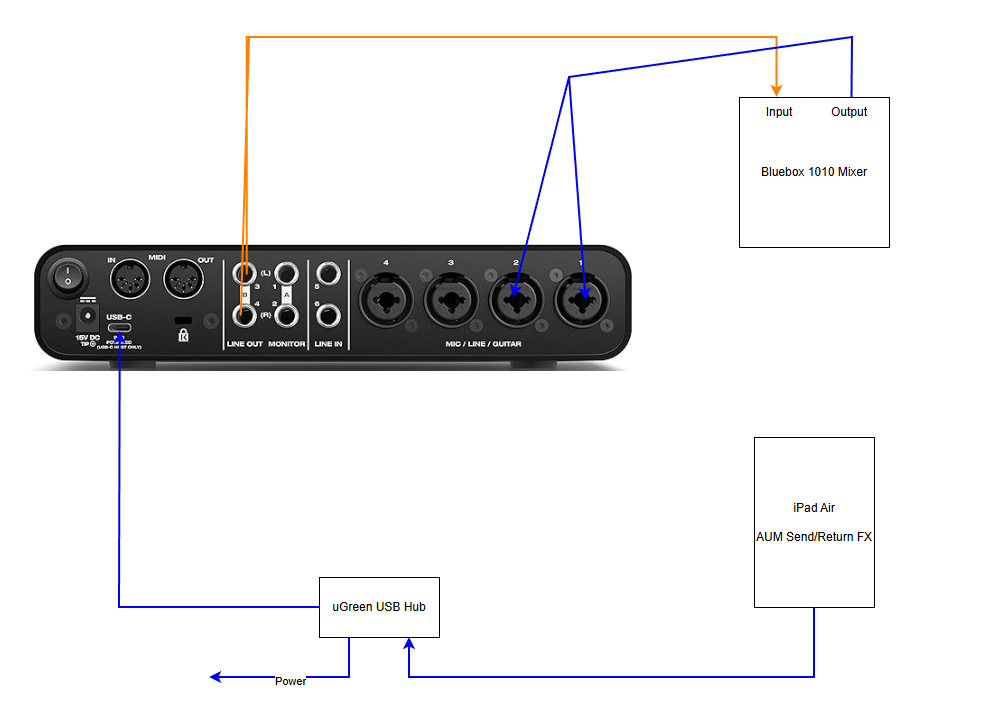
I have my real synths audio outputs plugged into the inputs of the Bluebox mixer (top right) and use that to send to the output which goes to the Motu M6 audio interface and then to the iPad via the USB-C port and AUM receives on inputs 1+2 and I send back on 3+4 and I hear the FX added, perfect.
I can’t play audio from the iPad and hear it via my Mixer. On the iPad I am running YouTube as a test and I have selected the audio output and it can see ‘M6’ which is my audio interface and I see on the front of the M6 that it’s receiving audio on 1+2, but I hear nothing. This all started when I opened up a soft synth on the iPad and I couldn’t hear it. My old iPad had an audio jack and I had that go into the mixer that way which worked, but the new iPad only has the USB-C port.
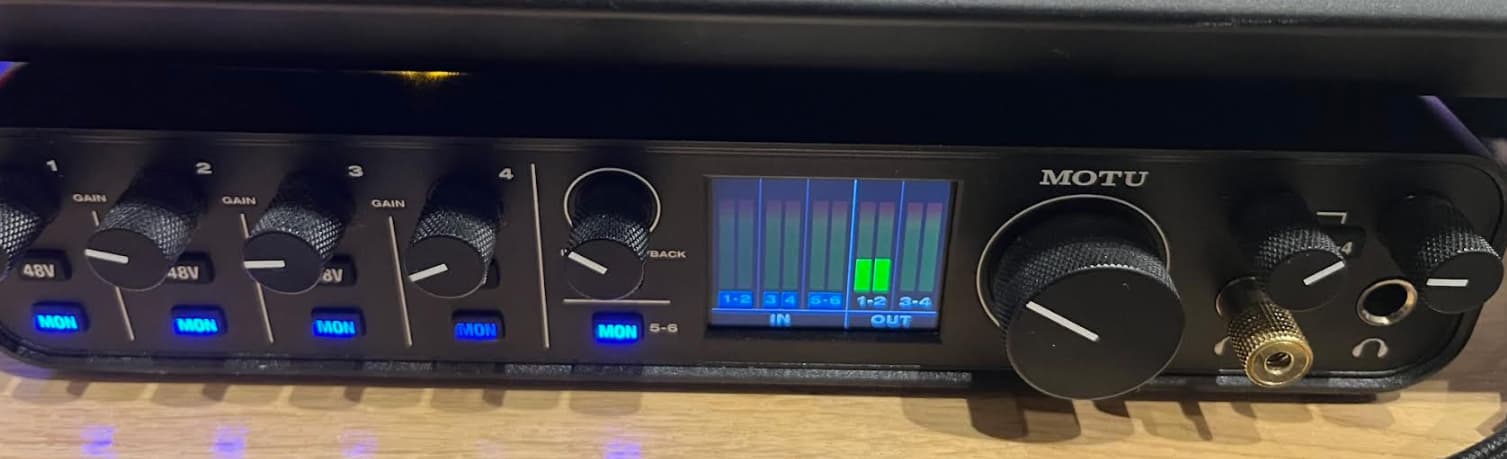
This is all I see when playing YouTube as you can see it see’s it 1+2:
I would have thought it would then go via port 3+4 to the mixer for me to hear?
I’m missing something obvious.
As a test I pulled the cable out of the iPad and put the iPad into my Digitakt which goes into my mixer and straight away I could hear the YouTube audio.
Is there a reason you need to have AUM routed to output 3&4 in this situation? Because while AUM will let you choose what output on the Motu you want to use, the majority of apps won’t, and will send to output 1&2 by default.
The Motu won’t automatically route audio being sent to output 1&2 to come out of the jacks for output 3&4. If it shows audio on Out 1&2, that’s where you’ll hear it.
As a test, if you swap the cables going to the Bluebox to come out of M6’s output 1&2 do you hear youtube audio? If yes, do you have a spare channel on the bluebox so you can just run both outputs to the mixer?
The second thing I noticed, it looks like you have direct monitoring enabled on the Motu inputs, which will send any audio it receives (from the bluebox, not the iPad) straight to outputs 1&2. And the mix dial is most of the way counter clockwise so it means most of any volume from outputs 1&2 will be direct from the inputs (not the iPad).
Thanks for the reply. As you can probably tell the audio interface confuses me, I’m new to use one of these (and old lol). I think I just fumbled my way trying to get it to work and haven’t touched it in cases I mess it up.
So I’ve just read up and you are right the blue lights are direct monitoring, so it’s best I turn these off?
I will test moving the cable first thing in the morning .
I did wonder if I’d need to use the headphone jack on the front to the mixer too to get the audio to the mixer.
The FX from the iPad work, but I guess from what you are saying not in an optimal way.
If it was your set up and you wanted to use the iPad for FX how what you have the Motu setup?
I want to use it as a soft synth to over MIDI and sequence from my Digitakt or Digitone which looks fine as I can use from one of those into the USB hub, but again the audio back from the iPad into the mixer will be the issue.
Yes. You would mainly use these for monitoring a signal while recording into a DAW. And then turn that knob all the way to the ‘playback’ position.
No, I think your setup for using the iPad as a send effect from the Bluebox is fine. You’re using AUM to host the FX apps right?
It’s just that most iOS apps will by default (and generally can’t be changes) use outputs 1&2 on an audio interface. So if you also want a separate feed to your mixer from the iPad for soft synths or youtube or whatever, that’s separate to the fx return, then you will need to have all the Motu outputs going to Bluebox inputs.
Thanks for the help, I think that did the trick with everything. I moved the cables to channels 1+2 instead of 3+4 and turned off monitoring on all of the channels, plus a couple of changes on the mixer and everything is working now. The FX have never sounded as clear as they do now.
Sorry one last question, so in theory as I have channels 3+4 spare could I use that into my mixer and with AUM have say FX on one synth over 1+2 and then another on 3+4?