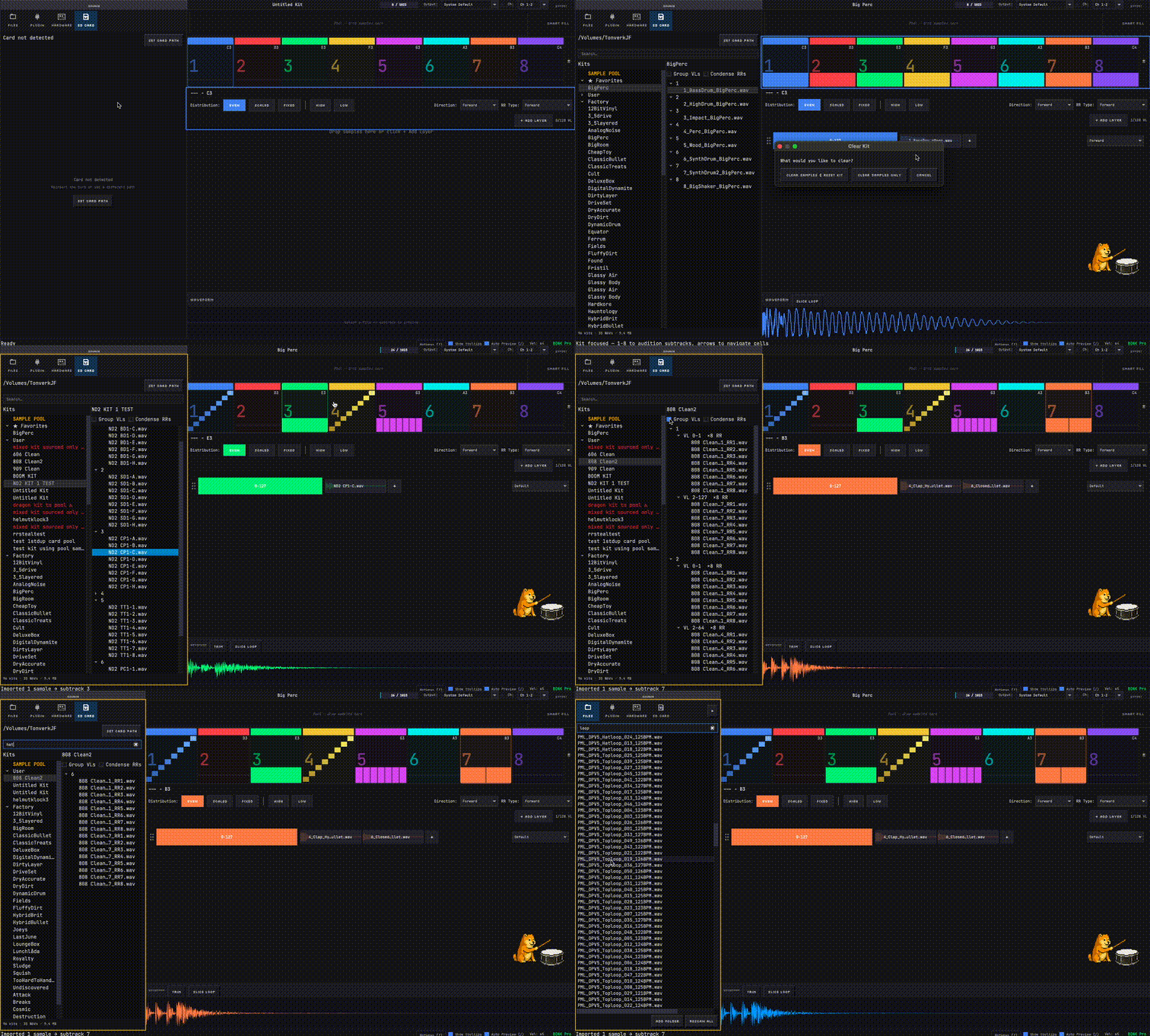
I just tested it, so cool, the only problem is that it doesn’t recognise they are the same samples and it duplicates them when exporting. I was hoping it would be able to export only the samples once and but use them in all the tracks.
Right now when you export a kit it duplicates the samples into a folder and adds the eldrum file with it. What I meant is an option to don’t export the samples to the folder(they should be already a toneverk playable file type).
Then you can have a library of samples in the user sample folder and the eldrums reference those samples with a relative path (I think it should work).
The advantage of this is that the samples can remain organised and be used in single sample machines or even in different kits.
Ah i see what you’re getting at - sample pool / size optimization via clever file referencing. Love it. I originally did some experimenting with sample chains (since the number of files on TV affects load times as much as the size of the files) but it didn’t work out for some reason. I thiiiiiink I also tested your proposed use case but I’m not 100% sure I remember correctly. It makes sense conceptually to me.
Have you tested it otherwise e.g. via hand-editing the files or using an llm to do that? If you can get a working proof of concept and an .eldrum file over to me to analyze, also maybe a screenshot of the filenames in the folder, i can use that as a starting point.
It would also mean a new workflow which would need a new UI flow in BONK, and potentially also implementing a new feature I anyway had on the roadmap (bidirectional syncing with TV) to manage a shared global subtracks sample pool and create new eldrum presets referencing that global sample pool. Otherwise things drift out of sync or risk duplication.
meta
Meta: these days time with my own TV is hard to come by (baby arriving very soon) so rapid QA and testing new use cases at the moment on device is difficult. Small tweaks on BONK UI side / mac side are way easier. thats why if you do have any example files I can build off of its helpful - I’d like to know that I have a good chance at oneshotting this without needing to bust out my TV in our cramped living room every night for a week
Will have a chat with Claude about it and see how far i get
Just an FYI, the multi and drum TOML configs can reference either the current folder, or absolute file paths from the Tonverk SD card.
So to support a sample pool, you’d need to write the file path as something like sample = '/mnt/sdcard/User/Single Samples/Path/To/Sample/filename.wav'
I tested this with some presets and it works, using relative paths didn’t work unfortunately.
Firmware 1.4 also lets you nest folders in the ‘Multi-sampled Instruments’ folder which I found interesting, several folders deep too, and the order of the multisample selection list takes the folders into account, but flattens their contents to a single list - I’m hopeful this is the seed for proper folder support on the drum and multi preset lists
If I were to put all my tb303-xxxxxx multi folders into an actual tb303 folder , it’ll tidy up my folder structure but … on tonverk it’ll continue to display them as it does right now ? ( a bit weird and random but I’m used to it ) ?
Would it break existing projects ? ( I’ll probably try it tomorrow anyway … report back )
Tonverk will display them in a different order, each folders contents get grouped together in the single list of multis.
I’m not sure if it would break existing projects tbh, I do not know if the project links them by just the multis folder name or if each sample also gets stored in the project.
I also found that multis need to be in a folder of the same name as the config file name to show in the list (even if the samples are referenced by their absolute path on the sd card).
New features: In-kit Sample deduplication (space-saving!) @andreu + Direct reading of kits from mounted Tonverk SD Card (Bonk Pro) + common Sample Pool functionality (Bonk Pro)
Added (All versions)
Within-kit sample deduplication — if the same source WAV is used in multiple
velocity layers or subtracks, the exported kit folder contains one copy and all
slots reference it. Smaller kit folders, no redundant files. Feature request from @andreu
Added (Bonk Pro)
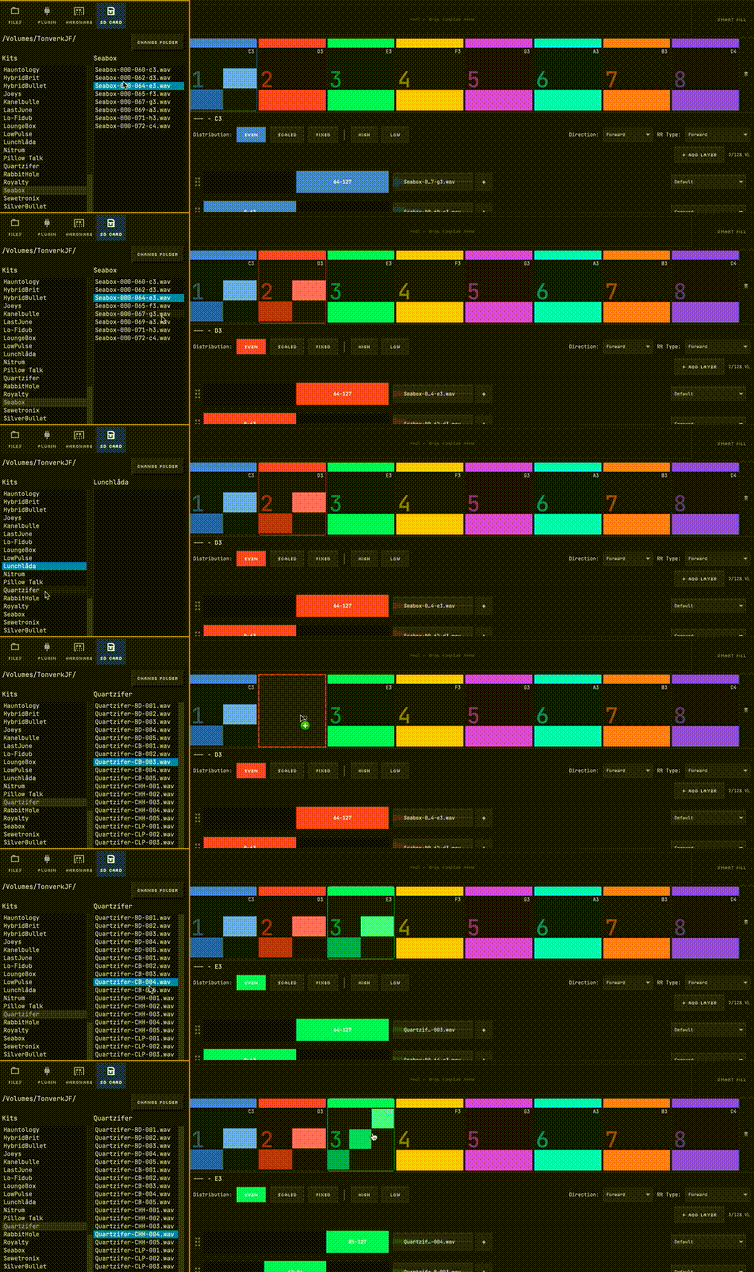
Directly read and edit factory and user kits from Tonverk SD Card. Browse your SD directly inside BONK. Auto-detects the card on first open, lists all your kits, reveals each kit’s samples, and lets you preview any sample with a single click. Double click a kit to load it into BONK, edit and customize to taste, then reexport back to your SD card.
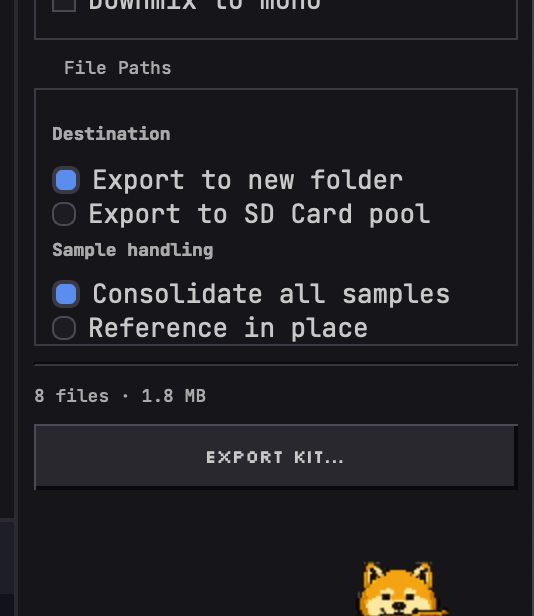
Sample Pool—centralized sample pool for reusing samples between kits without duplicating them. When exporting to the Pool, BONK copies any new yet unknown samples into Pool during export to keep things consolidated.
Reference in place: You can choose to reference known samples already on the card by their existing fixed path instead of copying them to destination, saving card space. However, this (and Sample Pool)'s fixed paths mean you can break kits if you move files on the device or delete certain kit folders. Of course, you can still do a traditional export to self-contained kit folder if you prefer.
Broken-ref detection — kits with missing samples show an orange
warning badge; orphaned WAVs in Pool are dimmed.
Clean Pool button — removes orphaned WAVs from Pool in one click.
Note - i put this behind bonk Pro because it was more complex and will require more maintenance going forward. Lots of edge cases and lots of things that can break for the user, so I’m assuming I’ll be hearing some feedback of things that need addressing especially on the kit reading side. So far it successfully reads/loads both user and most if not all factory kits. But there are more UI / UX cul-de-sacs to be discovered especially trying to bidirectionally manage things and reference files that may break links. It’s def a pro/advanced user type of thing…but it’s really awesome being able to audition TV factory and user kits directly through BONK!
I just realized the new release basically allows you to directly edit and customize the factory kits - or borrow samples from them into new kits ! Wild. Updated the release notes to make that clear
Currently yes. Sorry for the error on the website. Intel version should be coming in the next week alongside Windows - let me know if you’re up for testing the Intel version, happy to send you a discount if so!
Also if you already bought PRO and want a refund until Intel is ready, PM me. Sorry about that!
Edit: actually maybe i was able to make an intel build after all. Testing
Unfortunately building for intel is proving harder than I assumed… Running into lots of different walls. Github actions doesnt support intel anymore and its complicated building for Intel from a silicon mac… I’d like ot process a refund for you as I cant promise I’ll be able to ship this this week (and I have a baby on the way so dont wnat to hold onto your money if I can’t deliver properly!) Please check your dms:)
With 1.4.3, some nice new updates to make BONK smoother, faster, funner on all platforms (except Intel, see below):
Added (All versions)
Sample search in File browser
Fixed (All versions)
Various export panel layout fixes: section order, radio button rendering, Ceiling/Threshold row layout, scrollbar.
Bugfixes.
Added (PRO)
Auto-detection of inserted Tonverk SD card (if known)
You can now import individual subtracks from existing kits on your SD Card: doubleclick or right click a VL group or sample from an existing kit to import it to kit builder, preserving all VLs/RRs as configued in existing kit
Improved browsing UX of exisitng kits on Tonverk SD, Sample Search, Favorite Kits
Fixed (PRO):
Factory kits are now in the correct kit list.
Importing samples from the SD card into an empty subtrack now auto-creates velocity layer targets.
Export to SD Card pool and Reference in Place disabled when no card is inserted, and re-enable automatically when you re-insert the card
BONK correctly removes the pool export destination when the card is ejected mid-session, reverting to "Export to new folder
SD card root path and pool folder are now stored as separate settings — changing one no longer clobbers the other.
Search in the SD card browser now matches filenames correctly.
Upcoming:
Intel Mac version - still bugfixing
pictured below - reading tonverk sd card, loading user and factory kits, importing user and factory subtracks into editor, live sample search by filename



 Windows build is queued next!! I’ll drop it here when it’s verified later this week hopefully.