I have also selected the “32 inputs” option in the Force’s interface options - not sure if that makes a difference, but as I recall it was necessary for the R16.
Edit: and one nuisance here is that the R16 becomes the sole interface, so I have to plug my headphones into the back of that rather then the convenient front port on the Force. Moan moan moan.
I hadn’t really used the Force much recently, but having set it up to test those inputs earlier I thought I’d give it a try with the Pulsar, and I’m reminded that the Force is a really solid device and enjoyable to use. Once I’d solved the interesting problem of the Pulsar clock reset I was grabbing loops, layering tracks, chopping and reversing sections, all right on the beat and without having to remember any button combos.
I periodically feel like I should capitalise on my computers, because I paid money for them for Christ’s sake, and integrate my hardware with Live. But whenever I try I’m reminded that it’s a massive pain in the arse, in stark contrast to hooking something up to the Force.
Of course it’s not alone in that regard, and something like the OT can be just as much fun, but all that real estate makes the Force one of those devices where you can sit down in front of it, clap your hands and get stuck in with gusto.
So I don’t have anything to add, I just wanted to enthuse about the Force and thank the thread for leading me back to it. It’s a desperately uncool DAW-in-a-box plugin marketplace Frankenstein’s monster of a device and I’m all for it.
Chapters:
00:00 - Setup Info & Samples used.
00:56 - The Beat
Gear Used:
Boss SP505
Yamaha PSR77
Akai Force
PanasonicG9
Beat Info:
I start off tapping the SP505 pad & then the Force to show the difference of the same sample without & with an ADSR & velocity sensitive pads - which played a major role in this beat. I wouldn’t have been able to make this type of groove on the SP505 pads. Normally I would chop the sample up, but kept the full sample on each pad & just played it with a groove.
The first pad I press on the Akai Force is a sample of Pad#04 on the SP505. The 2nd is that same sample Warped & pitched up an octave (nasty sound quality, but I like it like that). The 3rd is just a copy of the 2nd pad pitched down an octave. The last pad is a copy of the 3rd in reverse used as the role of the Bass/Harmony.
Beat History:
This is a Boss SP505 (sampler) & Yamaha PSR77 (keyboard GM sounds) beat from 2003. I called it “Angels’’ at the time because I’m bad at naming beats & the main PSR77 patch I used to make this was a harp. 2 of the 3 PSR77 samples riffs I came up with got damaged on the SP505 as well as the drums.
Only the harp 2 & half bar melody & the drums MIDI sequence data survived, so sampled it on the Akai Force & recorded the drums MIDI data, then used the Force built-in drums samples. I copied the harp sample to multiple pads & turned on Note On mode so they play the sample only for as long as I hold the pad, but I did add some Amp Release.
Video Links:
Link for pt.2 which is the version I first did on the Force a year before this: Akai Pro Force
Oh yes you are totally right… I can see the mono inputs towards the bottom of the list!! Yay! So happy!! And also feeling a bit foolish but that’s fine!
It is a challenge to imagine a less helpful UI. There’s a massive screen! Just show me all the options. Having 64 pads also seems like an opportunity to make this quicker and easier.
Yeah totally agree they could make more use of the screen and pads for changing settings / choosing parameters. Feels very wedded to the “big encoder chooses from a (sometimes very) big list” workflow! Like setting a midi cc target for a knob - a lot of menu wading is required especially in a complex project.
Those 64 pads could be used for so many different shortcuts. While in a particular menu there should be a pad shotcut option like: FX menu we could assign our favorite FX. When typing words let us assign commonly used or customize words to the pads. When setting macros use the pads for CC#'s…
It’s enormously useful if I have eight mono sources and I want them all to have their own track (e.g. the eight dedicated outputs from the Rytm). They’re recorded as mono, though of course they do still take up one potentially stereo track (you can’t reclaim that lost half) - but it still means I can use my 8-input Zoom to record eight mono sources. If they were forced to stereo pairs, I’d have a problem.
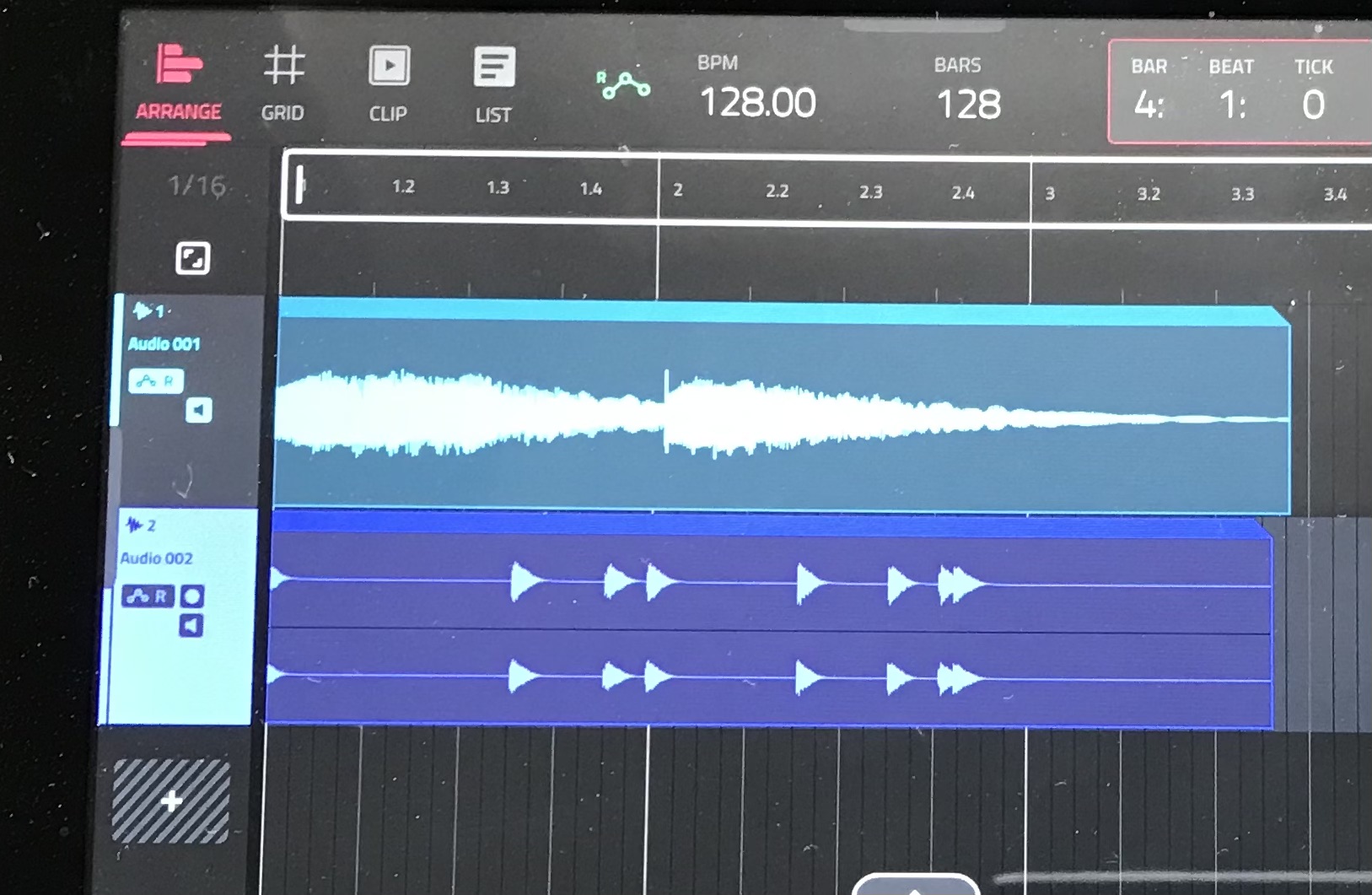
I did check this before I replied in case I was confused. If I record from a single input to an audio track in the Arranger, I get a mono wave file occupying that track (at least the wave is presented as mono visually). The whole track is now used, so I’m left with seven more audio tracks that can either be mono or stereo. Force is basically giving me eight audio tracks and it doesn’t care how I configure them - but as far as I’m aware it won’t refund me if I use a mono source, it’s still one track used regardless. So I suppose it’s a red herring to call them stereo tracks - they’re just audio tracks that can optionally be stereo. If you assign a single input, Force treats it as a mono track. Or I suppose you could say you have 16 tracks, but they come in blocks of two…
It’s different to, say, my old Yamaha AW16G multitrack - with that I’d have to use two channels to record in stereo, by linking the two relevant inputs to two tracks. With the Force I can link either one or two inputs to each track.
I think that’s all accurate - it certainly fits with my experience.
OK, got it - thanks. The way I originally interpreted what you were doing was assigning 2 different mono sources to 1 stereo track on Force (giving you different instruments in both your right and left channel). I see now that I was mistaken.
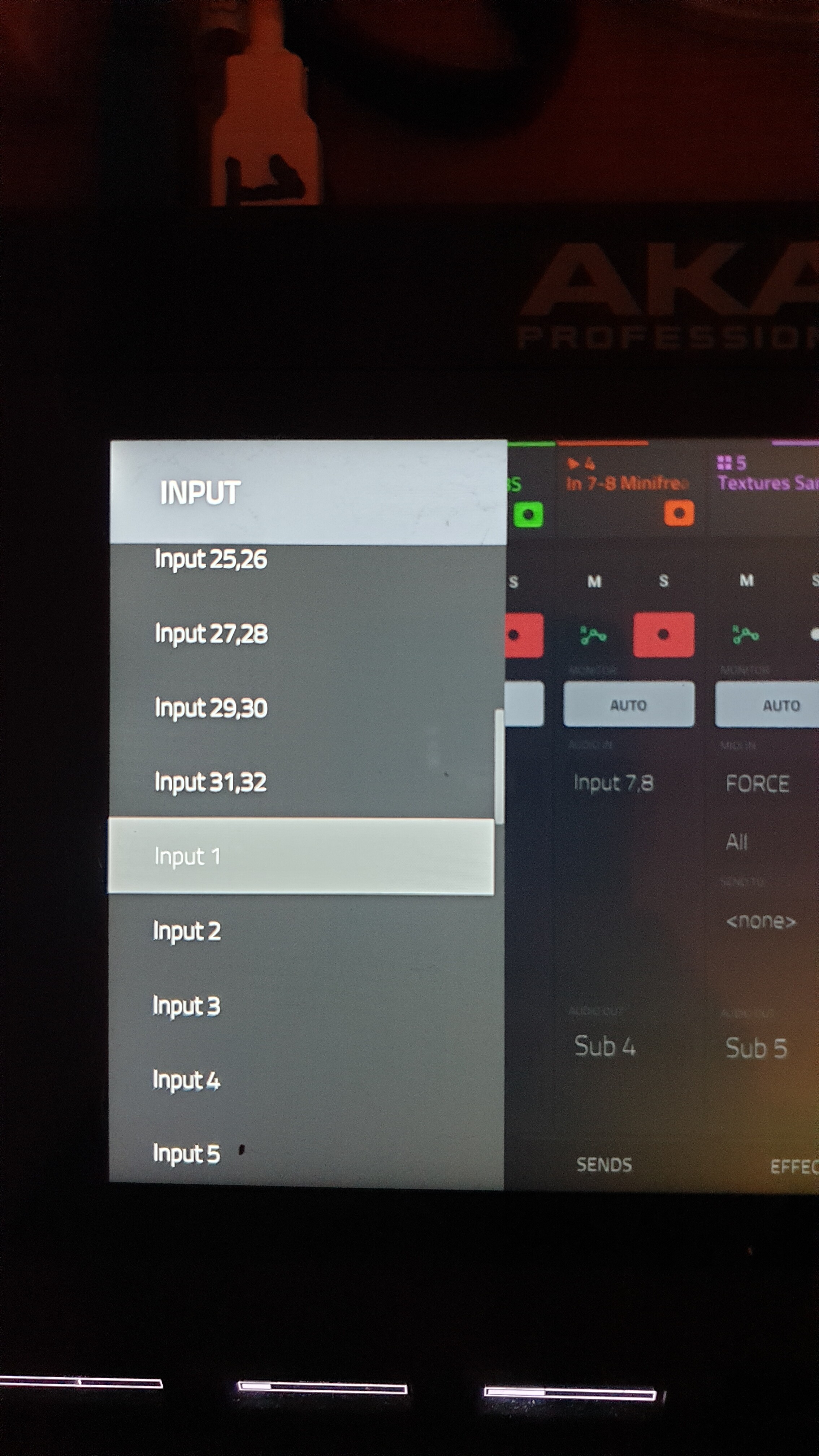
Images probably make more sense than I do. I just ran another quick test. Here’s the mixer setup - I just used the onboard inputs, so first I recorded to audio track 1, using input 1, and then I recorded to track 2 using both inputs 1 and 2:
And here’s the result in the arranger - one mono track and one stereo, but still representing two of my eight available tracks.
Hopefully that makes sense. Also I did dust and wipe that screen several times before taking the photos, but the Force is determined to imply that I live like a pig.
I was replying while you were, but I see the confusion. I guess we’d end up back at the suggestion from @stonecoldgroove about using the Stereo Width effect to merge a stereo file into a “fake” mono track, which would effectively give you 16 mono sources by sacrificing any stereo capabilities (and you’d also have to record them in pairs). Could be easier than doing a mixdown, depending on your setup.
You should try playing back 16 mono files; 8 from audio tracks, 8 streamed from Drum Programs.
Any tracks recorded in pairs can be separated using the tools in the Sample Edit page.
Just saying, there’s no need to “sacrifice”; if you’re needing to simultaneously record more than 16 mono or playback more than 20 tracks at a time on the regular, than Force May not be the tool you need.
Those numbers seem pretty respectable for a synth sampler to me.
For studio applications, this pretty much makes the recording capabilities endless since offline bounce is included.
For Live applications, remember that the Stereo Width plugin can be defeated / enabled at any time via clip launch, knob touch, or other MIDI signal.
Combined with the Monitor status of merge, 1 Audio track can playback, monitor, and process up to 4 signals at a time, 2 from file, and 2 from input.
Seems pretty flexible to me.
I don’t work for Akai, no shill here. I just happen to like the platform and I use it
Sure, I never feel like I’m sacrificing anything on the Force - I approach it as an eight-track recorder with an MPC attached, and that’s more than I’m ever going to need. Being able to bounce anything to a sample and then deploy that sample just about anywhere - plus the ability to stream from disk - means any limitations are likely to be temporary. It’s comfortably in the limited tier of devices I’d replace if it was lost.
I’ve just tried this and YES it does work. I have the USB direct from the Force. Not tried it via a hub. No dropouts or glitchy weirdness over a good hour of connection.
I so wish that Akai had put 4 analog inputs on the Force from the get-go. Way more useful than 4 outs imho. I would happily sacrifice the pre amps and xlr inputs for another 2 line ins. Even on mini jack…


 … The rubberized body is a dust trap.