I use midi from the force to control everything I got. But the only thing that you could control with it as a usb interface is a computer. I just don’t see the big advantage when you can just use regular midi. Or the network midi driver. 
1 Like
The Key 61 does not support this. And yeah - it’s a stupid artificial choice that Akai made to differentiate the products, as I said earlier. Don’t shoot the messenger.
I agree, as I would love fully bi-directional audio on my Force. That said, Force does support USB-Audio via Class Compliant USB audio interfaces, so… there’s THAT. 
Do you think it’s possible for Akai to add it now to Force & other MPCs or is too late?
I think they may add it in the next big update, but that’s just my guess.
Got a new fast microSD, gonna take mine apart and upgrade it. Also I’m taking my Force out of my main setup, as I’m switching to a hybrid setup, and it would be redundant there. That doesn’t mean I won’t use it though, it’s a self-contained unit that can work so well without anything else (or paired with the Oxi One).
2 Likes
That would be cool if they did.
Someone just made a video on upgrading their internal SD card: https://youtu.be/XuOtIEpDexc?t=144 Let me know how it goes.
1 Like
From a purely software perspective, they could absolutely add it to all of them if they wanted. But they won’t. You might see it on new MPC hardware coming out this year though. Once they bring Force features over to the MPC, it’ll be FIRE.
1 Like
Summary
“AKAI MPC/Force Basic Sound Design: Kicks” by Harlem-Instrumental
Akai Force: Internal sample that I convert to
Recorded: 2024-05-12
Camera & Line-in audio: Panasonic G9
Video Link: https://youtu.be/c91M27f4CqU
This video is just me showing some very basic ways to edit the sound of a sample using some of the tools of the Drum-Program. I’ll take 1 Kick & make 15 new Kicks out of it. I tap the pad as I go thru the parameter values to give you sense of the sonic range that can be achieved before I move on to the next pad. I want people to start thinking how easily it is to change 1 sound & hopefully start hearing sounds as they are but also as they could sound with what’s possible with the sound-shaping tools in the Drum-Program.
There’s so much more I’ve could’ve done, but I’ll keep it simple for now, tho, I’m thinking of doing a series with more advanced tips & tricks, & demos like this with other sounds like: Snares, Hats, Bass…etc. I didn’t use any insert FXs, but I could do demo just changing the sound with those & with the Drum-Program. I may just do a demo on just using each filter for the same sound.… So many ideas!
Let me know if you would like more of these types of demos by giving the video a like so I know there’s an interest. Also, drop any sound design tips in the comments. Thanks
Peace & dope beats!
Chapters
00:00 - Making copies of pad-1.
00:25 - Pitching the sample down & up.
00:35 - Pitching the sample up.
01:34 - Warping the sample down (The Project tempo=100BPM).
02:50 - Warping the sample up.
03:40 - Warping the sample in the default position.
05:08 - Low-pass filter.
07:49 - AMP ADSR & Note-On mode.
10:05 - High-pass filter with mid cutoff.
11:30 - High-pass filter with low cutoff & high resonance.
12:11 - Drum FX - BassE (Tight).
12:52 - Drum FX - BitCrush.
13:34 - Drum FX - Decimator.
14:24 - Drum FX - TubeDrive.
14:57 - Drum FX - HighPass.
15:17 - Drum FX - SoftClipper.
15:43 - Recap of all 16 pads.
4 Likes
"AKAI Force & MPC Sound Design Tips: Snares”
Video Link: https://youtu.be/GUbArpa5MbI
Does anyone like to see how many new sounds they can make from 1 sample?
I want #beatmakers to know how fun & easy it is to change 1 sample into many new ones just with what’s possible with the sound-shaping tools in the Drum Program.
This video is me showing 15 basic ways to edit the sound of a sample using tools in the Akai Drum Program & make 1 snare into 15 new ones. I’ll tap the pad as I go thru the parameter values to give you a sense of the sonic range of textures that can be achieved before I move on & keep playing the non-edited pad to compare how much the sound has changed.
Let me know if you would like more of these types of demos by giving the video a like so I’ll know there’s an interest. Also, drop any sound design tips in the comments & maybe can add in a video & give you a shout out.
Peace & dope beats!
Chapters:
00:09 - Pad01=Start (No edits)
00:20 - Pad02=AMP ADSR & Note-On mode.
01:41 - Pad03=Layer/Semi/Pan 4 samples.
03:27 - Pad04=LP-Filter to add a little bite.
04:02 - Pad05=BB8P-Filter for bass & nasty tones.
05:10 - Pad06=Layer/Semi+Sample Offset.
06:20 - Pad07=LFO/Random Pitch.
07:45 - Pad08=LP-Filter+LFO Square wave+Pitch/Filter/Amp.
09:40 - Pad09=LP-Filter+LFO Sine wave+Pitch.
11:02 - Pad10=LP-Filter+LFO Sine wave+Filter.
12:23 - Pad11=LP-Filter+LFO Sine wave+Amp.
13:29 - Pad12=LP-Filter+LFO Sine wave+Pan.
14:24 - Pad13=LP-Filter+LFO Noise wave+Pitch/Filter/AMP/Pan.
16:35 - Pad14=Mod/Pitch+AMP (Velocity changes pitch. Full Level off).
19:08 - Pad15=LP-Filter+Randomness (Sample Tab 4).
21:14 - Pad 16=Drum FX & freestyle editing (Beep Boop Time).
27:37 - Play thru of all the pads.
2 Likes
I was wondering if anyone has a suggestion for a compact and reliable audio interface that works with the Force and has at least 4 mono inputs?
I have a model 12, but looking for something to use in a smaller setup.
Thanks
The Zoom R16 works fine - I’ve posted about it earlier in the thread somewhere. Eight tracks, and I’ve had all of them inputting to audio tracks OK (though that was just to satisfy my curiosity, I usually don’t need more than four). It’s not as small as it could be, thanks to the faders, but it’s still pretty compact and very light.
1 Like
I am using a Behringer UMC 1820 (plus ADA8200) which works flawlessly.
1 Like
I have a UMC404HD which I have used with the Force but now it’s for my iPad since I also got a UMC1820 (plus a very old 2408 mk1 for the extra 8 adat i/o). Both work flawlessly with the Force for me.
Most important things to note is that the Force needs a class compliant device (i.e not requiring drivers) that can run at 44.1kHz.
1 Like
I confirm. Both Behringer 1820 and 204HD are great audio interfaces for Akai Force/MPC. I love the sound of them. No complaints at all.
1 Like
Cool, thanks for the suggestions, I’ll probably end up with the UMC404HD.
Does the UMC404HD work with bus power from the Force?
My 204HD does, my 1820 does not.
1 Like
As a note on class compliance (which I’ve raised before, so apologies to all the thread veterans), the Zoom R16 requires drivers on Mac / Windows to send all 8 channels via USB (and as far as I can tell it doesn’t like Windows 11) - otherwise it’s just a stereo interface - but plug it into the Force and they’re all right there, ready to use.
I don’t know whether Akai have included a specific Linux driver (Zoom don’t seem to have one) or whether it’s just picking up on some class compliant aspect that Windows and MacOS lack, but the upshot is that the R16 is far more useful to me plugged into the Force than my PC.
Obviously it’s not a good idea to buy an interface assuming this will be the case, but if you have something already I’d say it’s worth introducing it to the Force to see what happens, regardless of what the official specs might say.
5 Likes
I’ve not tried the UMC404HD with bus power from the Force, but I know my iPad bus power isn’t enough for it. Lights up but either no sound at all, or glitches.
Force probably has more power available - if I get time I’ll test it and let you know, but my instinct is saying it’s gonna cause issues.
Another thing to remember is that the Force audio inputs & channels are always a stereo pair… So if you’ve got 4 mono sources you won’t be able to split them to 4 channels on the Force with the UMC404HD. You’d need something with 8 inputs and use 1,3,5,7 etc.
I have lots of mono sources and I’ve tried to find a plugin on the Force where I can mute just one of the two channels in a stereo pair of inputs but couldn’t see one. Most annoying cos with that (and the Mockba mod that relaxes the 8 x stereo audio channel limit) you could have 2 channels with the same inputs 1&2 and just mute 2 on the first and 1 on the second and get individual control over each input and just keep adding audio tracks, not worrying about using up the 8 available in the stock firmware.
In the end I just balanced levels on the source devices, and plugged say 2 mono synths into inputs 1&2 then used a stereo width plugin to mono-ify them together. Tried to plan it so I’m likely to want the same fx etc on the sources I pair.
I swear I am not a Zoom shill, but isn’t this what you’re describing?
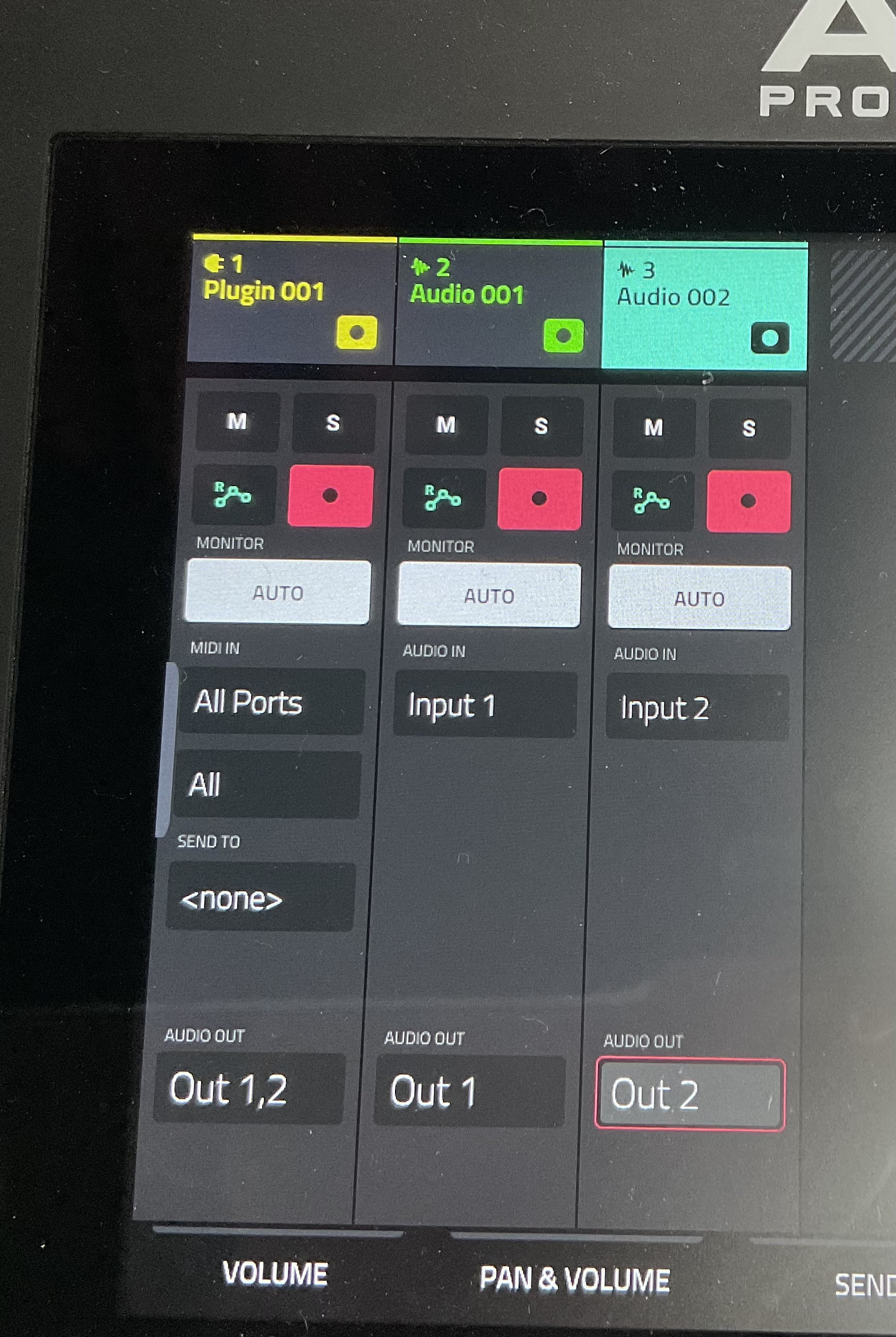
Here I’ve got the Zoom R16 hooked up to the Force, and my Voyager connected to the R16. Inputs 1 and 2 on the Zoom are connected to the stereo outputs on the Voyager, then come into the Force as separate sources (Input 1 and Input 2, found after scrolling through all the stereo pairs when selecting the source). I’ve then got them panned to outs 1 and 2 to create a stereo image (by default both 1 and 2 would go to the stereo output, creating a mono sum).
So in this case I’ve effectively got two mono sound sources, each going to its own Force audio track. Of course this is madness and in practice I’d just use one stereo track - this was just the quickest connection for me to set up,
I can move the Voyager’s right output from input 2 to any of the other 8 inputs on the Zoom - the Force is treating each one as an individual mono source. So I can have 8 mono sources all coming in through the Zoom, which is great. Is it possible that this is down to how the connected device is presenting its inputs?
The Stereo Width plugin is the one you want to use.
With it, you can have two mono sources share a stereo audio channel and sound mono.
Pair this with selective plugin automation and it can easily sound like each device has its own audio channel.
Also what @NickD said; Force áudio channels are *not locked into stereo pairs.