Hi there,
I’m trying to figure out if my new setup is correct. I’m using an RME UCX as my main sound card. But I also have an old Saffire Pro 40 and assume I could use it to add 8 audio inputs to the UCX.
I’ve got it working (I think), but I’m a bit concerned to overlook some technical issues, and it’s hard to troubleshoot since the Pro40 has to be disconnected from the computer to run standalone, so I can’t really check how it’s configured.
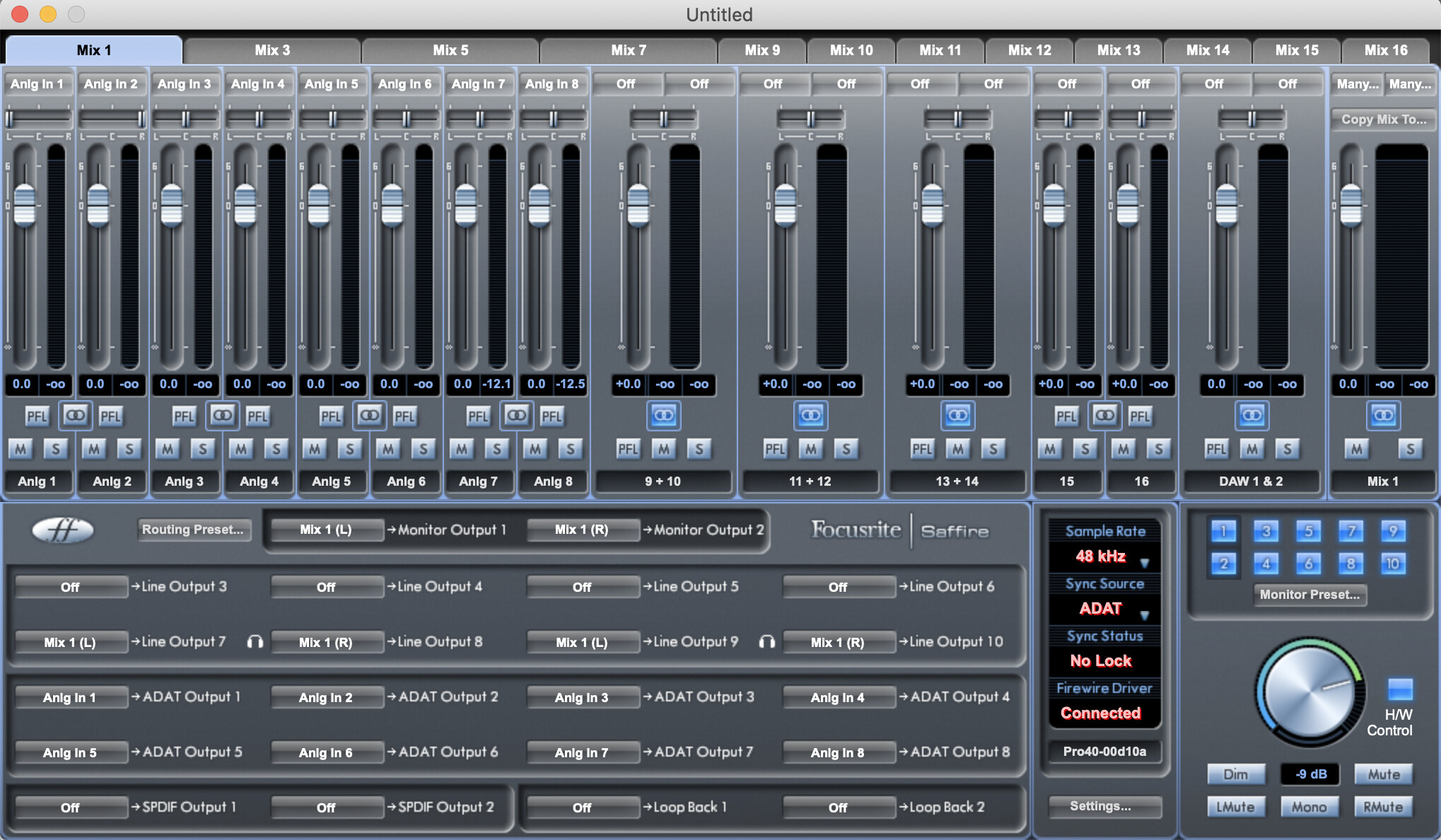
So basically, the Pro40 is set to ADAT clock source and set to the same sampling rate as the UCX.
I’ve got an ADAT cable from Pro40’s OUT to UCX’s IN.
It works, I can access the Pro40 inputs from my DAW (while the UCX is used as soundcard), but I think something is weird : the Pro40 stays “locked” (to a clock I assume) even with no ADAT cable plugged.
Side question : should the clock be transmitted with another ADAT cable from UCX’s OUT (master) to the Pro40’s IN (slave) ?
The image you show shows the Pro40 unlocked - so when you say
are you talking about the UCX sees it as locked? In either case, the UCX will lock to the Pro40 and merge the clock domains properly - basically the UCX is able to, as best as it can, adjust the received data from the Pro40 to it’s own internal clock and interleave the data. This is what the UCX would indicate by a lock in this case. Check your UCX properties and be sure it is the clock master, too.
If the Pro40 is showing unlocked when connected to a computer but locked when standalone it may have loaded a different configuration standalone and be using it’s own internal clock, and you may need to “store” or save the configuration to the Pro40’s internal memory somehow to make sure it boots up with this configuration in standalone mode. I don’t use a Pro40 so I can’t tell you exactly, but some interfaces won’t boot to the computer-set config unless it’s explicitly persisted in some manner to the interface’s internal memory.
The optimal scenario would be:
UCX : Clock master, ADAT cables in both directions to Pro40
Pro40: Clock slave via ADAT
Both should show a lock on their respective ADAT inputs in this case.
There are other ways to sync clock - S/PDIF and BNC word clock are both also supported by the UCX. The Pro40 could also use one of these as a clock source (if it supports them) if you want to use the UCX ADAT out for other purposes.
Yeah sorry about the confusion. I can only open the Saffire Control software when the Pro40 is connected to the computer. BUT, I have to disconnect it to work standalone. The screenshot it the set up I sent it before disconnecting it and restarting. There is a “load to hardware” function that I use.
And to clarify, it seems to work very well like this (just a cable from Pro40 OUT to UCX IN), but I’m afraid of the problems (clicks, or whatever) that could occur.
So far I made recordings with 6 Pro40 tracks alongside a UCX track, seems ok.
It’s just a technology that I don’t really understand (happy to read some general documentation).
Well the UCX is doing a very good job of locking to even unsynchronized external sources - it’s designed to do this as well as possible. However, it’s not guaranteed that they are synchronized enough to prevent any dropouts ever. So thats why you sync both ways - so the UCX’s main clock clocks the Pro40 and ensures that they both use the same timebase - this usually has the benefit of cleaning up the clock on the Pro40 as well.
So, not to say it won’t work how you have it, but you don’t have a guarantee that you won’t get under- or over-runs eventually, and you may get some phase jitter between the two because the sample clocks are not perfectly aligned and in sync.
The setup I suggested to you is, by design, intended to solve these potential pitfalls.
ADAT is the way to go. the clock is better. BNC wordclock can be flakey and full of jitter. if you read the RME manuals about wordclock they give a detailed explanation.
i have RME UFX+ and have a Lynx aurora 8 hooked up to it via adat so i get 8 more i/o. i connect both adat cables though i’m not sure it’s necessary. but the signal flow is as follows on the aurora8: analog -> adat -> RME -> computer.
the aurora is designed to be used this way and works perfectly. I don’t know anything about the saffireyou’re using… but if it is designed to work as a standalone converter then you should be able to use it the same way i’m using my aurora.
in RME fireface settings i can either set it to be master cloc or sync to external clock. I have it set up so the aurora8 is master but it really doesn’t matter in this situation.
is your safire designed to work in standone mode? unconnected from computer and only connected to another device via adat?
Many thanks to both of you to take the time to write these thoughtful answers.
I’ve also wrote to Focusrite support (which has proven to be awesome in the past), so hopefully I’ll figure everything well.
Not that it doesn’t seem to work, but if I go this way, it’s a big deal and a massive improvement of my workflow, so I want to be sure I can rely on it.
I hope will get some kind of golden shored prize for it since the topic is old…
But I did basically the some thing today with my new RME and good, old Saffire PRO 40. And wanted to share it as it may help somebody in future,
I configured RME as the main unit and Saffire as slave.
All saffire analog inputs were mapped to ADAT outputs.
Analog In 1 -> ADAT OUTPUT 1
…
Analog Input 8 -> ADAT OUTPUT 8
All of 8 ADAT inputs from RME were mapped to respective analog outputs of Saffire PRO 40 (starting from 3 rd output)
ADAT INPUT 1 -> Line OUTPUT 3
…
ADAT INPUT 8 -> Line OUTPUT 10
It is critically important to use the same sample rate on both sides and in my case both units use 48 kHz.
I configured Saffire PRO 40 to have Sync Source set to ADAT, RME clock source configuration is set to internal.
With that, all of Saffire inputs are available as ADAT inputs in RME, all of its outputs are freely assignable from the Total Mix.
Shame on Focusrite that they no longer support this great interface, I would be probably using that as main unit even today. I bought Saffire PRO 40 in 2013 or 2014 and for all of that time it worked great. Until Focusrite decided to not update the driver anymore.
hello , i just bought Jomox Alpha base mk2 and im really happy for this awesome sounds . im looking for Adat preamp . never had it and idk how to use but i neee more inputs on my Rme ucx ii . can u recommend anything ? what you think about Focusrite Clarett+ OctoPre 8-channel ? thanks !
I can only go on my own experience, I bought a second hand Scarlett Octopre Dynamic and it has never given me issues when used with a Scarlett 18i20 and subsequently when I upgraded my interface to an RME UCX II. I haven’t used it with a drum machine and I actually don’t need the inputs right now because I sold off a bunch of synths last year, but I keep the Octopre because I think the compressors on every channel might be nice to use with a drum machine in the future.
I’ve been using a Behringer Ultragain Pro-8 Digital ADA8000 to add more channels to my UA Apollo. Not the sexiest option, but can be found really cheap and does the job. Possibly upgrade when I have extra money/need changes.
I have an old firewire version of the motu 8pre, that I run into my scarlett 18i20. Runs great and cost me very little second hand. I think less than AU$150 5 years ago. I’m sure theres better sounding kit out there but it works for me and was the right price, I currently use it for individual outs from A4mk2.
I will second this. I used to run two old secondhand FireWire MOTU 8pre into my MOTU 828x for many years. Never had a problem. Can be found very cheap second hand