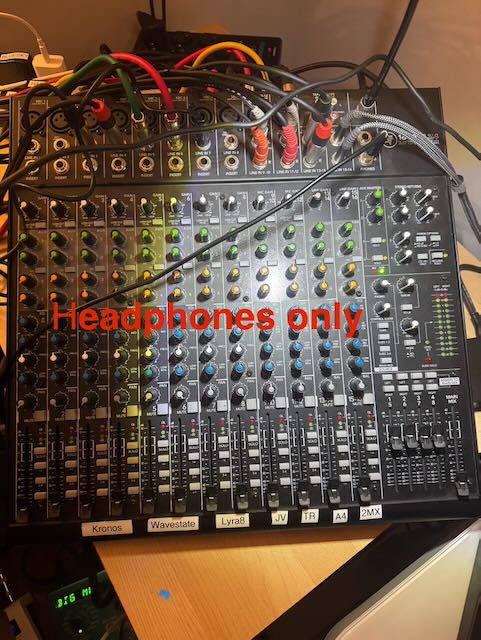
I use a Mackie 1602 VLZ 4. I have aux send/returns 1 and 2 going to two different fx boxes (which could also be a sampler, but I use Push for this (see below) and aux sends 3 and 4 to L and R inputs on my computer audio interface (right now using Push 3 as my audio interface, but don’t like that I have to always be running Live to use it). My computer audio comes back in through aux return 3, which I can then route to different places. I am still not sure this is an ideal setup for this mixer, but it’s the best I can figure out (from the not-so-great manual). I really like having the ability to tell every hardware channel coming into the mixer how much I want going to each dedicated fx box and then separately how much signal I want from that particular hardware synth going into the Push/Mac/Live.
I’d love to get better ideas for routing, but am replying here since this is at least a viable way to use a mixer with four separate aux send/returns for fx and sampling (and recording into your DAW). I’ve expanded the number of direct input channels for extra hardware synths by picking up a used Mackie 1202 (for less than $100), which then comes in mixed into the main mixer (labeled “MX2”) in the photo below. these other synths are also further away from my main mixer.
The photo below was taken so I can remember which of the many routing buttons have to be set so I can hear the main mix out or aux return 3 (from my computer), without any sound going into the amp or studio monitors. I also use the “control room” out to go to a separate set of studio monitors for when I want to be surrounded by the sounds I am creating (two sets of independent L-R outputs).