It runs standalone. Takes a while to load for some reason (M1 Sequoia). The export settings in the screenshot are Tonverk friendly - no need for any particular file naming conventions if you use these.
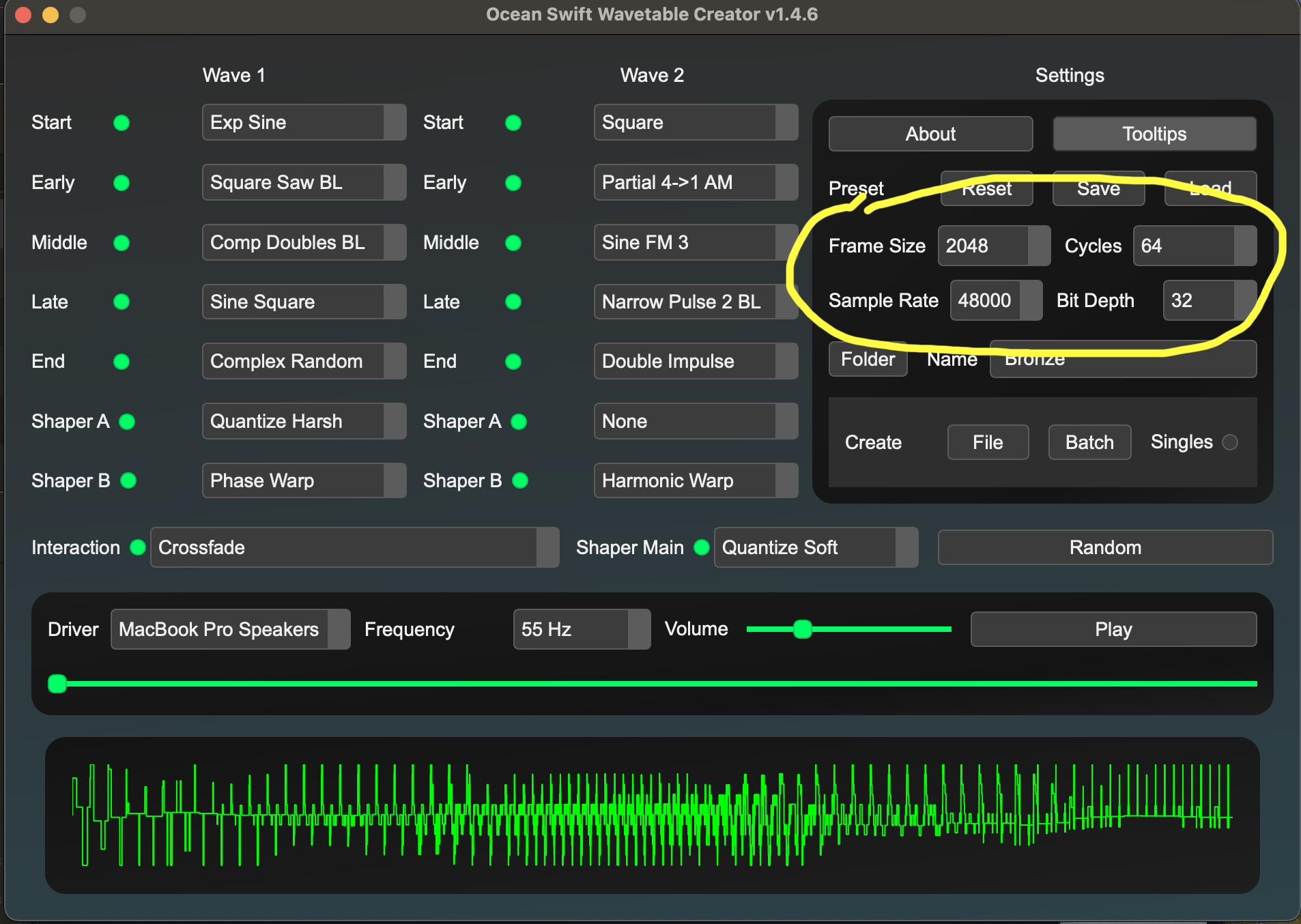
This tool is useful. Synthesis Technology - Waveedit
3 Likes
Now you’re speaking in terms I can understand. So preparing a wavetable .wav that will work well with TV is basically the same procedure as preparing a .wav that will work well with DT‘s slice grid machine when it’s set to 64? Just that the individual slices can be much longer?
Does the length of the sample/the length of the slices matter when preparing a wav file? Or do I just have to be sure that it’s exactly 64 slices in total and each of them is exactly the same length (1024 or 512 or 256 or 128)? If so, I can see myself tackling this with Ableton, thinking in Elektron steps when recording and later chopping. Like, for example, I could record 64 samples with TV set to 128 step recording length and 120 bpm , then and then import these into Ableton to export as one wav file with 64x128 step samples. Would that work well?
Thank you. I’m a DT2 owner however (no TV here) and so I’m interested in DT2’s particular needs for frame size, either 734 or 367 samples. Does this wavetable tool offer that frame size or just the more usual 2048/1024, etc ?
It doesn’t do those in-between sizes unfortunately
1 Like
Yes but you can have less slices.
I tested a 2 slices wavetable (2x2048).
Yes.
Additional Notes:
- Each wavetable preferably should contain no more than 64 slices. If there are more slices than 64, like 128, it picks every second slice.
- The wavetables can have different lengths (128, 256, 512, 1024, 2048 samples).
- If the wavetable length is anything else than 2048, the length should be specified in the file name by appending _wt” For example a wavetable with 1024 samples could be called: my-cool-wavetable_wt1024.wav, or a wavetable with 128 samples could be called: my-crappy-wavetable_wt128.wav.
- For raw (non-interpolated) upsampling, append “R” to the file name (for example wavetable_wt1024R.wav).
(I don’t know about raw upsampling)
2 Likes
I generally look at wavetables as a distillation of a complex synthesis algorithm. It seems like the majority of wavetables use fm, additive, phase distortion and waveshaping to generate their complex waveforms. These systems might have dozens or even hundreds of parameters that you are distilling down to a single control. It takes all that complexity and makes it quick and convenient to use and stack just like you would with simple shapes in a more standard synth.
2 Likes
But I think it’s important to also note that wavetables can also support very complex and strange textures that are difficult or impossible to make with the traditional synthesis methods (except additive, of course). These textures are what attract me to wavetables.
1 Like
Where did you find this out? I can’t find reference to it in the manual.
Infos for beta testers. 
2 Likes
Awesome thank you! I’m so glad they included this!!!
1 Like
Do you know what it means ?
No interpolation?
Any time it has to play a frequency that’s not the close-to-F# note you mentioned earlier (or certain multiples of that frequency), at least some of the sample times will fall between the ones in the file. Normally it will interpolate, i.e. average (or some more complicated mathematical operation) to infer what the sample value should be at that time. Turning that off will make it presumably pick the closest sample value, and sound dirty in a way similar to sample rate reduction or bit reduction.
Edit: spelling
3 Likes
Anyone who did a Analog 4 Wavetable pack?
This is extremely helpful, thanks as always @sezare56!
Good you mention slices and samples can be shorter. I don’t need them to be as long but thought you mentioned them as lowest possible values.
1 Like
This is pretty great actually. It’s fun generating a bunch of random tables and then dropping them in Wavetable and see what happens. Will probably use this quite a bit when I eventually get a Tonverk. 
1 Like
If you mix the additive generator, you can create simple melodies engrained in the table, that is a lot of fun scrubbing these tables, if you modulate the amplitude of each individual sine partial, it can sweep that engrained melody.
Also cool to combine it with a blend to a regular waveform.
Really a creative tool /toy.
1 Like
I just found out that by right clicking on parameters you can add/adjust modulators… 
Time to cook. 
I tested with 64/128 samples length wavetables with RAW UPSAMPLING. Nice crunchy results…
More informations from Matthias (Elektron) :
"The size of the wavetable determines how many overtones you have. Early wavetable synthesizers used very short tables to save on memory, but they also had extremely crappy ways of reading them out that introduced a lot of artifacts. When we tested those wavetables on wavefinder, which reads out the wavetable in a near perfect way, you only hear the overtones that are actually present in the wavetable and it sounds pretty dull. So I added this mode which simulates the crappy readout which adds all the tasty crunch you hear from vintage wavetable players.
It only makes sense to use with small wavetables, but with those you get a nice lofi texture.
I would recommend add that r (or raw) to the suffix if you have some very short wavetables. Its very nice on anything that is for example 128 samples long.
The differences are most pronounced when you play low notes."
4 Likes
What would happen if somerhing like a 5 sec drum loop was played back? I like the the way there seems to be more loop playback modes of this wavetable update. Is possible to play a wav and for it to sound like the original, if it’s scanned thru at the same pitch/rate?