i tried a different one same problem
1 Like
got it
yea i mentioned it in the feature request thread
it’s a strange way to implement Chord mode, because it impacts the sequenced subtracks for instance
i still would also like external midi keyboards to not bypass the chord mode
hopefully it gets fully baked soon
A couple of MIDI bugs:
Mix FX1 Params
EDIT: the below is still true, but I have since discovered that the CC mappings chart I have displayed is only for the Daisy Delay, every other effect uses completely different CCs for knobs A-H, which is crazy, so the bug still stands.
The MIDI implementation does not align with the manual in v1.2.0
I have no idea how widespread the issue regarding what kinds of tracks or what CCs have changed, but I am 100% sure that the Mix track no longer lines up with what is in the manual (though it did in v1.1.0, so this is a new regression).
On v1.1.0, FX1 knobs A-H were controlled by CCs 48-55 in order, now they’re in a completely different order and oddly, the G knob is completely missing. Here is a chart updating what the actual numbers are on v1.2.0
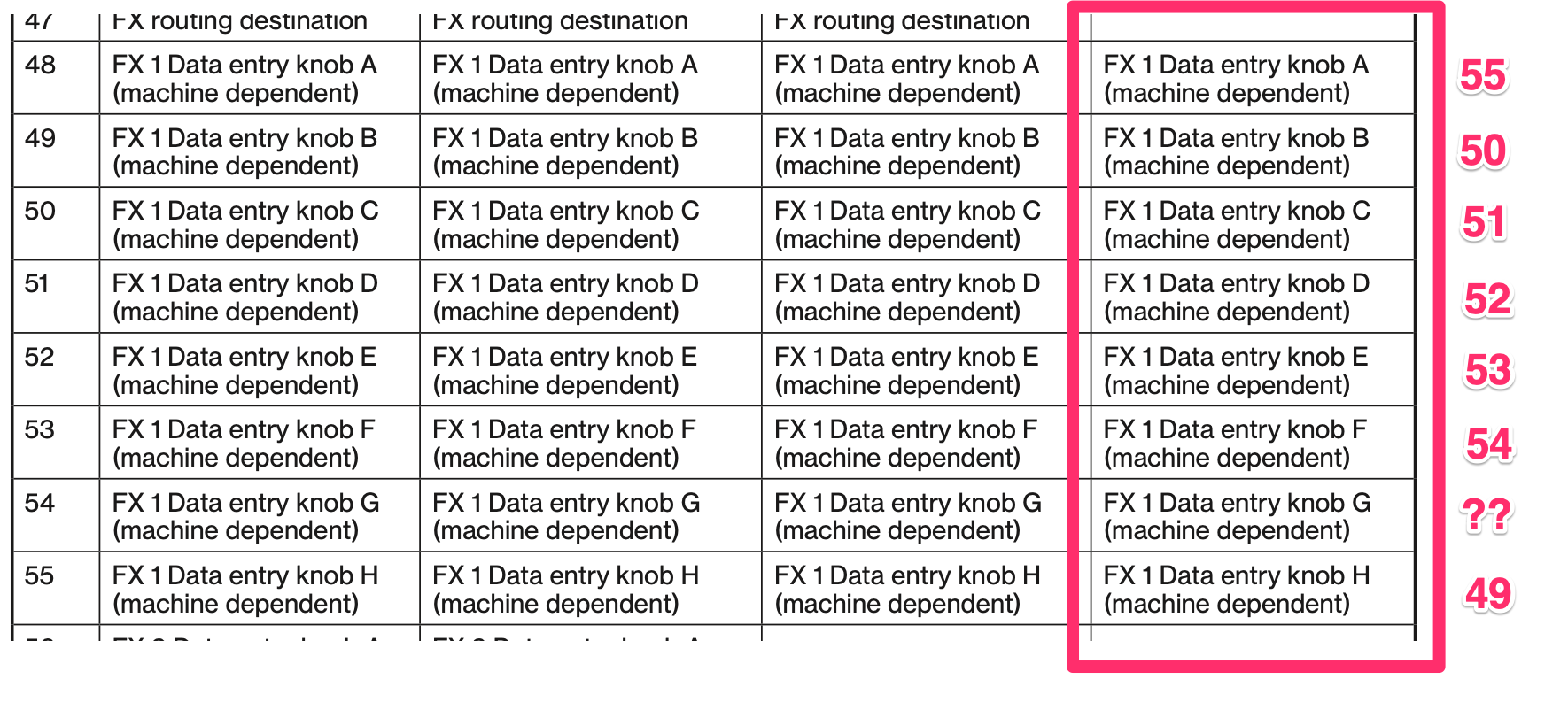
I spent a little time trying to see what CC is used for Knob G, tested with CCs 30 all the way to 65 or something to no avail.
RTRIG On/Off
This simply doesn’t work. The manual says it’s NRPN 000/042 but it does nothing. 000/043 does move the RTIM as documented so it’s not a matter of NRPN not working, just this one is missing.
RTRIG is already a really strong performance feature — it essentially gives you per-track beat repeats for steps that aren’t already using RTRIG, very similar to MPC-style note repeat. Even just toggling it manually during playback is super useful. Being able to map all 8 tracks’ RTRIGs to external buttons would be huge.
I’ll report these officially when some time has passed after the holidays
1 Like
The PB, AT, MW and BC macros do not work across patterns.
The values are not carried over when switching patterns. Tonverk macros always jump to the last value in a pattern, and won’t stay at the current value. (OS 1.2.0)
3 Likes
It’s also a problem when using perform mode or memorize/recall, the macros are overwritten by what was saved.
I added it as a feature request:
I bring this up because the underlying issue is the same: macros values are being ignored in some contexts when they should never be ignored in any context.
1 Like
Just chiming in to report that PROB/COND relationships are still broken on 1.2.0.
But I don’t want to sound whiny all the, so I’d also like to state that the dev team has done a fantastic job with the OS updates in general.
1 Like
are people still having issues with parameter values moving by themselves?
several levels (mostly the master volume) are being adjusted while i’m not even touching the unit at all
the tv isn’t hooked up to anything besides its power supply
i’m on the latest firmware
1 Like
yes, it happens on the the topmost right rotary, on the MOD destination screen for example (fw 1.2.0). No MIDI equipment/cables hooked up to the TV.
1 Like
it happens with all of my encoders and it’s usually concentrated in inexplicable waves
has elektron confirmed that they know about this?
should i report or wait until the holidays are over?
hm that sounds bad. I haven’t noticed all of my encoders behaving like that.
I don’t know whether it’s a confirmed issue by Elektron, I’ve just seen your post and assumed it had been reported by someone and wanted to confirm that I’m noticing the same behavior 
I guess it can’t hurt to report ASAP but that’s up to you 
Could dust etc. be ruled out in your case?
1 Like
it’s a pre-owned unit but seems brand new
the encoders themselves have very little resistance compared to my other elektron stuff though
i just wanted to check in to see if other people were having this issue or if something is wrong with my specific tv
1 Like
PARAMETERS MOVING ON THEIR OWN
I have already read that this is a known and common issue.
AUDIO DROPOUT WHEN LOADING SUBTRACKS
In some cases, loading a subtrack causes that subtrack to stop outputting audio. Muting and unmuting the track restores audio playback. I have not tested this behavior extensively yet, so the conditions under which it occurs are not fully confirmed.
OLD PATTERN SUBTRACKS ARE BROKEN
Some kits appear to be broken when using older pattern subtracks.
DUPLICATION OF SAMPLES WHEN LOADING THE SAME PRESET
Loading the same preset multiple times duplicates the sample. This is not strictly a bug, but avoiding this redundancy would be a useful improvement.
NO MICROTIMING WHEN ASSIGNING A CHORD ON GRID MODE
This is a huge regression. Microtiming on single notes was such a uaeful feature.
2 Likes
I’m trying Tonverk with an external MIDI foot controller and noted some odd behaviour, with all Stop commands being interpreted as Pause.
Starting with sequencer stopped (Only Stop LED is on)
Standard onboard button behaviour
- Hit Play => sequence plays from start. Only Play LED is on.
- Hit Stop => sequence stops. Only Stop LED is on
- Hit Play => sequence plays from start. Only Play LED is on.
- Hit Play again => sequence pauses. Stop & Play LEDs are on (pause mode).
- Hit Play => sequence continues playing, OR hit Stop => sequence stops
With MIDI controller, starting in Stop mode as above.
- Hit Start => sequence plays from start. Only Play LED is on.
- Hit Stop => sequence pauses, Play & Stop LEDs are on.
- Hit Start => sequence continues playing, OR hit Stop => nothing happens.
- Hit Start again while playing => nothing happens
I have used a MIDI monitor to confirm that my controller is definitely sending Stop, not Continue.
It makes sense to me that the Tonverk should respond to MIDI Start and Stop commands in the same way it reacts to hitting the Play and Stop buttons. Without Stop working correctly, you can’t play a sequence from the start.
Setup: M-Vave Chocolate controller, connected to iPad via Bluetooth (USB-C works too). MIDI Wrench app monitoring MIDI, shows controller is sending correct Start and Stop commands. Since the Tonverk can’t be a MIDI host, I’m using AUM on the iPad to route MIDI to the Tonverk, which has Sync / Transport Receive on and Send off.
PS I remembered I have another old sequencer (Yamaha QY10) that sends standard transport commands over standard MIDI, so I tried that and saw the exact same behaviour.
I’m seeing the same issue on 1.2.0 on standard Program Changes sent from a foot controller, so it’s not about Ableton as such. The Pattern changes immediately as if Direct Jump was enabled, but I have default Sequential mode set.
i downgraded back 1.1.0 because of this unfortunately. hope it gets fixed it’s kinda vital to me
3 Likes
Yes, I also really miss the micro timing on chords, that is an amazing function. Lost quite some time thinking it was user mistake before realising micro timing is no longer working
1 Like
I just encountered a severe bug/issue with distorted sound quality and weak volume from all analog outputs with OS 1.2.0. The unit is currently unusable.
Does anyone have the OS 1.1.0 available? I cannot find it from the Elektron website anymore. I would like to test if downgrading to the previous OS would remedy the situation. Meanwhile, I also submitted a ticket but likely it’s going to take a long time to get a reply from Elektron… 
Edit: Downgrading to OS 1.1.0 did not remedy the situation. The issue seems to be very random, sometimes I can play for solid 30 minutes before all of the sudden the main volume starts to decrease and distort, while sometimes the same happens in about 1-2 minutes after turning the TV on. No USB connected, only power via the Elektron PSU. Happens with every project / pattern, and it’s not associated with any particular FX or routing.
Bug Report: Device freeze on boot after deleting assigned sample in USB mode
Steps to reproduce:
- Assign a sample to a track
- Enter USB mode
- Delete the sample file
- Exit USB mode and reboot device
Expected behavior: Device boots normally, possibly showing an error for missing sample
Actual behavior: Device freezes on boot with message: “Cannot find sample”
Workaround: On boot, immediately switch to a different pattern before the freeze occurs. This prevents the issue even after saving the pattern and removing the deleted sample assignment from the original track.
Firmware: 1.2.0
4 Likes
it seems the oled screen saver don.t work anymore on latest os
I cannot reproduce this.
Can you try with a new project, just to make sure?
Have you reached Elektron about this?