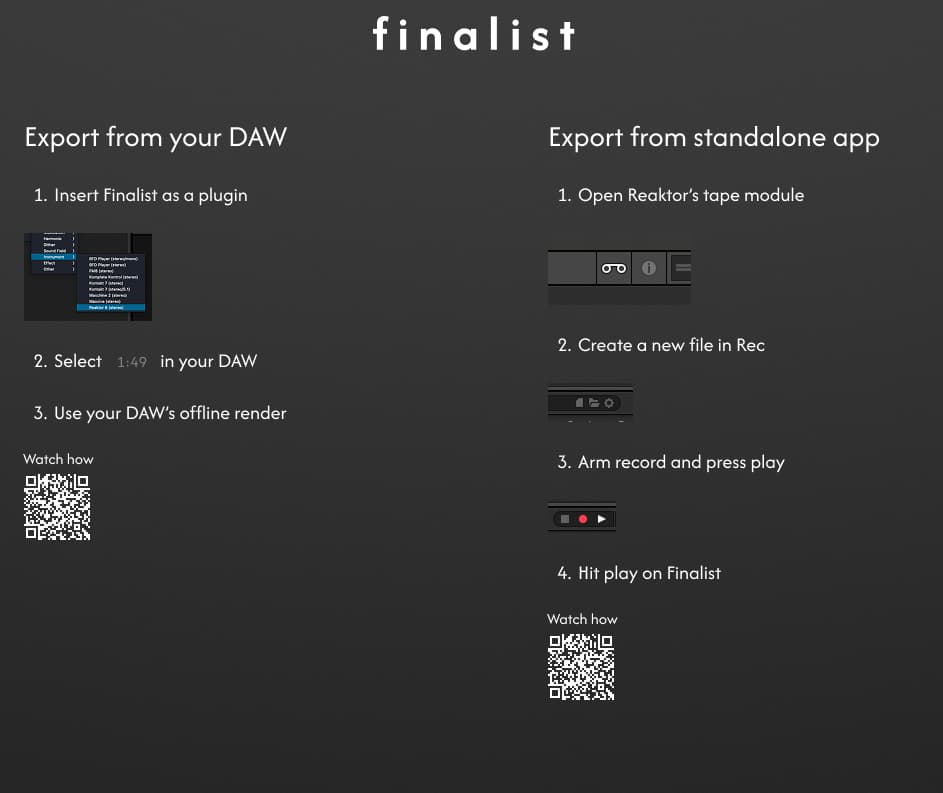
Tim Exile - Finalist

New plugin in development from Tim Exile. Some kind of non-AI stem-analyzing “auto” mastering thingamajig.

Deffo interested in what this is. I do pay for mastering from an excellent engineer, but like many I’m sure, my audience is sometimes lower than I’d like, so to have a tool that potentially gets pretty good results in-house without paying anyone anything does seem alluring.

2 Likes

Yeah it definitely seems neat although in my music mixing is half the fun so I’m not sure I see the point of a mastering tool that needs stems. Oddly seems like it could be way more useful for “proper” bands than electronic musicians, given it is being made by an electronic musician.

I think if it wasn’t Tim Exile doing it I’d disregard it immediately. But the self-mastering space is surely only going to get more and more accessible with great software, and this could be one of them to come!

2 Likes

4 Likes

I’ve listened to a couple of interviews with Tim recently and damn if he doesn’t deserve people’s support. He genuinely sounds like such an innovative creator and I suspect anything he makes is worth checking out. The enthusiasm with which he talks about what he’s trying to bring to the world and his philosophy on music making and the industry is incredible - and I’m trying to find a way to say this without sounding patronising - especially given the huge personal challenges he and his family have faced recently.

8 Likes

I wonder if this would be of any use with more noisy material like rock or metal.

It has a name now… ‘finalist’

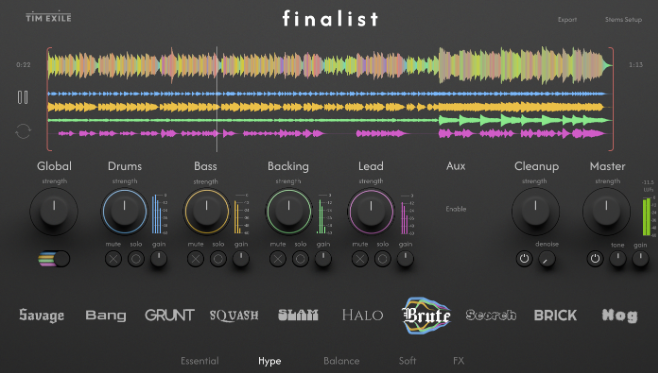
It’s actually super simple and surprisingly impactfull. No AI involved just lots of presets which you can adjust to your taste.

I got in early via Patreon membership but it is still available for the rest of the month.

Thoughts?

finalist

Screenshot 2025-10-15 at 15.52.45

4 Likes

I haven’t tried this plugin but just a heads up to those interested, as the thread title is a bit confusing. This is more of a mixing plugin than mastering. You drop stems into it and it mixes for you. Not sure I would ever use something like this given that I’m a mixing engineer, but I could see it being useful for those starting out.

4 Likes

I will amend :+1:

2 Likes

After hearing the gain matched comparisons on mymarlodies, I keep thinking the best use case is one of three things, 1) quick “fake” mix to listen after recording, 2) create separation after recording and switching “hats/roles” to mixing to diminish listening bias and 3) as you say, for anyone starting out.

I’m no mixing engineer but I dont think it’ll help me outside of contributing to Jamuaries output.

I do think this is pretty impressive to put together and impressive for balancing or removing frequency overlap quickly.

I haven’t seen anyone show what the export options are. I am interested to know if you can export individual tracks out, or if it’s limited to a stereo sum.

This would be perfect if it could stem out after or is it stereo sum ? Also curious

1 Like

This is pretty sick. I mix my own music but from what it looks like I can still do that and then this will process and balance all the exported sounds in separate stem categories. So it should balance your low end and drums well, which can be a huge PITA for even the best mixers.

What I hear that is very impressive is how it works with the upper mids, which can really separate the men from the boys when it comes to getting something really clean without being harsh.

I wonder if you can export a mix without the mastering piece at the end. So lets say I make a pre master to send to labels, it gets signed and then I send them the mix just without the mastering at the end? I feel like this is the case since I see power buttons next to the knobs, but I was curious there.

1 Like

I don’t think anyone’s taken the plunge. I might look for an email address to ask some of these questions.

I’m tempted to buy out of curiosity, but I don’t remember the last time that resulted in a good experience.

1 Like

He has a timed demo up. I’m going to mess with it once I have this track done that I am working on.

1 Like

Oooh nice! Will download after dinner.

1 Like

Just two different options for stereo sum

Still playing around, but I do think the demo is going to be the best option for anyone curious.

I don’t think I can make use of this.

For it to be useful, in my opinion, it could work so long as you do some mixing as you go along and make use of a slammed limiter for A/B purposes before exporting the stems (without the limiter).

Bringing tracks into Finalist is essentially doing the same thing, slamming those track through a limiter, so if tracks are not balanced well, you’ll hear that on first pass through, plus if it’s live recorded instruments, there’s a good chance of hearing unwanted bits amplified.

I’m guessing the unwanted bits is the reason for the noise removal, but I haven’t had a reason to make use of it yet.

1 Like

No disrespect here but find it hard to understand what you mean. Requesting some further explanation, please.
Maybe I’m getting confused by saying stems and tracks interchangeably?

Are you putting your exports stems into Finalist and mixing them there? How is that process? Im not really interested in the mastering side of things.

What’s your opinion on mixing imported stems from arranged songs?

My intention with the plugin would be write and arrange my song, roughly mix it, then send it into Finalist for final mixing then export it to master.

No disrespect here but find it hard to understand what you mean. Requesting some further explanation, please.
Maybe I’m getting confused by saying stems and tracks interchangeably?

No disrespect taken, because I know exactly what you mean. Sorry, I used to be purposeful when saying stems vs tracks, but gave up after some people argued they meant the same thing and now look at me! So yes, to be clear, I did use them interchangeable to describe tracks (but I also know the difference).

Are you putting your exports stems into Finalist and mixing them there? How is that process? Im not really interested in the mastering side of things.

I did try it with drum tracks (exported as stems), but didn’t like the results and went back to individual tracks. There’s basic mixing option for pan and gain, but you lose the option to fix at the track level if importing as a stem.

I wouldn’t recommend it for stems, because if something is wrong at this level, you’ll have a tedious process of going back to the individual tracks to then fix, and then bounce down the stem, to then reimport into Finalist.

I think it’ll work best when you have individual tracks for each, including each drum track, but then you’ll face the limitation of up to 32 tracks only.

My intention with the plugin would be write and arrange my song, roughly mix it, then send it into Finalist for final mixing then export it to master.

I’d still strongly suggest downloading the demo. As you mention doing a rough mix first, I think it could be helpful especially if you want to eliminate listening bias. Some of the presets are extreme, but again, it could be helpful, or it could be a complete waste of time.

I really don’t think anything bad about this, but I am struggling to see how to use this as part of a workflow and all I can think of is that it’s kind of fun trying different presets to hear how it sounds.

1 Like

32 tracks is a lot for dance music. So that’s no problem for me. I typically use less than 20

I also print delay and reverb tracks. I guess those go under backing? Will have to make sure I get right.

Anyway this seems more like a finalizer to me. The mix is already balanced and processed and the stems are bounced post fader so I’m thinking you just drop them on and then you are basically fine tuning everything from there. I could be wrong but this seems like the best way to use this plugin.

1 Like