was recently at a friend’s whom has run bitwig for several years + told me there’s no multi-output from the grid, nor is there a way to run a modulation from one track to another. (Ie, if you wanted to use note-on messages from a drum-kit to randomize a delay on another track, etc)
would be curious to hear if that’s true for you as well.
EDIT: I checked and you can’t do this unless I am missing something.
This is such a fundamental part of how live works and always has been that I can’t figure out what exactly you’re talking about or what you’re trying to do. Any audio or MIDI clip can be a loop of any length you want. Any clip slot in session view can contain a different loop of any length and you can switch between them at will. And in arrangement view you can have any number of clips on any track arranged however you want and they can be any loop length.
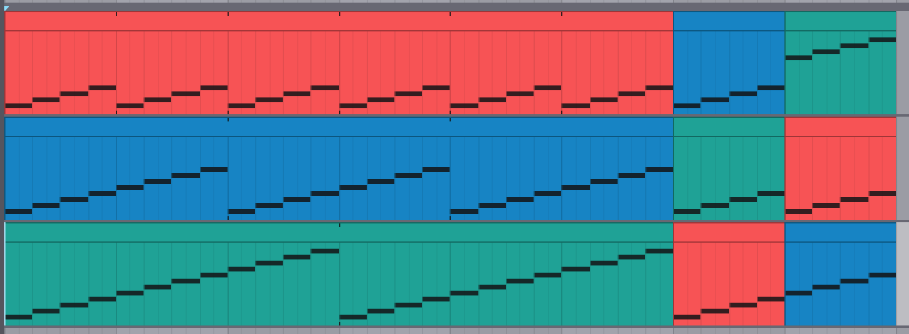
Here’s an example. Track one is a one bar loop, track 2 is 2 bars, track 3 is 3 bars, and then it can change to whatever else you want whenever you want.
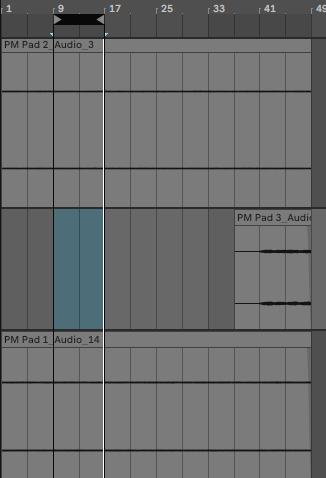
Here is what I mean as an example. I want to loop 9-16 of PAD 2 and find what part of another track goes with it. So, i want to be able top loop 9-17 of PAD 2 while looping 41-48 of PAD 3 and/or 25-32 of PAD 1. Is this possible? I am not talking about looping them separately. I want to loop different parts all at the same time. I have been looking for a tutorial or something on Google and YouTube. I can’t find anything unless I am missing something. I am using Ableton Standard (I must add I am using it as a caveman since I use it almost always for mixing&mastering). My understanding from that article is that Digital Performer allows something like that. Never used it of course.
Yes any clip can be a loop of any length. This probably isn’t the thread for it but scroll down to section 8.1.5.3 Looping Clips on this page.
Btw that interview was talking about an album released in 2002 but after ableton live came out I think this kind of thing became standard in every daw now.
Without getting into a rabbit hole of 0.0003 latency etc…All i know is when i track in the SP1200 into Luna - all the UAD effects are in real time and sound correct. I literally switch off the computer screen and play the SP1200 through Luna and use its FX. It also has perfect sync…I track in 8 tracks from the SP1200 into Luna, then create a fresh SP1200 project and continue to jam that new project over the 8 tracks i previously tracked into Luna and it all syncs/works/sounds correct. This workflow would not be possible in a million years with any other DAW, it just works. Essentially the computer is taken out of the equation (which is the 100% cause of any latency). As long as your using hardware kit (drum machine/synth/sampler, whatever) and using the UAD Apollo - all latency is dealt with. Luna is simply some clever programming which lets u use the UAD plugs in real time on the comp. So yeah you are right - analog machines and the Apollo interface will keep it zero latency.
…sure u can’t do this in the serial concept of a timeline arranger…
but that’s what u got the clip arranger view for…in bitwig these two totally different arranger approaches/concepts can even work right next to each other independantly but at once…
love to hear from those devoted long time reason users…one of my oldest friends is also one of those…
funny enough, no one mentioned fruity loops yet…what a nightmare in software…but no matter what, some serious people managed to create quite some hits and bangers with it…
never worked with it, but whenever i see some handling footage, i can’t believe my eyes how hyperfractured and ubercomplex even the most simple routings turn out to be…
but here we are again…if u know what ur doing and found ur workflow, it does not really matter anymore…
When you first open it and are greeted with the step sequencer, that’s intuitive. And then you want to add effects and you find the mixer, that’s intuitive.
you know, it’s an interesting question, being on Live for quite some time I actually appreciate that the changes are smooth enough to not miss the previous versions and usually the transition is quick, the main ui barely changing for most of things, they add stuff along the way but being same design language it’s so easy to get used to, I don’t miss old versions at all but I can say for sure that I could still be on Live 8/9 and probably would be happy with it, but still appreciate every new version just because it’s so easy to get used to without compromising on almost nothing.
Reaper is very intuitive but so cluttered, it’s too much info for me, sure you can customize everything but that would take me so long to strip it down to what I need…
but definitely amazing software!
I don’t think in current state of music production anything can be intuitive unless there is a specific effort towards that. I remember the very first software I used - Cakewalk 5(?) already had tons of mysterious features and it was MIDI-only DAW at that time…
I second this. I made the song below after 1 week of just messing around with Ableton, zero YouTube tutorials. I only had to google how to get VSTs to show up. I had to google a lot for FL to do what I wanted to do in the song below.
This is what Live’s Session View is for. It is designed to allow you to do exactly what you describe.
In Session view, you highlight the section of an audio or MIDI track you want to loop, make sure Loop mode is turned on and… that’s it. You will only hear that section, looped, whenever you trigger the clip in Session view.
Do the same with other tracks where you only want to loop a particular part of the total audio or MIDI clip.
Then - staying in Session view - play the relevant clips for each track at the same time, and see how they sound.
If you hit the record button in the transport bar at the top of the screen, any clips you play in Session view will be recorded as they play out into the timeline in the Arrangement view. You’re performing in Session view, and the Arrangement view is recording everything you play.
You can also drag clips from Session view to the Arrangement view. Click and drag the clip and ‘hover’ over the icon in the top right hand corner of the screen that switches between the two views. When the view switches to Arrangement view, drop the clip wherever you want it on the timeline.
This is one of the foundational features of Live since forever and it remains (for me) one of its absolute pure gold features. It is so fast to go from a bunch of clips that may (or may not) sound good together to a structured arrangement.
And to add to this, you can also ‘unlink’ the loop boundaries of an audio/midi clip from any of its individual automation parameters and have effects/param envelopes that are different lengths to the audio/midi that they are assigned to. Which can be very powerful.