It really is incomprehensible that support has not yet been added for that. I did buy bitwig at 50% discount so not super mad, but still, it’s not a feature I expected to be missing!
1 Like
You should check out the operators.
2 Likes
The quick way is to draw one long note, use the Repeats operator, then Slice At Repeats.
2 Likes
Microtonic-like drum synth in the grid, fun times
11 Likes
hi all! I’m trying to route a signal from an fx vst (in my case, Snapback from Cableguys), to an internal sidechain of a plugin (Soothe). It doesn’t show up in the list of sidechain sources, i guess since it is an fx, not an instrument, so Bitwig supposes it is not a valid sidechain source. how to get over this? is there a device to send the signal to the sidechain?
I don’t have Snapback, but I do have their ShaperBox, which Bitwig says is also an Audio FX.
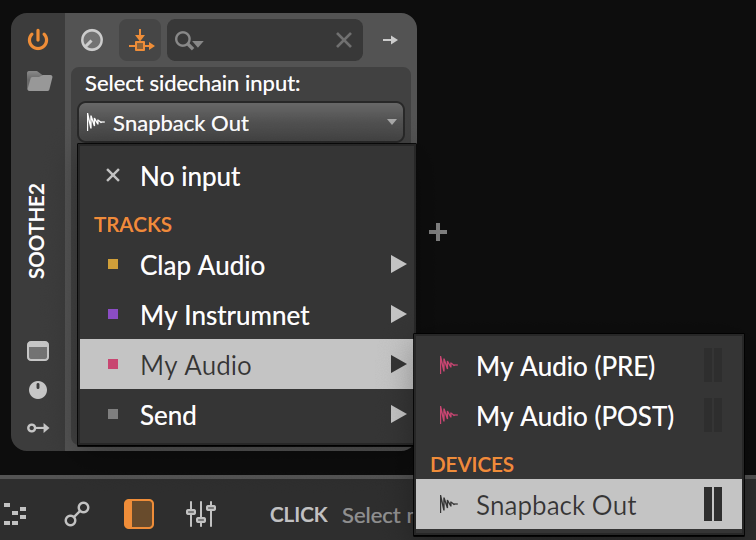
When I click on the sidechain icon of Soothe’s device, it shows up there no problem:

And when I cue the sidechain from within Soothe, I hear the output from ShaperBox. So it seems like this works in at least some configurations. Can you give any more details about your setup? Or maybe even share a minimal project that shows the problem?
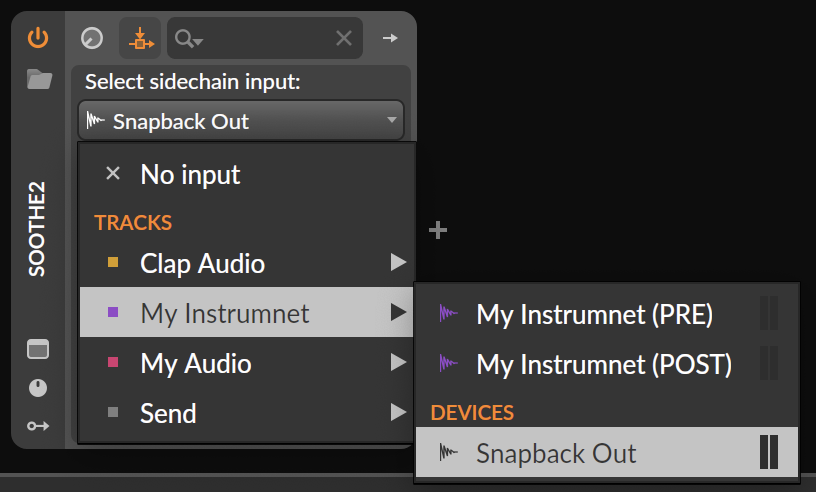
yeah, solved it that way as well, it won’t show up unless you have an audio source on the track, like a synth or a drum machine, thanks!
now there is an another obstacle. by doing it this way I have the snapback isolated signal, which I can route to soothe, no issue. issue is with snapback, it has a really useful visual guideline which is lost since it is no longer on the original track (it superimposes the track audio with its own to use eyes and ears). so the question is, how to keep the snapback on the lane to get the visual but have its signal separate to use as side chain source for the soothe on the same track?
hope this makes sense
I’ve been playing around making a version of the DN2 FM drum engine in the grid and ta been pretty fun.
One slight problem is that, because everything runs at 4x oversampled audio rate, all the pretty extensive stuff I had to do to make possible to do things like switching through the algorithms with a single knob, have an impact on the CPU use of the device.
This is one case where having control rate and audio rate would be nice. Although the side effect is that you can modulate everything (including the FM algo) at audio rate 
1 Like
That’s true and its true in any DAW but maybe more so in BW where the devices are kept fairly simple but with options to expand. This is where a specialized VST helps a lot.
…u wanna process snapback audio with soothe…?
why?
don’t have soothe, but is’nt it ment to do realtime smoothe out certain frequency edges…?
while snapback adds perfectly tailored transients and tails, to embrace certain frequency edges to an already perfect fit…?
to let sooth handle all this on top of it one more xtra time makes no real sense to me…
anything u could want smooth to do, can already get nailed perfectly within snapback…
for unmasking, heard soothe excels at it. unmasking is a sort of spectral side chain, like trackspacer only better, so I want to unmask the added snapback frequencies.
I like the way it sounds. but right now I can’t see the waveform of the affected track, or I can’t side chain it internally with soothe…
Okay. I got the Snapback demo.
It does for me. On an audio track with just Snapback on it:
An instrument track with just Snapback on it:
It’s very unclear what you’re trying to accomplish. Taking a guess, I’d say:
- you have a drum track
- that you’re layering something onto with Snapback
- And want to process the whole track with Soothe
- But want to sidechain Soothe with just the isolated layers Snapback is adding so that it’s only getting its spectral information from Snapback?
I’m making a lot of guesses there. But if I’m close, what you can do is:
- Add Snapback to an FX track
- Send the drum track to that
- You now see the superimposed signal in Snapback, but are hearing double the drums (one from the original audio track and the sent signal playing through the Snapback)
- So in the Snapback plugin, click the little headphones next to “Snapback" and “Transient” to solo those signals.
- Now you hear just drums from the drum track and just Snapback from the FX track, and the two are being summed together on the master.
- So add Soothe to the master, and set its sidechain to look at Snapback on the FX track.
think again 
ps it works really well btw
4 Likes
Thanks for the hint!
I might not need this after all, as my DTII is currently drenched in cold sweat at the prospect of being replaced by an OP-XY 
Try overbridge before you succumb to GAS, especially if you need to sell the DT2.
1 Like
I don’t need to sell the DTII and of course I’m going to keep it until I’ve tested the OP-XY thoroughly. I’ve already ordered it. I just like to keep the amount of instruments I use as small as possible.
DTII is nice and I like it, especially because I don’t really need overbridge for it. Lots of nice options to get great sounding stereo mixes right out of the box. Overbridge would have just been a nice bonus for me to quickly record stems as a backup.
1 Like
I haven’t had that much time with DT2 + overbridge in BW but it works as far as I’ve tested it. It makes the DT2 accessible when I’m in the box and a tighter connection to jam machines is valuable. Fewer ideas fall to the side.
1 Like
I’ve used overbridge extensively back when I had a DN. But I’ve just used the standalone version to record a few takes of my songs. Then later I imported the audio files to bitwig to concentrate on mixing. I get too distracted when I try to do both simultaneously.
Mixing is where the connection is most useful IMO. My DT2 jams tend to be peaky and boisterous and it’s nice to be able to work on a mix and have the changes be persistent inside the DT2.
I’m in! (I bought Bitwig) 
14 Likes