I just used draw.io you can use it for all sorts.
3 Likes
That is a great tool, thanks for the link 
That was a bug. I believe we did fix it in the latest beta. If you still see it after upgrading., please pop over to the 1010music forum and let us know.
Thanks!
2 Likes
Thanks for replying. I’ll check out the beta and pop over to the 1010 forum.
Other than this small hiccup, I’m totally digging this box.
Just thought I’d report back that these Hosa YMP-137 have elliptical/oval connectors, so if they’re oriented vertically, they do fit next to each other connected to the Bluebox:
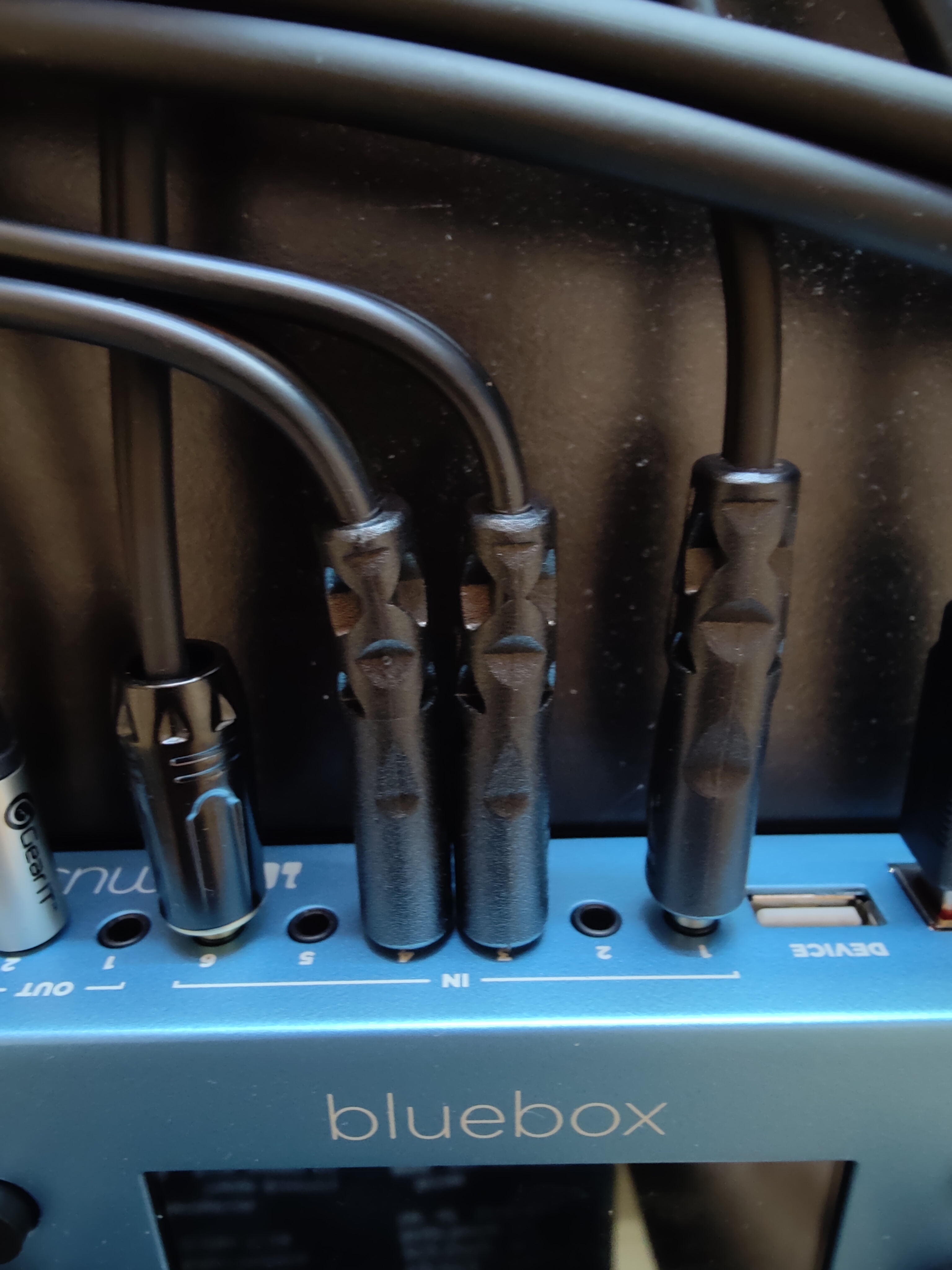
They’re the skinniest adapter of this type that I’ve found so far. Not perfect, but they work if carefully connected.
1 Like
yep - that’s what I use. 
These connections so close to me just doesn’t feel right. I wonder how many would favour this vs a breakout cable? (or a bit of both)
1 Like
I think a breakout cable would be cool. It would be nice if the jacks were 2-5mm further apart, but I think I’ve found a solution for now.
Anyone using the Microcosm as send effect through the 1010 and getting low audio? As I am.
I’ve only got one effects pedal and I was sending my Digitakt to the Microcosm via the 1010 and when I mute the Digitakt and turn the mix and filter to the right the audio is so low! I’ve set the Microcosm’s global effects volume to the full as well.
On the 1010 the Digitakt’s volume and gain are set to 12-1pm which is enough as if I do anymore the volume hits the red on the 1010. My Digitakt’s volume is also at the 12-1pm mark.
It’s so quiet I can’t really use it properly since I bought it.
Any ideas on what I can try next?
How are you sending to the Microcosm?
Have you checked the send level to it on the Master page?
I had my Big Sky set up how you describe and it was fine.
Via the Output 2 to the Stereo input of the Microcosm - https://i.imgur.com/5SctR6k.png

I’m thinking the Bluebox might be just what I need. I want a device where I can switch between different routings between my samplers easily and without repatching:
- SP404 -> (can be mono) -> Liven Lofi -> Main out
- Liven Lofi -> (stereo) -> SP404 -> Main out
- Plus, any other input device to either Liven Lofi (in mono) or SP404 (in stereo)
From my understanding of the Bluebox this is straightforward, yes? I’m assuming I can also utilise another mono out for an effects send?
besides the main out, there’s one additional out (OUT2) which is pre FX. if that fits your usecase, then yes. for me, it’sa bit of a limitation since I would like to use the blackbox alongside the ZOIA (so I always need to route a specific channel to OUT2 manually).
1 Like
You can also use the cue output as a separate output instead of being a copy of main, and split output 2 into two separate mono channels.
2 Likes
Might as well mention my Bluebox setup incase it helps:
5 stereo inputs for various things
output 1 to headphones / speakers
cue to Digitakt / RC600 for looping and sampling (running this through a crude splitter to get the signal to both)
out2 going to zoia stereo and then zoia going back to the remaining stereo input. When I need effects going to something else you can make out2 split into out 2 and out 3 mono.
It’s ridiculous that I can do the above with such a tiny box and also record with it.
4 Likes
Just to check, I can split output 2 into 2 separate mono channels as a setting or do I need to use panning?
You can split it in the settings
1 Like
How easy is it to edit the individual track recordings in the bluebox?
Cut/copy/paste stuff like that. Cheers
Not very. You can punch in and out, switch takes, but nothing much else. People on the support forum keep asking for drag drop and edit but I’m not even sure it’d be that fun if they did it. Same with the constant request for looping. It’s a pretty perfect device for what it is and any more would probably hurt it. Only wish is maybe some more effects? But even that probably not.
It’s a beautiful and tiny mixer with a super streamlined all or part recording interface so simple it makes you actually record things.
2 Likes
Editing, is borderline impossible I’d say.
I’ve not dabbled with the punch in and out & takes stuff but it’s there buried under the UX. I just record the main mix (sometimes the induvial tracks) in one take
If you’re looking for a DAW like experiance when I comes to handling audio (even a very basic one), the Bluebox doesn’t meet that. Then again what hardware device does?
2 Likes