Yeah like if I do a lot of detailed twists of the knob in quick succession, sometimes the motor will get confused and fell like it’s catching against my twists for a moment. Which then results in a jump in value of whatever parameter I’m controlling with the twisting.
It’s fine 95% of the time but not perfect like say a push 3 encoder. Glad to know that at least one person is experiencing this too
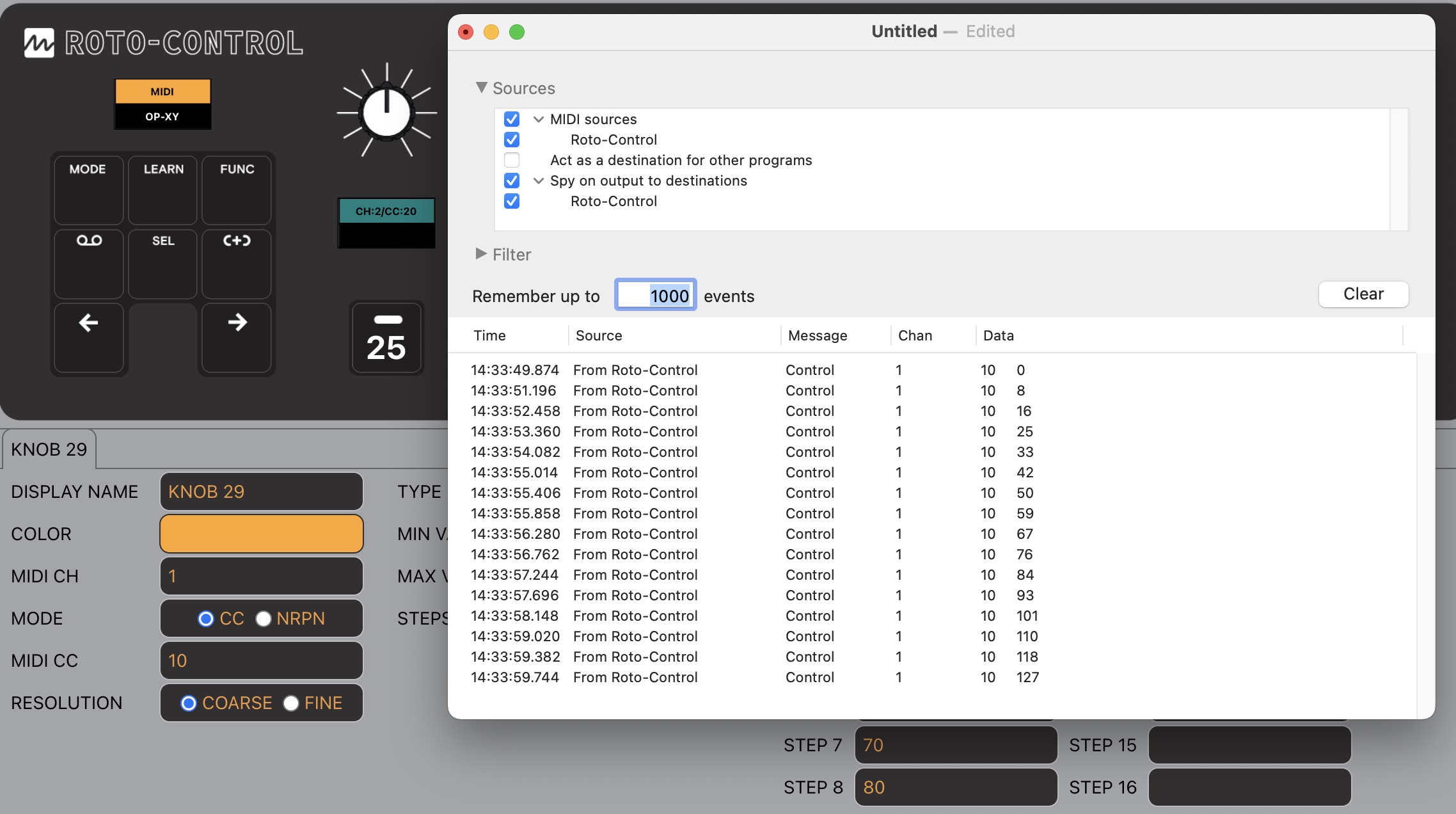
For midi control, when you setup steps, does it just divide the range equally among the number of steps, or can you define the midi CC each step hits? There’s no real manual, so I can only go of the video manual.
Not sure if this is the answer you are looking for. You can only assign one MIDI CC to a knob. The steps are divided up over the number of steps. Screen shot of a knob with 16 steps and the MIDI output of the 16 steps.
That’s what I was wanting to know! That answers my main question. I’m assuming if you have the min 1, max 3, and 3 steps (thinking Chase Bliss 3-way toggles), then it will work for well, a Chase Bliss toggle… for example: ENV = 0, 1 TAPE = 2 STRETCH = >2
For those sort of toggles I usually prefer to use the buttons on the Roto-Control, which are really excellent for that sort of thing. And when it comes to the buttons, in toggle mode you specify how many steps and then label them, and then adjust what is called the ‘on value’ in this mode. So for the example you gave, you would tell it that there are 3 steps,. leave off set to 0 and on set to 2, and the button will toggle between outputting CC values of 0, 1 and 2.
This is basically exactly the same behaviour as the knobs, only some of the labelling is different in their config app (for knobs its min and max values instead of off and on values, type ‘step’ instead of type ‘toggle’).
So far on the occasions where the automatic division of stepped knob or button output values didnt quite align with what a particular plugin was expecting, slightly tweaking the min and max values (off and on values for buttons) was enough to get all the other steps values to match what the plugin was expecting. For example, to get the multi-step toggles to work with various parameters in the VST version of Madrona Labs Sumu inside Ableton, I often needed to change the off value to 3 instead of 0. Trial and error was involved, just make small changes to the value to start with.
By the way, within Ableton I have found variation as to whether a stepped parameter is fully configured and each step labelled automatically. Built in devices seemed to do that. I havent yet got round to establishing what other factors are at work, on my mac it could even be that AU versions of some plugins do it automatically and VST version of same plugin doesnt (or at least didnt when I tried with earlier firmware weeks ago).
Hi is there any intention to be able to motion record parameters on pages 2/3/4? Its a bit frustrating only being able to motion record the first page of parameters. For example, I set up volumes and mutes on page one for my 8 tracks (OP-XY), like your Octatrack example, but now I cannot motion record my filters on page 2 and beyond, as they are not on page one
Hopefully it’s a relatively simple feature to add?
I suspect they are dealing with a relative lack of storage capacity, and most of the compromises we so so far are due to that. If this is indeed the case then I’m not willing to raise my expectations about future features that generate a fair amount of data that has to be stored somewhere.
Maybe someone can give me a hint here. So i am on Windows, in Ableton. I did updated to lates fw, i did connected in and out for roto in control surface, but it doesn’t see any channels or can’t be mapped. What am i missing?