I’m seriously unimpressed so far by Roland who took my warranty claim, had me answer a dozen questions and has since not gotten back to me all week while my tr1 is boxed up awaiting to be sent out.
I have no interest in external sequencing, at that point just get a blackbox and save your money and desk space for an instrument that’s functioning as intended.
Okay so I did a thing, I made a 1/8 note 24PPQN wave file, uploaded it into the TR1000, used one track to send 24PPQN audio to Multiclock, then this goes to OXI which splits it to rest of the gear and… it’s kinda awesome I get less than 0.1 BPM fluctuation, TR1000 is the master, and rest of the setup gets awesome clock from the multiclock
It looks awesome anyone tried something similar? I bypass the whole MIDI clock thing, sounds very good to my ears.
Hmmmm - interesting - so I’m clear, you made an audio file - 1/8 interval (12 x audio pulses) at a specific tempo ??? Then you assigned this sample as a track instrument and placed triggers on 1/3/5/7/9/11/13/15 and press play and output this audio track via direct out to ERM ???
Am I right ?
Aside from it being (what shouldn’t be required) a complex workaround - my issue (if my understanding is correct) is that even as a Master device - using this method the step to step playback isn’t accurate enough to provide a seamless stream of 24 PPQ pulses to the ERM ???
I do not really care that it is a complex workaround, this also enables me to have the whole midi chain the same downstream from multiclock, and I can swap master clock via 1 audio cable, it either takes the click audio from TR1000 or Ableton Push from the plugin, I am very happy with this setup
I think we can optimize it even further, as my way file was generated via some python script from Gemini
I tried to render 1 bar was file from Ableton but it wasn’t stable, but it’s also possible I did something wrong as I got this idea yesterday in the evening while repatching my setup
Looking forward to other users trying this and reporting how it’s going!
EDIT:
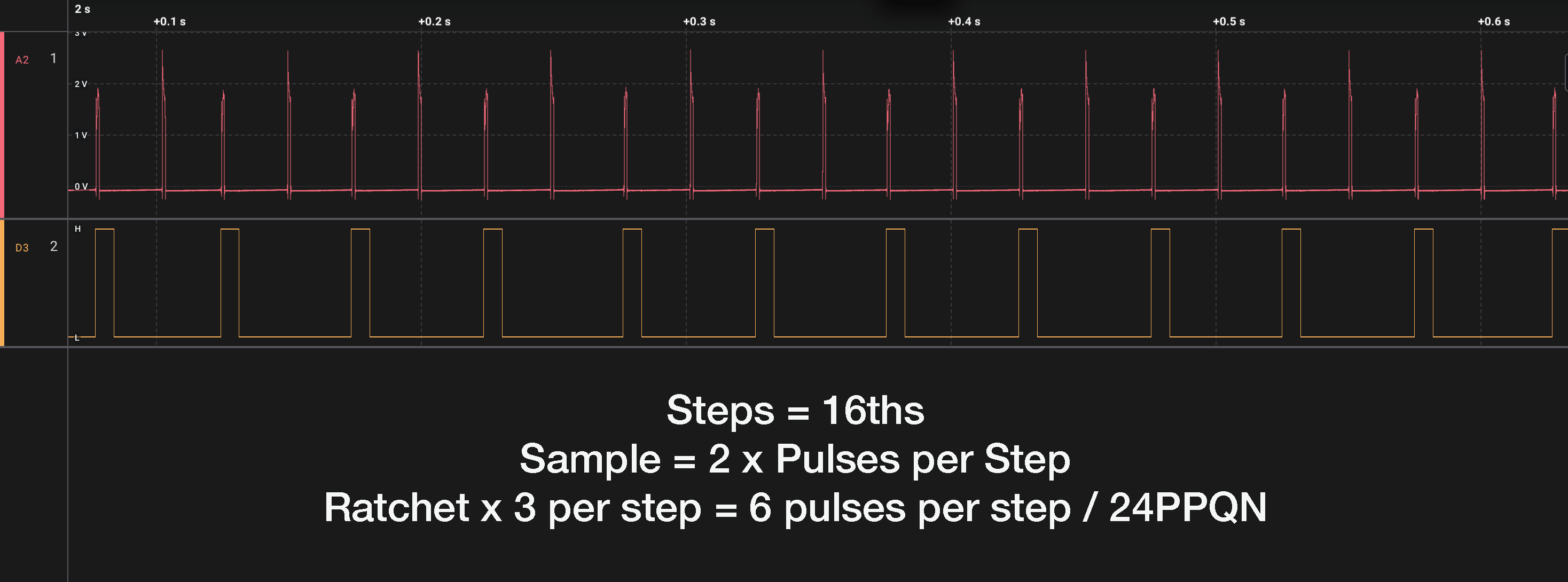
Okay I created 2 pulse sync signals, which is the smallest amount of pulses that can be sequenced internally by the TR1000 sequencer, settings below:
set all steps in one channel (I use RC to trigger the sync sample) to 127 vel, and 1/3 ratchets
remember to also set the same track the same way as the main one in FILL IN TRIG edit mode
remember also to set your chosen track to INDIV out
also important to set sync compensation to -20, this fixed a little lag with the new files
connect audio cable from INDIV out of chosen track to AUDIO IN in Multiclock
Tested for a few minutes, having BPM readout on Multiclock, Push 3 and OXI, and all seem stable, hihats play on TR1000 and a Push 3 that is behind the OXI and Multiclock
Below you can find wav files for specific tempo, you can use one, but the more the tempo will deviate from the wave, the bigger the jitter will be ~0,12 ms higher for every 1 BPM.
If there is a need I will generate all sync files, which can be then used for very tight clock
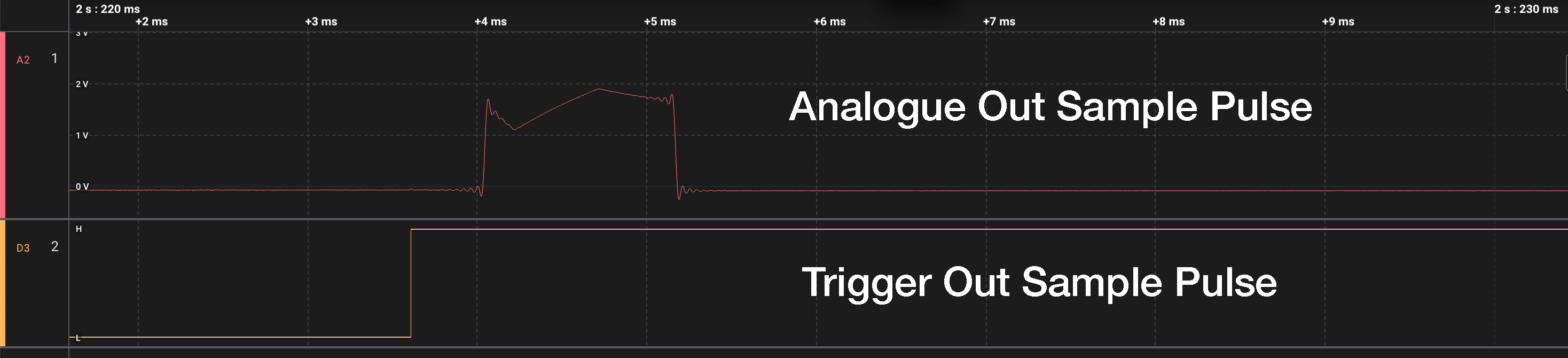
Setup: A 50 ms sample containing two pulses exactly 25 ms apart, triggered on every 16th at 100 BPM, each step ratcheted 3×. Result: a continuous 24 PPQ pulse stream from the audio out. Trigger out captured alongside (fires per ratchet = 12 PPQ). 90-second capture at 781.25 kS/s, ~3,600 pulse events.
The point of the two-pulse sample: the interval inside the sample is fixed in the audio file — the sequencer has no say in it. The interval between re-triggers is pure scheduler. Same capture, same outputs, two subsystems measured independently.
Results:
Inside sample playback (1,793 intervals):
• Mean 24,999.85 µs, std 0.03 µs, total span 0.23 µs
• Effectively perfect — the playback engine and DAC path are sub-microsecond
Across re-trigger step boundaries (the scheduler):
• Jitter Max: 2,672 µs
• Only 22% of re-triggers on time
• Every error an exact multiple of 666.67 µs (32-sample buffer @ 48 kHz)
• 8 ratchet triggers silently dropped over 90 seconds — confirmed missing on both audio and trigger out at matching timestamps - reason unknown
Trigger out: leads the analogue audio pulse out by a fixed 355.5 µs.
Please can anyone verify these numbers in case different or method incorrect - I’m struggling to know how the ERM can lock to this and output stable clock to anything ???
That would drive the folks on The all things MPC Thread bonkers if it didn’t get collapsed back into this thread! They already think there’s some sort of conspiracy afoot!
I had the chance to fire mine up for the first time in about 2 months over the weekend (mine is possibly the least used of the entire population in the wild XD) and due to circumstances couldn’t actually hear what I was doing. Based on memory of last using the device and playing it safe with some guestimates I actually put together a decent jam when I got to hear it later. Great instrument.


 anyone tried something similar? I bypass the whole MIDI clock thing, sounds very good to my ears.