Beware ! Long post 
Here is my actual view and how I feel about the TR-1000.
Maybe this helps some people to get a clearer picture of the actual state of the machine and whether it is worth the purchase for you at the moment or not.
IMPORTANT:
This is my view: strengths, weaknesses, experiences and comparisons to my main drum machines that I had before— Analog Rytm and TR-8S
Keep in mind : Everybody has different setups, workflows and needs. I can only speak from my perspective.
Why I was hyped
As a lover of the Roland sound, I was completely stunned when they announced and shortly after released the TR-1000.
It is basically what I always imagined the perfect drum machine for me would bring to the table — and more.
I had the Analog Rytm for many years, although a great product and for many the right drum machine, it was never the big love me.
Analog Rytm — the good things (for me)
- The famous Elektron sequencer: parameter locks and sound locks. Being able to have not only many different parameters, but also different sounds/presets/samples per step in realtime is amazing.
- Direct jumps make it very performable from the sequencer perspective.
- All that with very good timing / jitter.
- It was the first machine for me that had pre-muting. Super cool: press shift, press the track buttons you want to mute, and release at the time you want (and the other way around).
- Having 8 real analog filters that sound ace — and driving them — gives it a strong sound.
- Some of the analog engines really kick a#!, like the Dual Osc, giving it some nice synth capabilities (mainly for bass sounds).
Analog Rytm — the not so good things (for me)
- Like mentioned, I really like the Roland sound and it automatically steered me in that direction, but I couldn’t find it.
- The parameter ranges are very broad and give you a lot to dial in, but for me not many sweet spots.
- The hats and toms I found boring. With driving the filter they were okay, but no 808/606 shizzle.
- Snare was meh, and the kicks had massive low end.
- But the low end on all bottom-row machines easily smeared the low end into a mess, so I had to use the filter to clean up — so the filter was already used for that application.
- For punch you often had to work around it with a one-shot LFO to modulate tune.
- Although samples sound great through the filter, the thing is: the Rytm has only a linear envelope. So for example, using a 909 closed hi-hat sample and playing with the decay like on an OG 909 is not possible — it cuts too abruptly.
- The strange thing: the Analog Four has envelope options that include an exponential envelope, which is much more suited for drum duties.
- You can work around this a bit with a one-shot LFO with exponential decay, but this also costs the only LFO you have per track, and sometimes that LFO is also needed to modulate pitch (or other stuff) to get more punch that was often missing.
- The workflow is very “track” focused. This means most of the time you switch to a track and adjust the parameters. Combined with the endless encoders it has the strength that you never have parameter jumps and a compact form-factor, but I really prefer to have a lot of knobs in front of me and can train the muscle memory better.
This was too much working around all the time to get the results that I wanted. At the end I sold it and got the often mocked TR8S.
Why the TR-8S made me happy after diving deep
Diving deep into it and using the barely documented options that Roland provided and with the great tips from users like @Microtribe really made me happy.
If you use the tools inside the machine, you can get it to have real K.O. punch right out of the master output.
Here you can find a summery of them:
Roland TR-8S - #2336 by Monopete - Other Gear - Elektronauts
Especially for the money (new or used), it’s a fantastic drum machine. Still highly recommended.
Now back to the TR-1000…
What the TR-1000 is for me
For me the TR-1000 is NOT a replacement for the 909. It is an evolution and it’s own thing.
The analog machines in there are not the sole highlight for me. They are very nice, and I see them more as another building block — especially with the dual layer tracks, mixing them with other sound generators.
You can achieve huge new analog sounds or analog-hybrid sounds thanks to the tools Roland provides.
Take a 909 kick, adjust the amp envelope and/or filter it, and use the filter envelope so you only get the attack/punch from it. Then take the 808 Kick on the second layer and adjust that too to get the body of it. Delay one of these two tracks, or if needed invert the phase and enjoy the result.
It’s that kind of detail and tools that make you realize how much thought and user/musician feedback was involved. On the Roland blog there are some very nice stories from the development that show this.
Comparison with a real 909
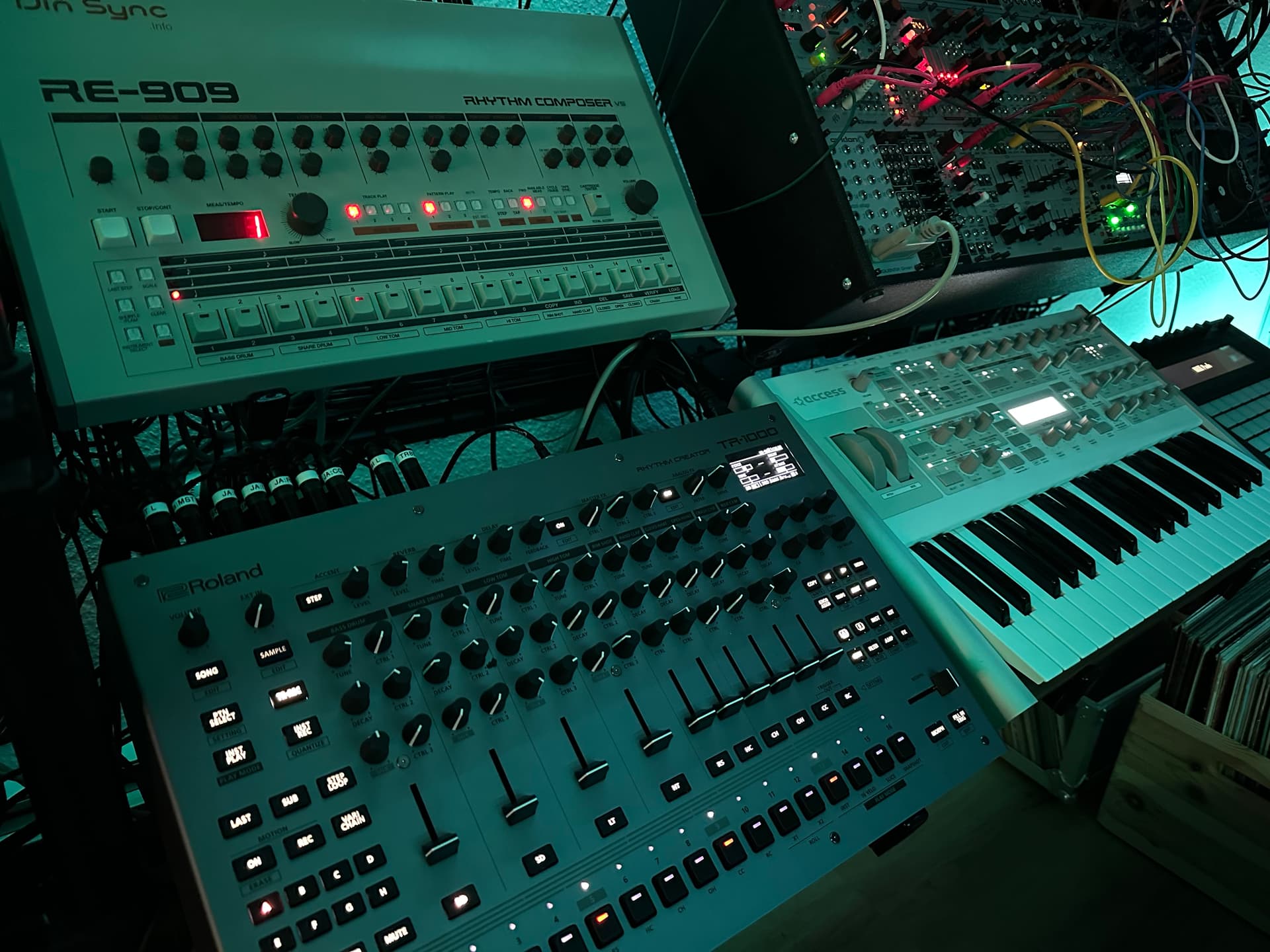
Around 1.5 years ago I fulfilled my decades long wish for a real 909. I got a professionally built Dinsync RE-909 with Addictive Instruments V5 OS .
For me it’s the real deal. It sounds and feels like an OG 909, Has the OG cherry buttons, knobs, casing, and is a 1:1 replica.
But it was not cheap. I paid exactly the same amount of cash as the TR-1000.
I only compared the kick and hats basically accidentally when I searched for the exact swing settings of the 909. it’s not that kind of interesting to compare every little detail for me and there are enough video that do this, but it’s what I hear:
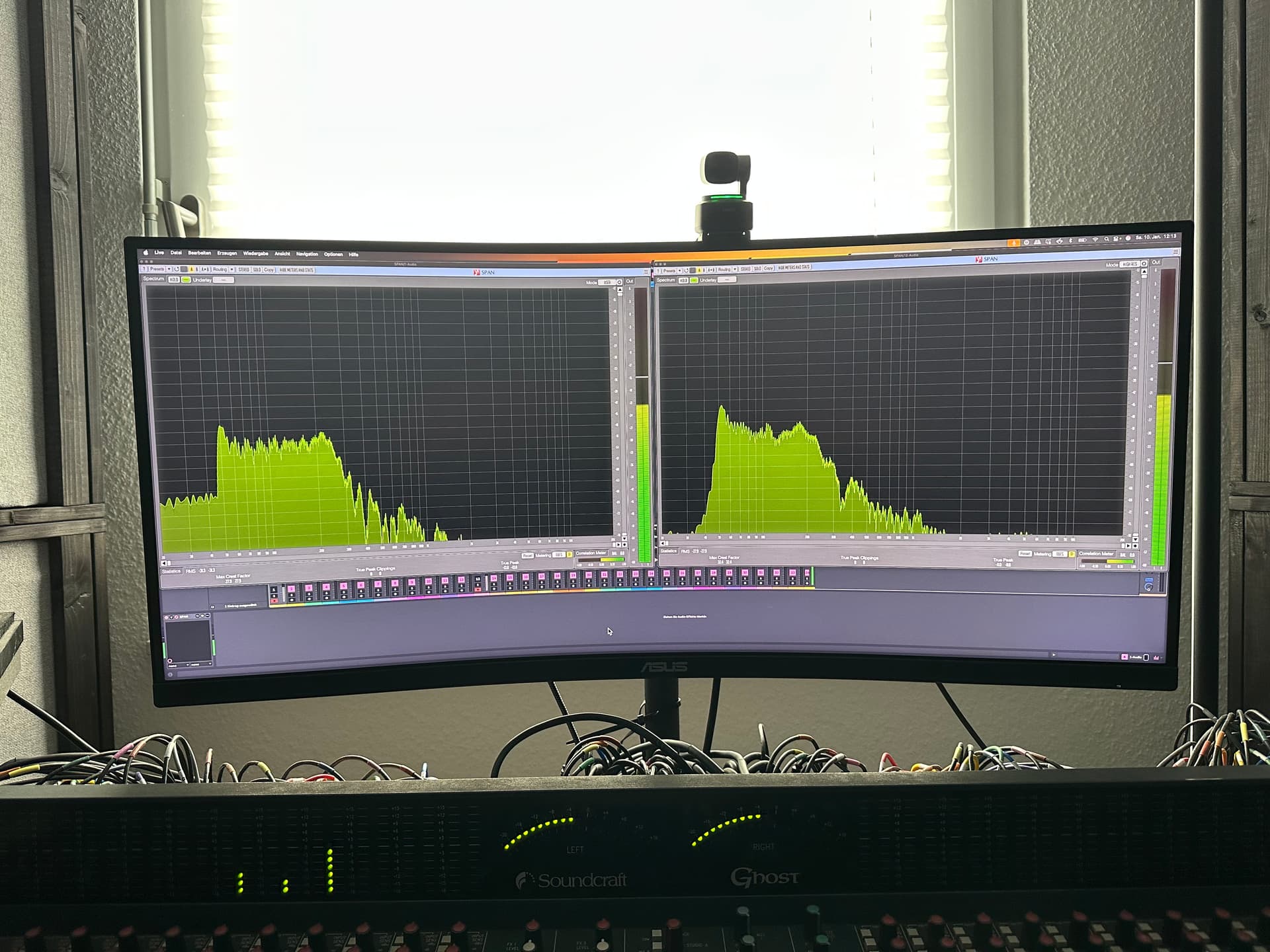
The kick of the OG 909 has this nice gooey punch. Like a tennis ball hitting a hard floor after a serve. I couldn’t find this exact feel with the TR-1000. The TR-1k sounds a bit harder with the pitch envelope, but of course you have more possibilities because you have pitch and tune parameters. You can get very near. One thing that I noticed : there is a lot of mud under 50hz in comparison to the 909. You can get it away with the HPF. + Raising the resonance a tiny bit in this scenario punches you out of the seat! So fasten your seatbelt 
Left : TR1k BD - Right: 909 BD
The hats on the TR-1000 are ACB modeled. They differ a lot in the low end. But does it matter? I EQ the lows most of the time out anyway to get a cleaner mix. You have to judge that yourself.
Both are different tools for me.
The 909 you turn it on and ride blindly away. A very good and known path — but only this path.
The TR-1000 gives you hundreds of directions and no GPS.
What’s really great on the TR-1000
The ACB models are massively expanded in comparison to the TR-8S and are for me often even more interesting than the analog models on their own. Again, here you can mix the modeled sounds on the layer tracks to create new stuff.
Take the rimshot for example: you can manipulate all 3 oscillators of it. And it goes on and on. Next level Roland sound manipulation…
The analog filter and drive make it sound really organic. It doesn’t matter that you have digital effects and sound generators in use — it makes them all sound ace and takes a lot of the digitalness away. Right out of the box.
The drive never kills the low end. Excellent tuning!
You also get:
- Sidechain per track (adjustable in %)
- Filter / EQ per track (per layer track)
- Envelope per track (per layer track)
- Compressor per track
- Really good insert effects (like the already known multiband saturator)
- Soft clipper (which already brought the [TR-8S] to life)
- PCM + VA + FM capabilities
- A whole sampling section that misses nothing for me for a drummachine (slicing, different time-stretching modes, and more). So much fun already with slicing loops and mangle them.
- Huge storage (46 GB), making it the central sample station for me
And finally — for the first time for Roland (in my opinion) — a really good menu interface & OLED display that reminds me a bit of Elektron. Most menus are one button away.
Unlike the TR-8S, for me the software editor is not needed to build kits.
No. 1 point for me: performance capabilities
All this is great, but the No. 1 point for me is its performance capabilities — and getting all these features under control with a great knobby interface that you can tailor to your liking.
The TR-8S already had a great interface with many faders and knobs, but here you get more and you can set it up more to your liking.
- Step looping to make fills on the fly
- Pre-programmed fills
- The Octatrack-ish crossfader for breakdowns
- Motion recording
- Programming patterns before playing them
- DJ-style pre-listening of tracks with fader down
- Good placement of the headphone jack
Also the nudge function is finally really good. The TR-8S nudge was unusable for me:
- It was too broad, so you often landed before or after the beat when trying to align it
- It created hiccups in the sound
Now you can smoothly align to the source. Very important for a turntable junky like me.
The build quality is really good too: nice steel housing and smooth, stable knobs with no wiggle. I really like the design.
Another big one: connectivity and routing
Another big one is the massive connectivity and routing. You get 14 outs , including two buses: the master out and the analog out.
Example:
I route delay and reverb to Master FX → into Analog FX and route all tracks separate out, not to the analog bus. Now I have all tracks on my mixing board patched plus the FX bus.
Delay + reverb go into the Master FX where I have a chorus/lfanger or similar set up->Analog Filter->Analog Drive = Space Echo vibes. Then you can send each track with a assigned knob on the TR-1k to this massive FX bus.
This way you can build effect chains with up to 7 building blocks simultaneously (counting filter, compressor + insert effect per track). The digital effects through the analog filter + drive sound really warm and nice! And you can drive them properly hot in that case.
Lots to experiment with. Like @claid mentions before there he routed just some tracks to the Master FX with the DJFX inserted.
That all is like checking every checkbox I imagined a perfect drum machine for me would have.
But… two big elephants in the room (and they are in a bad mood right now)
Sounds all sweet and heavenly, no? But there are two big elephants in the room, and for me they decide if the machine will be the GOAT or not.
Roland has it in their hands and a big task right before them, if you ask me.
1) The often-mentioned timing
On its own the TR-1000s is playing okay in “All Tracks Mode” (internal sound generators are in sync). It’s fun and you can use all the features very good that Roland gave you (Step looping and banging in beats on the fly and so on…).
I have for 10+ years a very tight clocking setup in my studio. Ableton is master and syncs via audio tick to my Multiclock, which distributes everything in my studio.
Since years it’s basically no thought about timing anymore. My Cirklon, clocked by it, doesn’t show even a slight flicker in the .0 BPM display. And the Cirklon is super precise.
So tight sync integration is a must for me, and no other sequencer/drum machine gave me headaches. I can adjust if I need to, but it was never more than 1–2 ms when machines were late.
When I setup the TR-1000 to external MIDI clock + All Tracks Mode (which is a must because its role is also to be the central sample hub for me), the machine is around 50 ms late to all other machines.
I can easily compensate with the Multiclock, BUT not for the latency that then occurs.
Also important: when the TR-1k is the master , the sent clock is not good enough for my setup either. The jitter is too high, and every couple of bars there is slight drifting / wobble (depending how much load and what combination of sound generators are in use). Maybe live acceptable, but recording it gives me headaches.
So for me the timing problem is not only about running it as a MIDI clock slave with high latency — the master clock side also needs work if you want tight integration in a bigger setup.
What this means:
A drum machine is mainly for me a performance instrument — to play it live and become one with it. It should be responsive and snappy. That’s a part of the fun for me.
The latency that occurs when the TR-1k is clocked externally and in All Tracks Mode kills that aspect:
- you can’t bang in drums in live recording mode properly anymore
- you can’t use the step-loop functions in time properly
- even a filter sweep feels very latent (doable, but not good)
So this defeats and destroys many of the amazing aspects of the TR-1k.
You can of course still program patterns, fire fills, do sound design — and have a lot of fun with it — but the live performance part is massively diminished.
What I’m doing at the moment is basically this: I program and organize while synced to the studio’s external clock, and then I jam internally clocked.
But even in this scenario there are some drawbacks:
If I want to sample a sequence from another machine, the recorded audio ends up so low that I have to normalize it hard — which raises the noise floor significantly. So a lot of the time I prefer to sample somewhere else and just import via USB stick… which kind of defeats the purpose of the TR1k’s great sampling features. And then it means switching setups and basically killing the workflow.
It’s a constant way of compromising.
Layered Gens Mode (Sampling tracks 8ms late) is not an option for me, because a big part of why I bought this machine is the sampling section. If the internal sound generators aren’t properly aligned, you end up with weird loop handling and you start working around the machine instead of working with it.
And even if you manage to work around it, the jitter is than so big that it just doesn’t sound good across all patterns/kits. It can be even funky sometimes, but not every time.
And I can’t keep it when easy in sync with my turntables — it’s fluctuating by up to 3+ BPM.
And also : when you switch back to “All Tracks” mode it creates total chaos, because all the patterns you re-adjusted in Layered Gens Mode don’t fit anymore.
My skepticism is this:
The timing gurus at Innerclock Systems did some scientific tests recently, and they kind of show the dilemma. Compared to other hardware sequencers/drum machines, the TR-1k is lacking when it comes to timing and jitter.
Some will say: these are just numbers, and it’s all about the groove. If you don’t like the groove, it’s not for you.
And honestly: the machine grooves! Very similar to my beloved 909. The swing settings can be set up almost identically (909 Swing setting 1 ≈ TR-1k Shuffle 30%, 2 ≈ 40%, 3 ≈ 50%…).
But for good integration in my setup, I expect it to be better. And I didn’t had this behavior with many other devices through the years.
The interesting conclusion from the Innerclock numbers (you can look them up on their Instagram account):
The jitter / sync of the machine as a MIDI clock receiver is better when it’s running on it’s own with internal Midiclock ! This means for me that when it have enough time to process everything than it is tighter. That shows that this is likely a processing problem. If you give the machine enough time, it can be tight — but with the huge downside of latency.
If you take that time away, things feel more responsive — but you pay the price for it in the form of more jitter.
This will not be an easy one for Roland to solve, because finding the right balance / the right path here is going to be tricky.
2) Stability / freezes
I regularly encountered freezes of the machine. And by freezes I mean the machine completely froze and only pulling the plug helped.
Mainly while dealing with samples in all kinds of situations — even when just sampling through the inputs.
Also sample organization is problematic. Sample folders can be not visible or sometimes samples can’t be deleted. Information is conflicting. The nice long tutorial video of Roland shows that you can have subfolders on the USB-Stick while importing, but any try to important samples not from the root directory ended for me with an error message.
Some suggest only using 8 characters for folder names and 48kHz / 16-bit samples, but experiences differ. I just import from the root folder into the folders that Roland provided.
At the moment it is okay after I factory reset it. But I have no sense of trust.
The software editor that Roland already provided would be the perfect solution for sample organization like naming, sorting and importing and even supports it in theory. But it is not well documented and can make the mentioned problems even worse — and the instability can get even worse too.
Price point
Many times discussed and mentioned. Everybody has to decide that for themselves.
For me the machine replaces two other machines and could even replace my 909 in some situations. The build quality and what you get, make it a really good buy for me. Although there are already some reports that the button labels wear off. I haven’t experienced it so far. Only time will tell.
When I compare it to my Eurorack stuff, it’s not even that expensive
But if you only use a fraction of the features and you mainly want a Roland drum machine, the TR-8S is still an absolute recommendation.
For years many wished for a Roland drum machine with analog sound and better build quality / design. They provided.
You can’t have it all and cheap.
At the end Roland needs and wants to make cash, and for me the price is fair.
Bottom line
If Roland solves the timing issues, makes the machine stable, and provides good sample management with their editor, this will be the GOAT drum machine for me and I’ll barely have any wishes left.
Maybe this helps some of you get a feel for the TR-1000 and what the current status is. For me it’s a dream come true — but with a few serious drawbacks.
If that drawbacks are important for you or not = only you can decide.
Going to make some beats… cya