Just trying to cover the bases before I assume too much 
2 Likes
Yes you can use the 2012 - I’m managing mine with a 2011 on 10.10
Format the card in the SP, then add the samples from Finder into the Import or Export Folder on the SP SD card, since those are the only two directories into which the SP can search.
I was previously using a Terminal script to convert 44.1 wav’s to 48k, but I ran a test the other day and found that the SP converts 44.1K to 48K no problem. I haven’t tried the other supported file types, but I think it would be fine.
2 Likes
I appreciate it, thank you! I assume I can set up normal hierarchies of folders within the Import and Export folders and those should be available once the card is loaded back into the SP?
I wouldn’t assume that.
I just do what the manual says to do, especially regarding File Management.
In this case, it’s printed quite clearly on page 115 of the reference manual; Import or Export Folder.
It makes no presumption of different directories inside of the Import and Export directories.
2 Likes
I added an archive folder in my export folder and have yet to have any issues. I move files to the archive folder when copied to another device.
Under the samples folders I created all sorts of folders and structure with no problems.
1 Like
I also tried a quick measurement of the difference between the CUE and MASTER in DJ mode, and the difference was 1 sample(44.1khz)…
I’ve been trying to work out the SX delay for a looping workflow, here’s an attempt at that - the drum patterns are setup before hand and punched in/out while the guitar is played live.
Would love to see some looping features in an update but it’s pretty fun as is 
and then I mangled it up in DJ mode 

2 Likes
Seems to work just fine over here as well.
It is encouraging to see the up directory symbol once you’re inside of nested folders.
Seems that as long as it’s inside of Import or Export alls good.
Thanks for the tip, @Kegeratorz
2 Likes
Good morning SPnauts
So I woke up and tried this test again to see if I was going mad, a problem with my unit, etc etc etc.
And I’ve worked out the issue and its a big pile of nonsense and I feel stupid yet have identified a small thing that may crop up again for some.
So I took the CUE from both the 3.5mm and 1/4” for sanities sake, the main outs and the combined desk out and recorded all individually upon PLAY.

As you can see the MAIN out is still delayed by 21ms.
My girlfriend (a theatre stage manager) was getting ready to leave and (having experienced a 30 minute head scratch at a recent show due to a persistent echo in the stage speakers which ended up being one of the techs leaving the desk fx on) joked “have you turned the fx off?”
I explained the FX were all off, but it triggered me to disable BUS 3/4 entirely to be sure.
The result:
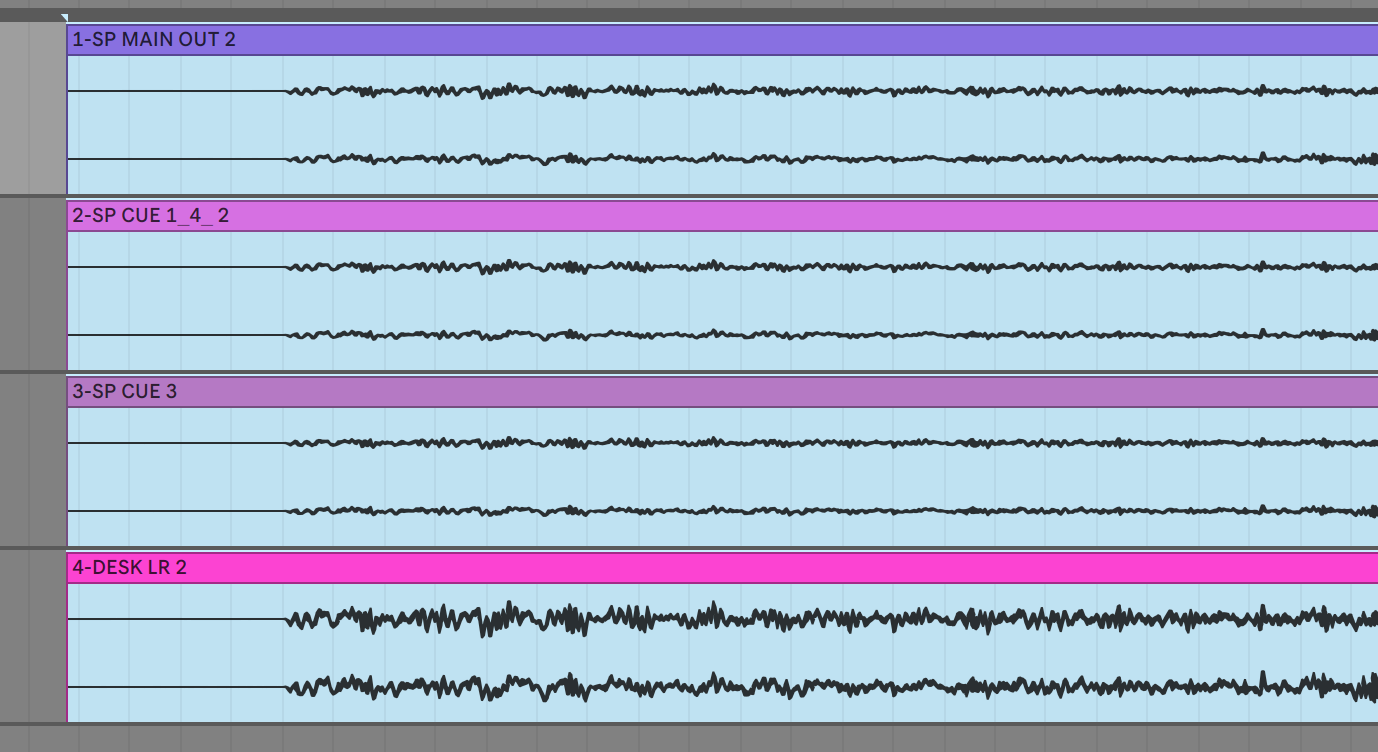
DAMMIT!
So BUS 3/4 in my current setup are a Scatter and Cassette sim.
Scatter is OFF. Cassette is all at zero.
I’d assumed this would mean no interference with the signal.
WRONG.
I assumed it would be the scatter, but disabled both and tried individually ended up being the cassette sim that delays the signal by 21ms even with all params at zero.
So, apologies for wasting time.
But the one positive piece of learning is don’t use cassette sim on your master bus fx in DJ mode.
Not sure if this is bug, probably nature of the that FX, I assumed that all Cassette params at 0 would mean no effect present. Clearly not.
Thanks to all those that tested. especially @NearTao for his diligent and tireless approach. i owe you a beer or 3.
Always great to share a crisis on a public forum as it does seem to result in a solution eventually.
20 Likes
Had another go with it tonight and here is what I think would make it so much more powerful, or in other words, the whiney moans of a professional misery expert.
-Efx of some sort per bank for a total of 20 total (2 for each). I keep wanting to manipulate the sound other than with pitch and I keep looking at the DT with its filter per channel, and delay/reverb sends. Just a filter per bank would be great, but as it is, if I’m doing a live run with it, like in the techno jam box clip I posted yesterday, I’ve got to dick around with the fx bus. Which isn’t the most intuitive, even if midi is in play.
-Improved sequencer. Why you can’t to copy and paste steps is beyond me. The substeps/ratchets selecter is so illogical arranged that it tells you what a rush job it was (well that and the lack of copy pasting steps). Why would you go to one, two, three subsets, then have a bu ch of scatter step options, then go to the 4 substeps option? It’s so annoying to try and do an impromptu jam on this thing, only to realize that this isn’t that type of thing. Everything has to be well layed out, ahead of time. It would be infinitely better if they allowed at the very least plocks other than having to dial in your settings with the knobs, deselect or select the step, punch it in, wait for the sequencer to make a whole rotation, then hear whether or not it sounds like toss. It’s just so infuriating to use as a live improvisation live jam box.
I really hope they don’t just ditch the sequencer. I’m not sure if the cpu is capable of more (I have no idea how much of the processor is being used and if it’s available of the above request) but I’d gladly give up the Dj mode if it allowed for a better step sequencer, and expanded efx per bank manipulation.
Perhaps I’m just wanting to fit a square peg into a round hole and should just get on with it.
1 Like
Idk, I’m still a new user but I think maybe including TR/step mode was a bit of a miss as it doesn’t play to the 404’s strengths. It’ll never be a digitakt, so why open up the comparisons at all? Also I don’t see how they could add more features when the UI is already bursting at the seams. Would have been better to really focus on what the machine does uniquely and well imo.
1 Like
For those wanting to throw a proper sequencer at the SP, I highly recommend getting a used Model:Samples. Microtiming, swing, trig conditions, probability, etc, all down pat. And it’s only a stereo minijack cable between the two. I had it so that M:S could trigger up to 16 samples per bank across 6 banks (matched to the 6 channels on M:S).
7 Likes
Ah good old Cassette Sim
Cassette Sim needs a buffer to be able to do the wow and flutter magic, so no surprise there. athe reason it has a buffer is because through the magic of how it works it needs to be able to dip into both the past (no buffer needed) and the future (buffer needed since we otherwise do not know the signal that is in the future)
So what was apparently happening was that MAIN, due to going through the FX bus was actually delayed and not the CUE. Doh.
Well do not feel too bad, I get similar problems from time to time in comments/email, and I still forgot to consider it directly., When I am properly awake perhaps I will try and put together a PSA video.
8 Likes
You did the opposite, anyone running into the same situation will be grateful👌
5 Likes
Oh wow, I was lurking the whole discussion about latency without having much to contribute, but thinking: “ah well, that’s strange, I have a somewhat similar problem…”.
These last days, I’ve been working on a beat with drums consisting of a heavily swung drumbreak and one shots carefully programmed on top to match the swing. To match the grain, I’ve been applying some cassette sim on my one shot snare and then… “WTF, it’s hitting too late, now…”
And finally, I have my answer. Thx guys!
4 Likes
For those of you using skipback to capture the computer’s entire output (youtube etc) how are you avoiding feedback loops when you want to use input fx? I’m trying to figure out where to put my cables…
2 Likes
Thanks again, I’ll experiment with this but it’s good to know I can manage things with my old Mac, even if I don’t have the convenience of the app.
Would a Model:Cycles do all of this as well?
1 Like
Yep, exact same setup. Of course, other Elektrons are more flexible but they’re more expensive
1 Like
Thanks! When I read the word FX in your post I remembered that Ricky Tinez mentioned the same problem when using the SP as a master FX in a live set. Good to remember this as I want to try something similar with my Syntakt.
2 Likes