Yeah, I think I just didn’t grasp that and assumed it’d overwrite a clip. After thinking about it in this light I understand why it’s the way it is. It just caught me off guard after years of using only arrangement view.
1 Like
I don’t love the ergonomics with it being so flat. What stands are people using? Is it worth waiting for a Push 3 specific one or are there good P2 units that could be recommended?
Loving it so far though!
As a temporary fix, I’d suggest looking into laptop stands. These can be very cheap to come by and it’ll give you a good idea of the angle and use you get out of it.
I’m saying this as someone who has had many stands and ended preferring no stand after years of angled usage. Part of this is that Push 2 ended up on the under-desk roll out tray, so it was prefect when flat.
I have no plans of buying a stand now because I’m going to keep mine portable.
The wooden premium stands should be available soon, just in case that’s what you’re after. Someone earlier in the thread had a custome one made through Etsy (if I remember right).
1 Like
This works well
1 Like
Don’t have it yet, but I ordered this one (picture is obviously the P2 version, but if you contact them, they will make one for the P3).
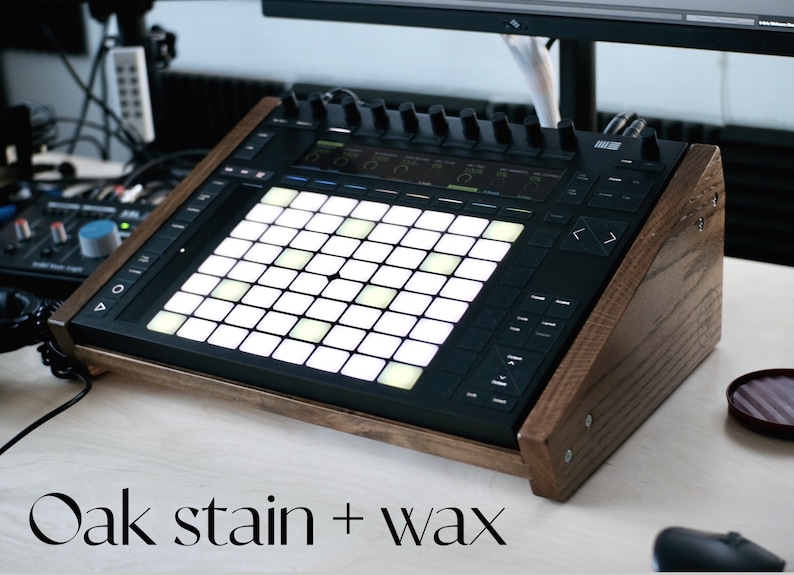
Ableton Push 2 Stand // Desktop Rack for Ableton Live Push 2 - Etsy Sweden
I’m currently using a laptop stand. It’s okay for now but not ideal. Not stable enough for the P3’s button presses lol.
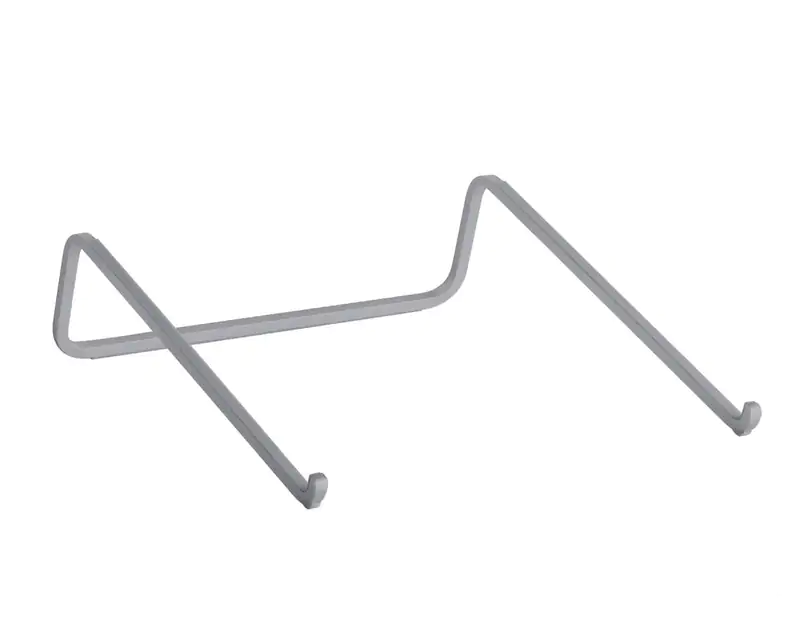
I’m using a Rain Design mBar MacBook stand I got a few years ago - perhaps a bit overpriced for what it is but works very well with Push 3.
4 Likes
In my experience Laptop stands with hinges are not the best choice for Push. Eventually they will become loose and wobbly. I don’t know about this particular one, but it happened to me with a different one, which looked and felt very sturdy otherwise.
Currently my Push 3 is on a Loci Classic Stand. Perfect angle and stability for me.
2 Likes
This basic stand works well:
1 Like
I’m just using a basic Ikea stand that was about a fiver. I used it with the push 2 and it seems to be fine for the push 3 even though that runs a lot hotter
1 Like
Can you move tracks on Push 3? Could not find anything in the manual. If not, anyone made a request? These basic operations could imo make the workflow eaiser/faster.
1 Like
Currently no way to move a track.
I don’t believe this is the final workflow because as mentioned earlier you can only group adjacent tracks on Push 3.
Hopefully there’s an announcement soon about the Push 3 standalone beta referenced from the Ableton forum.
I’ve always worked in arrangement view.
Is there an easy way to combine different clips to create new “scenes” on the Push?
Yes, while playing the clips you want on a new scene, just press the Shift + Duplicate button. It will automatically add it to a new scene.
Edited to add “Shift + Duplicate”
3 Likes
Also, copy/paste works easily too.
Duplicate + Clip, and then choose the destination to paste.
3 Likes
One of this type Millenium Laptopstand Tripod – Thomann UK (I haven’t checked the dimensions of this particular one so select your own!) as I am using it to move around my studio next to anything I’m using. On a desk I’d personally use on of these as I use one for my Nina and it’s great K&M 12195 – Thomann UK or alternatively K&M 12197 – Thomann UK but I think the first is best as then you can position it over a controller keyboard
Are you sure you can only group adjacent tracks? I’m pretty convinced that I managed to change tracks positions by exactly grouping and I grouping tracks:
- I wanted to move track 3 to track 2 position;
- I grouped track 1 with track 3.
- I ungroup the group made with track 1 and 3 and then I had, from left to right, track 1 - track 3 - track 2.
I’m not with the p3 in front of me right now but maybe somebody can confirm that?
2 Likes
I know I’m just a username on a random forum but if I had a review or advice to offer on the Push 3 it’d be to wait until the software under the hood is fixed.
With that said, I’ve done about 3 or 4 jams straight on the standalone box. Good stuff too. Fun to make. Got in the flow. Seamlessly transferred the projects to my laptop via WiFi (so awesome).
I also hooked up my Polyend Play to the Push 3 to come up with some cool melodies and rhythms via midi. Really fun stuff.
But I’ve had about 4 or 5 crashes. Some bugs like unresponsive button presses to change settings on devices (the buttons work, the software doesn’t update).
And. Just my own personal workflow gripes. Starting over at the top-level folder when browsing samples. No clip toggle options. Can’t trigger clips without selecting the track. No way to start up a default project without going and loading your own template.
All that to be said in the last two days, I haven’t taken my hands off the box. It is fun.
But if you got the patience, I’d wait. Even though I didn’t 
10 Likes
I agree, but be super careful… I bought a cheaper laptop stand from Amazon which looked perfect for my Vermona Perfourmer - and it was until I realised it had scratched the bottom panel due to a badly manufactured metal lip. I was absolutely f*#king fuming. 
3 Likes
Appreciate you sharing your experiences.
3 Likes
You are right!!! 
Not sure what I did that it kept grouping all tracks in-between. I’ll have to keep playing with that.
Great workaround for moving tracks for now too!
@xeamus… please see above. I was wrong, there is a way to move tracks via grouping/ungrouping.
6 Likes