Interesting! Maybe I dismissed it too quickly. Regarding your initial post:
I can talk about how I’ve set up variation recall in my current set (same concept, just different execution).
Without going too deep into it, I have 8 channels of audio (so that it doesn’t exceed the Push view), and each one has a DJ Filter, Reverb, and Delay. I have other utility channels for MIDI routing, FX buses, etc but they’re off screen. I’m using the Launchcontrol XL 3, so each effect is mapped to one of the three encoders for each channel. This means I can twist a bunch of knobs and go crazy, and then punch a button to have it all snap back to zero, and because they’re encoders there’s no value jumping. It also makes it easy to remember which effect is mapped to each encoder, because it’s the same across all 8 channels.
Some things to note:
The Reverb and Delay are on sends so they have a tail (complicated to set up how I’ve done it, but much easier with Iftah’s Variations I think).
I played a show last week and didn’t use the effects on some channels i.e. reverb on the kick, so I’m going to swap these out for something more bespoke. I found that I was using the DJ filter as more of a low cut on stems, but I have the master out running into a Pioneer FX unit which has a HP filter, and I ended up using that way more often than the individual channel filters.
Using Variations in a relatively straightforward way like this could be great, I think it has the potential to get really complicated otherwise. My biggest fear with playing live is getting lost/the gear getting in the way of the peformance, so keeping it all simple and streamlined has helped with that muscle memory.
In regards to the variations and reverb, there is a stylistic choice to be made. I use reverb a lot in my DJ mixes to cover up transitions and use them in a similar way in my music, sometimes.
But I also like the sudden transition to a drop, in which all effects including reverb are stopped/killed, and in this instance I’d definitely use a variation.
Yeah this is a great point. I have a bus channel with ‘master fx’, so the output of the main 8 tracks is sent to this channel instead of the Main track.
This is firstly my workaround for grouping them, because grouping would shift the whole view over by one on the Push, so instead of seeing tracks 1-8 by default it would be Group & 1-7.
I don’t really do much with this channel at the moment, it would be perfect to have a big wash reverb that could be hard cut like a DJ mixer. I mentioned I have the Pioneer RMX500 on the master - it has versions of all those classic Pioneer effects but the gain staging without clipping is quite hard. The fx are often much louder and obvious than I’d want them to be. It’s definitely meant to be set up on an aux send.
In general terms, how are you pressing a single button to reset parameters? Is this a function of the Launchcontrol or something you’re doing in Ableton?
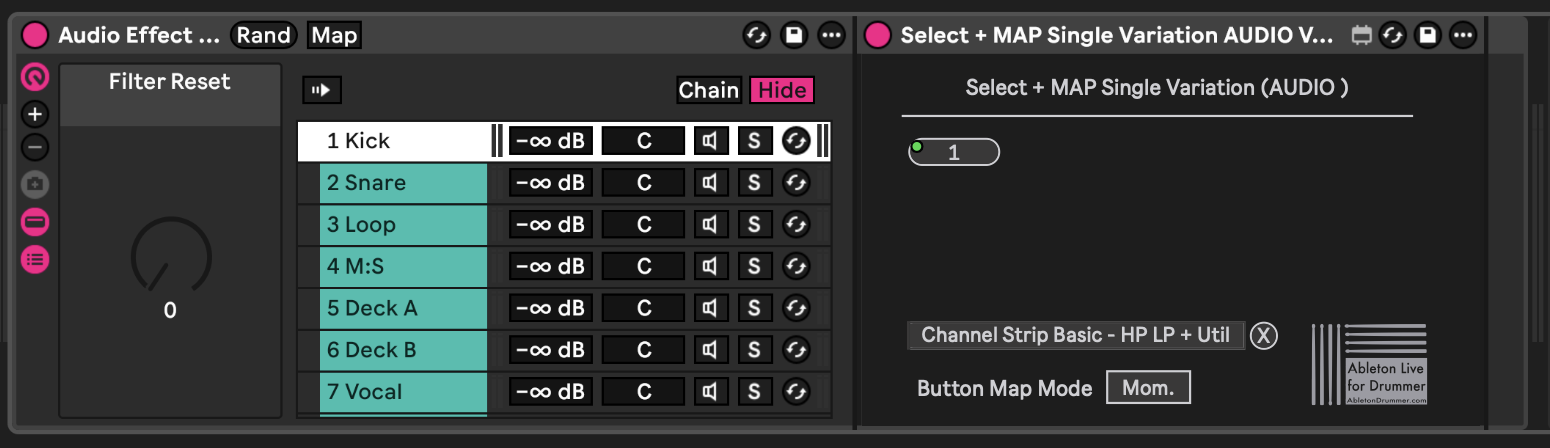
I’m using this device (works on standalone). You can place it anywhere you like in the set, it’s an audio effect. I’d suggest putting it on a dummy track because for it to work across multiple tracks you need multiple instances of the effect (ie stacked parallel chains in an audio effect)
Here’s how I’ve got it set up:
Audio effect rack with 8 chains, each chain has an instance of the device (the name is too long so I’ll just call it the device)
The device needs to be mapped to an audio effect rack with a variation, you do this by clicking ‘map’ and then clicking the on/off button of the rack you want to map
Each of these racks has an Auto Filter set to DJ mode and two Shaper devices which are mapped to sends A and B. I’ve set the Shapers to manual mode and drawn in a straight line from 0-100%. Essentially they function as a connection between the send knobs and the macro knobs of the audio effect rack.
Each audio effect rack therefore has three macros - Auto Filter bidirectional HP/LP (where the center value is neutral), then the two Shapers (which are then mapped to the sends)
Effect rack has a single variation which is all three knobs set to default values (middle, zero, zero)
When you map the device to the rack it detects how many variations it has, these are buttons that can be mapped.
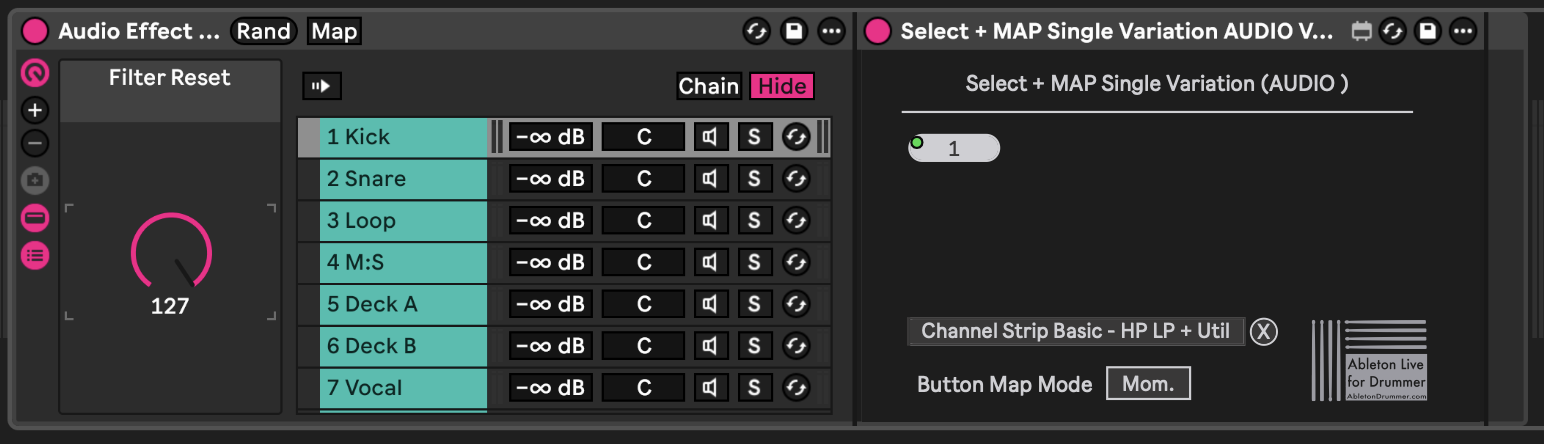
I’ve then enabled macros for the rack that has all the devices stacked in 8 parallel chains, so that I can map the 8 default variation triggers to the same macro knob
LCXL3 Note On momentary button is MIDI mapped to the macro, so pressing the button turns the knob from 0 to 127 immediately, which then activates all 8 variation launch buttons at the same time
All of this nonsense because Ableton won’t let you map a single MIDI message to multiple variations. I can take some screenshots tomorrow which will probably explain it better, I’ll edit the post to add them. It’s not as complex as I’ve probably made it sound, but I think you can achieve the same thing with Iftah’s Variations device (per my post to @shellfritsch)
Finally testing out the audio interface support in the Standalone 2.3 beta, and I’m pleased to report that my old Apogee Quartet’s MIDI ports are recognized!
I “simplified” down to Push 3 / ADAT so that I could switch between Standalone and Controller mode more easily, but I really missed Quartet’s Soft Limit and that extra 25db of mic gain. I also use Push’s USB port for MIDI, and I have an old-fashioned but insurmountable aversion to plugging audio interfaces into a USB hub. So the fact that Standalone supports this is a big deal —now I can set everything up around the Quartet, plug my custom-mapped Faderfox UC-4 into its MIDI port, and just swap one cable if I don’t feel like booting up my laptop.
The main downside is that I won’t be able to use CV Tools unless I use Push as my output device, but I’ve barely touched it since getting the Cascadia earlier this year.
On the other hand, Quartet’s output has a MUCH lower noise floor, and I’ll be able to switch Push from Controller into Standalone to transfer presets and samples without having to reset my audio settings in Live. So I’m calling this a small win all around.
Yep! Although as far as I know, the Push USB port has always acted as a standard USB hub in Controller mode, so there’s nothing new about using it to connect audio interfaces to your computer. I just wasn’t sure whether audio devices would “take over” the USB port in Standalone. But it looks like P3SA supports simultaneous audio and MIDI via the USB port.
Regarding latency, I haven’t taken any measurements but it seems fine? I don’t hear a noticeable delay at 44.1 kHz and 64 samples. Mind you, I’m not exactly a perfectionist — I used to record guitar with software monitoring and 20-30 ms roundtrip latency, and I just dealt with it. Some people are a lot more sensitive. My interface reports 6.10 ms roundtrip latency in Live, and it feels roughly the same in Standalone.
No worries! Added screenshots which will hopefully explain it further. It’s not as complex as it sounds, just a bit tricky. The LCXL3 makes it all work because of the endless encoders.
Theory crafting further - you could make it work on just the P3 by creating a one-shot dummy clip that triggers the reset macro, and then using Mapulator or Map 8 (some kind of mapping device so you can control macros from multiple tracks). SO you could have Map 8 on the screen to control the macros with Push’s encoders, and Session view layout on the pads to trigger the reset dummy clip.
Sooooo purely in the interests of figuring out how to hone my drum racks for Push users, I may have picked up a P3SA.
I’ve spent a couple of hours searching for the current best way to import custom instrument racks (Drum Racks and Samplers) into Standalone, and am hitting some blockers. I’ve looked up YouTube videos and of course this thread but (likely due to my own fault) can’t find solid/recent guidance. I’d appreciate some support, and apologise in advance for the n00b questions!
What is the best way to import Drum Racks with their samples? Is it still a case of Collect All and Save with the computer then transferring the set to the P3SA?
I have custom Instrument Racks of Samplers containing multiple samples which can be cycled through, with macros controlling Sampler parameters and effects contained within the rack. Can these also be transferred?
Ableton have a page on their site about this which also advises to transfer the set, then save the rack on the P3SA.
I’ve also watched the video from this post (Push 3 Users Thread - #7159 by ZX81) but it seems rather clunky and I’m yet to get this to work (samples didn’t transfer along with the sets in P3SA) - if this is still the best way then fair enough, clearly I’m missing something.
Also worth remembering that a normal USB hub can be plugged into that host port so that more than one USB MIDI device can be used with the standalone at the same time. I have used that technique to handle a separate MIDI interface at the same time as an audio interface too, but didnt actually spend long enough testing it to post here about it with any confidence yet. Your post reminded me to at least mention the possibilities in this regard.
Try pressing the top left button – it toggles between Settings and Device. The Device tab only lets you select I/O and enable/disable ports.
I will say that, compared to the 12.1 and 12.2 betas, 12.3 feels much more beta-like. I’m really excited about the new features, but I’ve encountered enough bugs that I think I’m going to stick with the stable releases after this cycle…
I might be misunderstanding your question, but if you go to Mixer view and click the track header button twice, it will unfold the Drum Rack and you can mix each pad individually.
In Device view, it will let you access and control devices for each pad, including effects, by clicking the top row of buttons.
It’s a lot of clicking, and I’m not sure if you can CREATE sends or if they need to be added via desktop (I typically just modify stock Drum Racks). But if your pad has a send, you can access it on Push!

 )
)