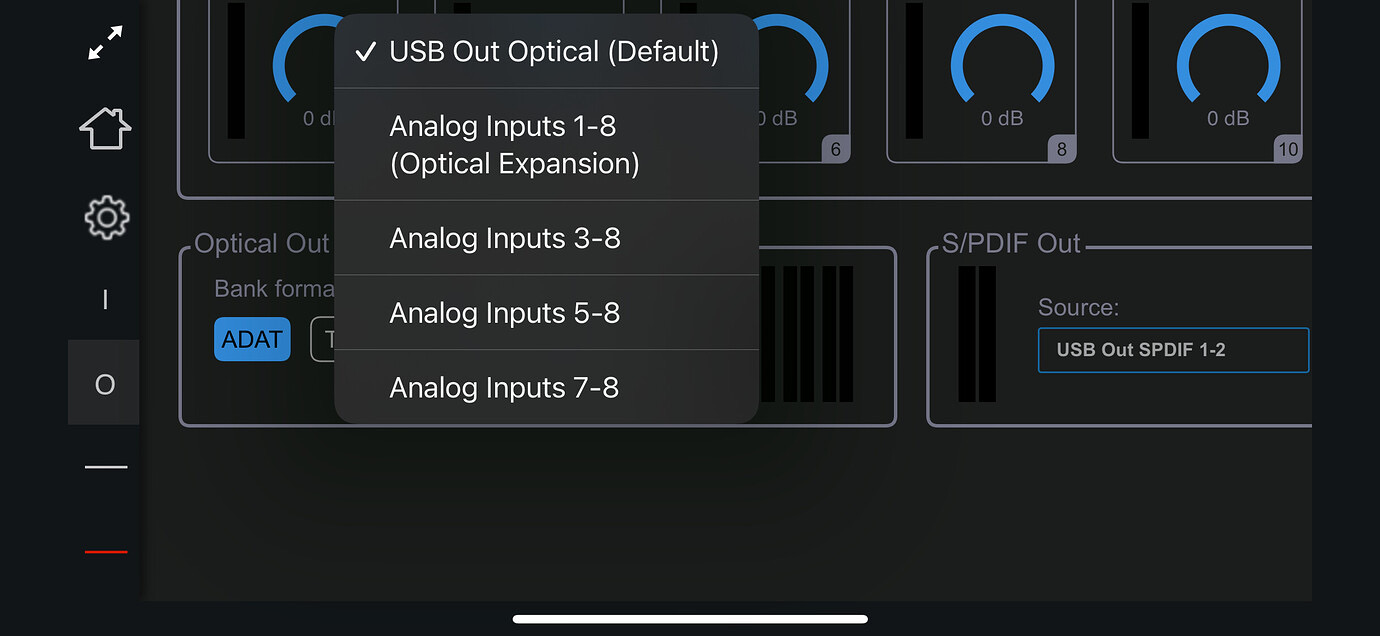
When selecting what gets sent out the ADAT outputs in Cuemix - OUTPUT - Optical Out - Bank Source, what is sent on the first 4 or 6 ADAT channels if e.g. Analog Inputs 5-8 or Analog Inputs 7-8 is selected? I understand that Analog Outs 1-8 is the best choice if you’re using it purely as an expander (in my case with a Push 3), but I’m secretly hoping that the earlier channels send the corresponding USB Out Optical channels, similar to if it was being used in the default USB Out Optical mode - thus allowing the ability to stream directly from iPad to Push 3 Standalone on the first few channels, and mirroring the Analog Inputs for the latter channels… Curious to know if anyone has tested what comes through on those first few channels, any help appreciated.
Not sure if this applies to Ultralite Mk5, but on my Ultralite AVB in the web based mixer app there’s a matrix view where I can precisely setup routing between inputs and outputs. Does CueMix not have such a view?
No, it doesn’t unfortunately. It’s possible to define precise custom mixes for each of the analog output pairs, but not for the ADAT outputs, as far as I can tell - the only options are those listed on the dropdown menu above, which is why I’m trying to understand exactly how the last three options work. I might be missing something basic though. I’m using the “virtual” UltraLite Mk5 in CueMix5 as I don’t currently have one.
If the smaller size of the Ultralite Mk5 is not a key consideration, and you’re looking for maximum flexibility in terms of routings, expandability down the road, etc, I’d take a look at the new MOTU 16A – 16 analog ins and outs, 16 channels of ADAT, and 128 channels of AVB networking (2 gigabyte ethernet ports so can act like a switch in your AVB network). All this for <$1500. Pretty damn good.
This plus a Push 3 would really be the center of a super flexible studio setup or a even mobile setup if you’re willing to carry our a 2U soft rack (so you could add a patchbay for front facing inputs/outputs as needed).
This looks great, particularly for custom routing - I can definitely see the appeal. In my case the small form factor of the UltraLite is one of the key attractions though - trying to fit a limited amount of gear in a large-ish pedalboard flight case.
I’m assuming I can get a hybrid analog/USB setup with Push and iPad happening if I select USB Out Optical mode, and have the connected iPad utilise software monitoring of some analog inputs (with iPad effects if needed) and iPad sound sources sending on other channels.
Wish there was a preset selector on the front panel - I can see myself switching between USB Out Optical and Optical Expansion modes regularly depending whether there is an iPad connected.
anyone had issue with sample rate occasionally resetting?
I’ve noticed that from time to time the SR getting reset from 48k to 44.1k, no idea why, I had a suspicion that it could be some software glitching like Max/Live/Audacity but so far none of them change the SR when I open them intentionally and they all set to 48k manually, so I’m starting to think that it could come from the interface itself, I don’t see a way to lock the SR internally, even if I do that from the interface itself any software like Live can easily override it and set to whatever.
if anyone knows a way to lock the SR internally would love to hear how you do that!
Yup. However, I’ve never figured out what causes it. I’m on Windows 11 running Ableton 12. I have two identical Intel NUC Pro 13’s both with their own UL5. One is dedicated to live performance and is as stripped of bloatware as possible. The other one has some tweaks and more of my daily driver. It’s the latter one where I’ve run into this issue.
AFAICT, Soundforge seems to mess with the sample rate in my situation. It forces the MOTU to its configured sample rate rather than setting itself to what the MOTU is set to. I ‘think’ once I set Soundforge to 48KHz, the problem went away.
that sounds like what I was suspecting, but I only use 4 apps that have audio config that can set sample rate: Max, Supercollider, Live and Audacity, all of them manually set to 48k and when I try to intentionally fully kill them and re-start the SR stays the same, but from time to time I notice it’s back to 44.1k and it drives me crazy…
it wasn’t like that at the beginning so I’m thinking maybe the last firmware update has something to do with it, dunno. the randomness is really making it hard to figure it out, could be one of the programs, could be the firmware, wish I could lock the SR internally.
Don’t forget the Mac also has a sample rate setting on, like, the OS level. Launch the “Audio MIDI Setup” app and look at the “Audio Devices” window to see it. You should be able to select the interface and see what it’s set to. Maybe it’s 44.1 and so it keeps getting knocked down when something else isn’t running or some OS process takes over for some reason?
If you’re on a computer that supports it, you might also want to set the “built in speakers” to 48k too? Just less hassle the fewer things that get swapped around.
oh yeah I’ve checked the Audio MIDI Setup some time ago when it started happening, the sample rate there follows the interface setting but I never open it so it has no reason to switch. I’ve also tried to force quit/open and it didn’t change to 44.1k so I have no reason to be suspicious about that…
as for the Built In Speakers it’s independent from the audio interface, it’s on 48k either way and doesn’t change with the interface.
also the fact it happened to @d4ydream on windows pretty much confirms to me that this is not an os thing but either one of the apps or the interface, I have another suspicion about Max that it might change after updating the version, no idea if that’s what’s happening but I do update with homebrew and it might reset the settings or something, so I will try to notice that next time I’m updating Max.
I just purchased the MK5, I have my P3 hooked up to it , along with digitakt and digitone, and I am trying to set up ADAT mode.
I believe I have ADAT working as I am able to add the digitakt and digitone as seperate audio tracks on push, and can record all separately or together. When I unplug the ADAT cable, nothing is recorded.
But when I look at the Cuemix5 software, the only input readings I am seeing are on the Line 1 - 8 channels, and no readings on any of the ADAT channels.
Any idea why this is? I would assume that if the signal is going via ADAT, there would be readings on those channels.
What is your external ADAT device and how is it all hooked up to the elektrons? Digitakt and digitone only offers their stereo mixes (2+2 channels) over analog line outs. For recording of all individual channels you need to record through overbridge.
OK, so I have L and R trs Outs from digitakt, digitone and cydrums going into line In’s on the MK5.
I have P3 ADAT In going into the ADAT Out on the MK5.
I have Out 1 and 2 on the P3 going into the In on MK5.
I have the MK5 usb going into my macbook.
I have added an audio track in P3 for each of the digitakt, digitone and cydrums.
I can record all of those at the same time, onto different tracks.
I can see the readings on Cuemix5 on the Line 1 - 8 channels, and I can change the individual track volumes on that, but there are no readings on any of the ADAT channels.