Had a quick look. In Toslink mode (stereo only) you can select from a bunch of outputs, as ADAT it’s a choice between a bunch of tracks from USB, or line inputs 1-8
1 Like
if only they’d add some sort of control from the unit itself or allow midi control it would really be a dawless mixer, and even though most of the time I have it connected to my mac it would make perfect sense to control it from my EC4 instead of opening the Cuemix every time.
I’ve sent them a feature request but so far nada…
just curious if it was possible with previous gens to control from the panel itself? even basic stuff like selecting mix or muting inputs
1 Like
Awesome stuff! Yeah I’m in the same boat. Recently got it and have it hooked up to an Octatrack with some synths, and since OT lacks some inputs/outputs, I’m extending that via the Motu.
My idea is to use OTs cue outputs as a sends, going into the Motu, out to a stereo delay pedal and back.
Interesting what kind of ADC is that?
Two of those, one with coaxial (just tested, works nicely), second to use as optical toslink for an additional 2 inputs (not had time to test yet)
They output digital in 48khz.
Did the mistake of buying the Swissonic ones, did not work. They output 192khz while ULMK5 only takes 48khz
2 Likes
Could’ve gotten a behringer or something, but lets not get into that discussion 
Thanks for that. In the output settings of CueMix, it looks like it’s easy enough to connect the Mk5’s analog inputs to its ADAT outputs (which connect directly to Push 3’s ADAT inputs) to easily expand the Push 3’s inputs.
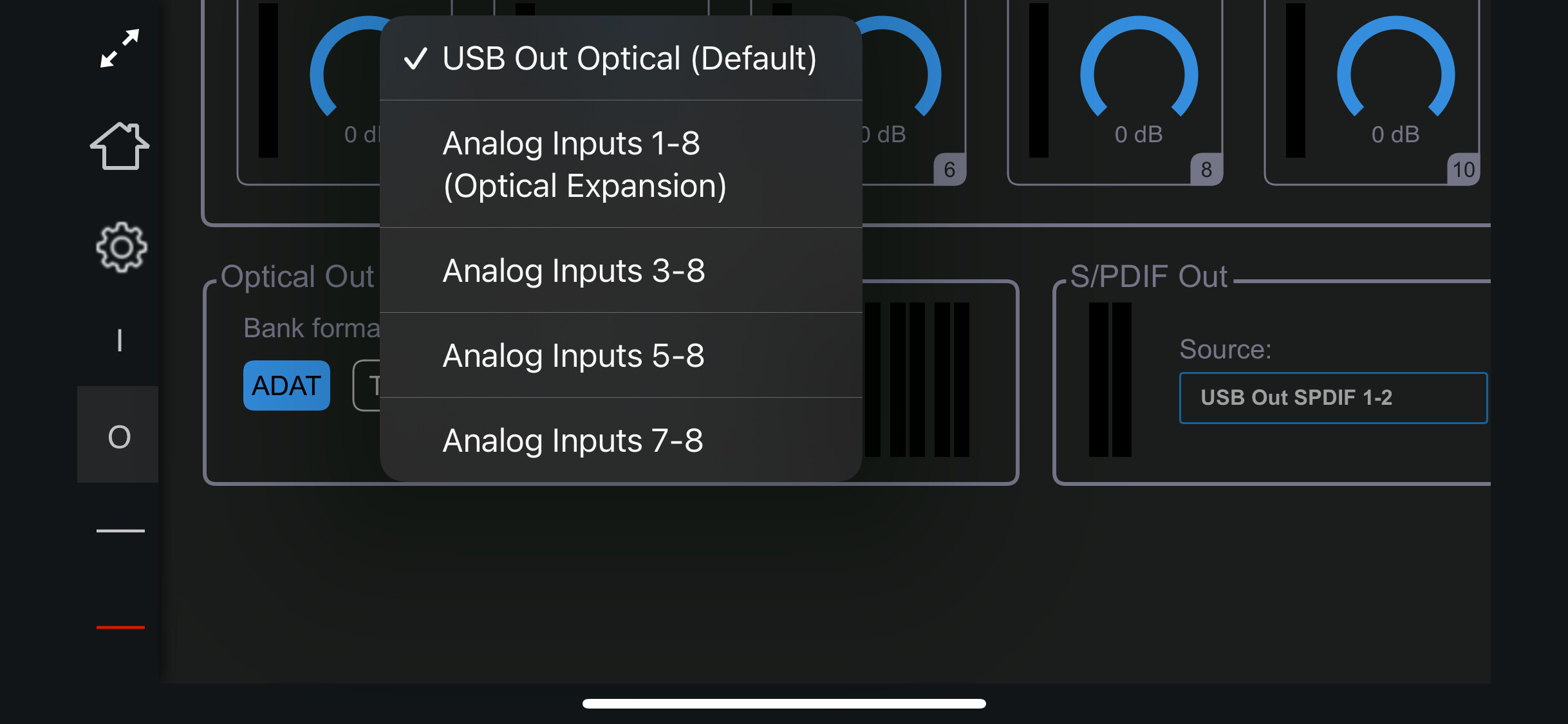
I’d also like to expand the Push’s outputs with the Mk5 in expander mode (to send audio to samplers, FX loops etc.).
How do I ensure that the audio going out the Push’s ADAT outputs into the Mk5’s ADAT inputs is directly/automatically routed to the Mk5’s analog outputs? Couldn’t find an obvious global setting in CueMix like for the first scenario - do I just need to turn up the relevant ADAT input channels on the individual input settings for the stereo pairs? Will these settings save with the unit when it is turned on in expander mode? Any help appreciated.
Can you control anything via midi? How are you using the send?
They appear in the same output mixers, so you mute/adjust volume for each or as stereo pairs for each output. So ADAT inputs 1/2 could be -12db on output 3/4, and 0db on outputs 7/8 for instance.
Yeah it maintains settings between restarts. It also has configuration presets that you can save/load from on pc/mac 
1 Like
I haven’t gotten MIDI to work on it, would’ve been nice. Haven’t tried very hard though.
So for now i just use a laptop or iphone whenever i wanna change something. Don’t have to restart or anything, i just keep the usb cable next to it and plug it into my laptop, boot cuemix app, change settings, disconnect. Fairly quick and easy
Goes out of output 3/4 to BlackHole reverb, then back into the optical via my new ADC.
I then in the app mute/unmute source inputs in output 3/4 mixer
That’s awesome, didn’t know you could expand it with such a low cost and size! Would be interested if you try it, and wanted to report back 
Yeah I’ll give it a go tonight and report back! 
1 Like
@aortan Ok i couldn’t wait, here’s the report:
Works well!
Plugged the NTS-1 into the ADC, ADC into coax input. Then turned the volumr for spdif up in output 3/4 mixer. That goes out to blackhole, blackhole goes back into the other ADC and then into optical input of ulmk5 as toslink stereo. Worked like charm  i now have 12 total inputs
1 Like
i love this interface,like a horse on win11
4 Likes
Dude, that’s great news!! 12 inputs is not bad considering size and ability to run in standalone.
Thanks for reporting back!
1 Like
My pleasure! I love this interface
Be advised, when choosing an ADC, ensure you pick ones that output in 48khz. The thomann swissonic ones don’t work
3 Likes
Update: after a lot of testing, seemed like my unit was defective (bought used on this forum a few months ago).
As I was relocating to Berlin, I had to bring it over with me from Argentina, then mail it to MOTU’s German distributor. Since the original purchase was made on Sweetwater, the repair wasn’t covered by the warranty. It amounts to 185 EU, since it needs a board replacement.
I understand that they can’t - and shouldn’t - cover the warranty of a product bought somewhere else, but it still pisses me off.
I’ll pay for the repair, but this is my last dance with MOTU.
4 Likes
Yet another (traumatic) update: my MOTU came back, supposedly a brand new unit… I’m still getting all the same issues.
I’m starting to wonder if it’s related to the power supply. Anyone in the Berlin area willing to lend me theirs for a few hours to do some testing? I would greatly appreciate it.
Alternatively I’ll have to send it again, but I’m worried that it might be in vain, just another useless expense. Their german distributor (who replaced the unit) said they tested it and it was working fine. They also said that there were issues with the display on my old unit and “other things”, which I never really noticed but I have to take their word for it.
1 Like
that is unfortunate but if the unit is new and they’ve tested it then it’s either port/cable/power supply, are you sure it’s not the usb cable?
I tried several USB cables, different computers… they all seem to do the same. I don’t own the original one though, but tried 4 or 5 different ones, same result.
1 Like
Not every device can power it via usb IIRC, did you check the AC adapter?
1 Like