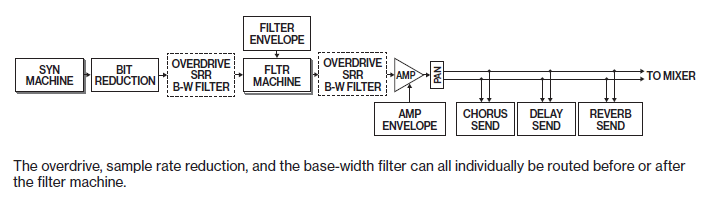
Interesting ! I thought it was before, but BW FILTER follows written order below. I suppose the order is OVERDRIVE, SRR, BW FILTER…
Anyone can confirm ?
1 Like
As it says, OD, SRR and BW can each be routed pre- or post- the filter machine, individually.
It was a surprise to me too when I learned that BW had always been pre- main filter.
What do you want confirming?
Oh hmm according to this it isn’t after all the FX, just OD and SRR (still useful), it sounded like it completely sent everything through when I tested it but I’m not home to try so might be wrong about that part!
1 Like
Yes I thought you were talking about FX in FX page, which is the case, not post FX returns…but it works as “master dj filter” with control all anyway…
OD SRR and BW slots order, pre or post. I previously thought the order was different because of switches order.
Order seems to be as written below.

3 Likes
This part with the parameter locked trigs for euclidian mode really threw me as previously I thought there was no interaction between the two sequencers and didn’t even realize you could p-lock in euclidian for some reason. But then I had to investigate to figure out what was happening, because the locks weren’t happening where I would have expected based on the original sequence…
What happens is, if you are in the normal sequencer and parameter lock step 5 (anything you want, can even be a different sound from the pool), when you turn on euclidian mode and turn up the pulses it won’t appear on step 5, but instead it appears on the 5th pulse, wherever in the sequence that is! Very interesting and if you have a lot of parameter locked trigs makes the euclidian sequence very cool and different though somewhat related to the original in a way, as you said.
The inverse direction also works interestingly enough; if you are in euclidian mode and parameter lock the 10th PULSE wherever it is (like say on page 2 step 8, whatever), when you switch off euclidian and go back, that parameter lock will appear in the normal sequencer as a parameter locked trig on the 10th STEP!
Very weird but kind of neat and fun! Thanks for pointing out the trick!
11 Likes
Actually was so blown away by this that I had to make a video immediately if anyone wants to see in action or can’t follow my explanation… https://youtu.be/AymSzdCFr_s
5 Likes
This synthesizer is absolutely brilliant. I’m still finding my way around, but last night I noticed something kind of cool while playing with some of the busier patterns in the preset project: you can do a kind of weird track muting by locking an increasing number of voices - when you lock all 16 you get a mono synth and this will affect which elements can be played. It’s a stochastic and fun way to “fade in” tracks besides mutes.
3 Likes
At first I thought it was buggy when I plocked Euclidean trigs and see trigs in the “wrong” place in Gric Rec. 
To sum up, in English is that correct to say :
The Grid Recording trigs numbers correspond to Euclidean trigs order ?
Not sure it is very clear, maybe that’s why they didn’t write it in the manual ! 
4 Likes
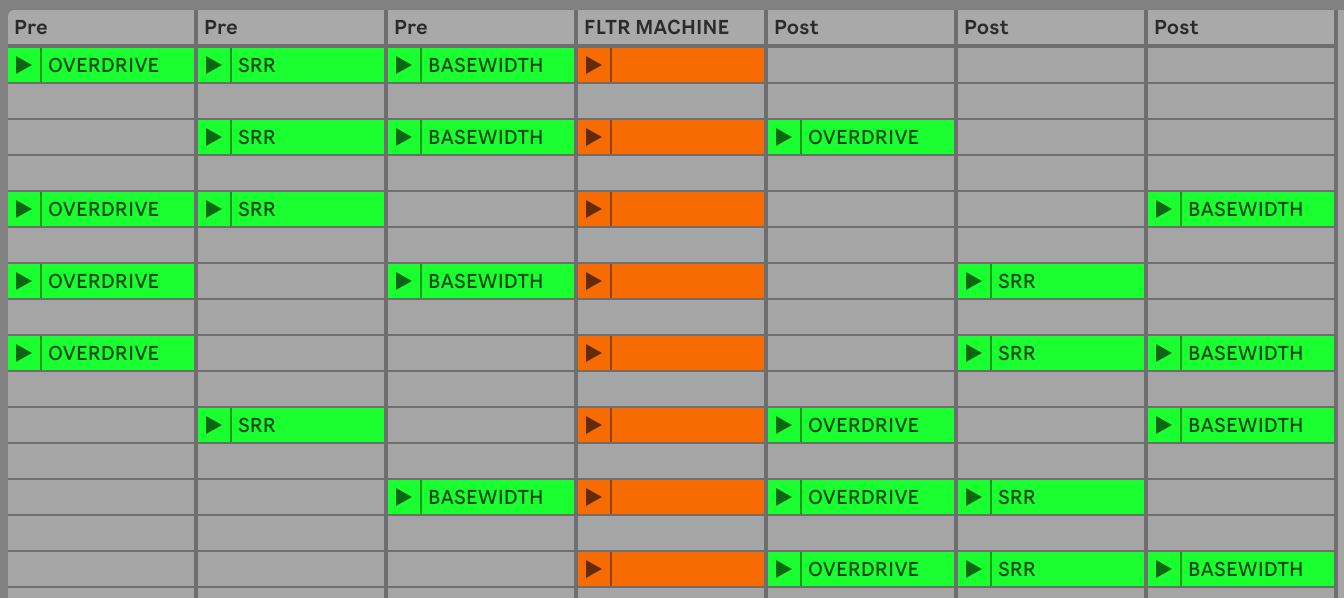
Looks like they’re semi-fixed in that order but can be split apart with the Filter Machine.
e.g. the order can be SRR (pre) > FILTER MACHINE > OD (post) > BW (post)… but you can’t switch the BW to be before the OD (when they’re both post)
Here’s a diagram using Ableton clips so I don’t have to open Illustrator 
9 Likes
Hehe thanks, nicer than Excel !
(I miss Illustrator)
2^3 routing possibilities. 
2 Likes
Yes exactly 
And because of this you’ll naturally hear plocks in the earlier pages of a grid sequence much more often than later ones… for instance if you have 8 pages and put anything on the last page, you’d need to have between 112-128 pulses on euclidian in order to hear anything from that page.
1 Like
“FX Track"
Probably also possible on the OG. But now we have more tracks it is easy to create a special track for MIDI Loopback which midi channel is set to the midi FX channel.
Set some cc params to the FX params (you could map them the same as on the FX parameter pages). And voila, you can sequence, P-lock and modulate (LFO) the FX!
13 Likes
Sidechain with a ghost kick
If you’re like me and don’t use the DN II as your main Drum/Kick Machine but you want to Sidechain some elements with a « fake Kick », there’s an easy solution. Just don’t send your fake Kick to the Main Output in the Audio Routing menu.
13 Likes
Fix slow LFOs!
When an LFO is running at very low speed, it can seem completely broken.
The reason is that a voice is randomly stolen on each new trig, and the state of the LFO of each voice is not coherent between voices.
To fix this, either check the option “reuse” in the voice allocation menu, or choose in Setup/Play mode the “POLY M.LFO”.
Alternate between 2 LFOs
Keep Play Mode at Poly + Reuse off. Then lock 2 (or 3, 4…) voices for your track.
You then get two parallel LFOs with 2 different states that run against each other, being chosen alternatively.
Fun destination for this are amp decay, filter frequency, pan or a drum transient… Have fun!
13 Likes

How can something be so bizarre yet make so much sense!
1 Like
This is not a tip, but a real pain in the a…
As you can mute on the fly using the FUNC button, I often erase patern hitting PLAY wile still holding FUNC. Hopefully it can be undo by hitting PLAY again, but sometimes you went too deep and it’s goooooone… 
1 Like
Why you want to mute the Play button is where the weirdness lies 
1 Like
does anyone know what Operator C is in “FM DRUM”? is there any control somehow, aside from the phase in the noise page?
from the manual: “NRM
Noise Ring Mod will (when switched on) use Operator C as ring modulator for the noise”
noise ring mod sounds interesting but i dont get how to implement it really

C = Carrier.
Control on waveform, pitch, wave fold, etc…all body control except A and B parameters in second page.
It makes the noise softer, more alive. Try low pitch for C.
1 Like