I know there is a way to set a fixed pad velocity, but is there a way to set a default trig velocity? Currently trigs default to Vel 100 but to make accents work as they should I want to set it to Vel 60.
Thanks, Alex
On the Trig screen, change the VELocity setting, then all newly entered trigs will be set to that:
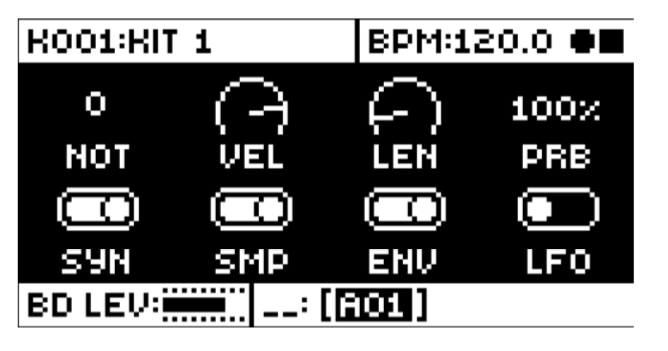
Works for all previously entered trigs too, as long as they don’t have p-locked VELocity settings.
Great thanks! So you have to set this for all 12 tracks each time? I was hoping there a global default.
Each time, unless you make a default Kit and copy it from pattern to pattern, project to project. Just be sure to resave it as a new Kit each time otherwise you’ll overwrite your default Kit. I’d say that quickly setting VEL to 60 each time is far easier tho 
Actually, thinking about it some more, why not used fixed pad velocity to achieve this? Set that to 60 then use the pads to enter trigs in whatever recording mode suits you best? Quantized recording will help you with timing them right.
Sorry I’m new to Rytm. I did try this before posting by hitting a pad at fixed Vel 60 and then entering trigs but the trigs were all still at 100. I’ll try again. With non fixed velocity I was expecting trigs to be entered at the velocity I last hit on the pad but that doesn’t seem to be a feature.
All good. What I meant was to commit to playing everything in with the pads (quantized or not – it’s easy to switch it on or off as needed). You never know, it might spark some ideas that are more groovy and natural sounding than entering trigs
IIRC with grid recording on (press rec button, led lit up) if you hold a trig and hit a pad in chromatic mode, it locks note pitch and velocity (and note length?!?) for that trig.
Also works in live recording mode (press rec+play, led flashing).
Somehow I think it also works when not in chromatic mode…damn…these things you do every day without thinking about it are often hardest to recall^^
Okay thanks, I’ll have another go!
read another tip recently here: Use an external midi controller, set all tracks to same MiDi Channel and “Ctrl-All” with one knob … maybe a feasible workaround?
I just tested it and this works in both Play and Chromatic works. I was trying to do it the other way around (hit a pad and then a trig) like on some of my other drum machines.