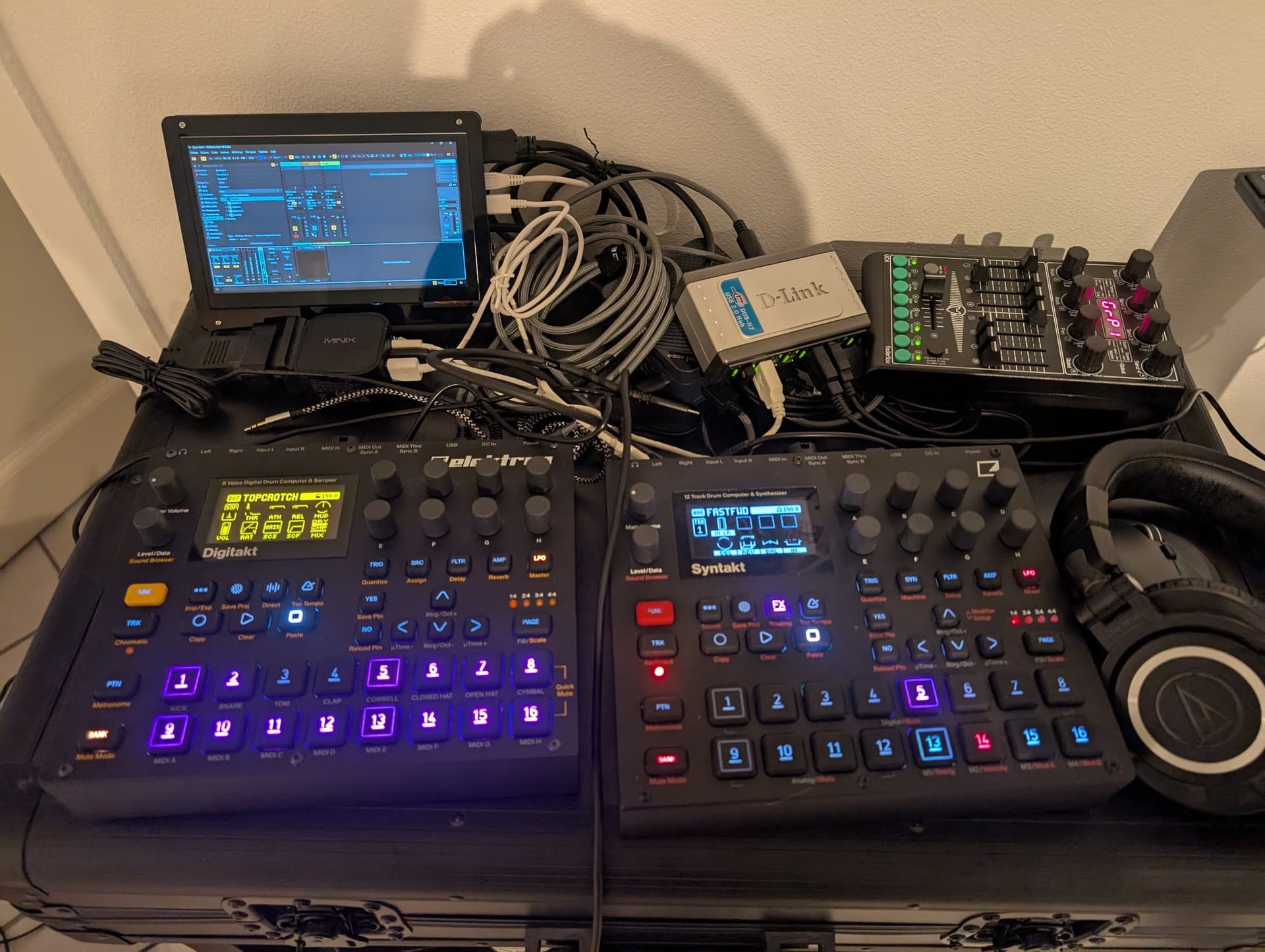
I was mainly thinking of using macro, but the crossfaded + looper approach looks interesting.
Re the N150 it should be fine, it’s almost 2x as powerful than my 12" MacBook on which I composed many tracks with hungry vsts. I only need 5-6 FX + looper, I don’t think the CPU will be an issue.
Worst case I’ll use an old Live version!
I concur. This is part of why I do this. Also, a screen is simply not necessary for computing. I plan to become more adept at simply using the computer entirely with no screen at all, using a screen reader and keyboard shortcuts. To my knowledge, Ableton, which had previously been notoriously inaccessible for blind and low vision users, is now accessible to screenreaders.
For my own purposes and experience playing live with a headless computer, I used a korg nanokontrol2 several times and then I have also used it with a Faderfox unit. In some of my performances Ableton was effecting live inputs like you’re saying, though my effects were played like an instrument (custom max patch) and were not “end of chain” so to speak. I also played instrument patches and VSTs this way. I can definitely recommend both previously mentioned controllers if you would like to have live control over the set.
I would recommend going for what you want and being creative. I would not settle for a laptop or an ipad for these purposes like others are suggesting. Every time I have performed live with a headless computer, I have enjoyed the opportunity to take agency over my computer experience and truly design my artistic practice the way I see fit. I also enjoy the active rejection of the centering of vision in the computing experience. It is very empowering. You should go for it.
Get the computer refurbished of course, I recommend.
Double posting because I see OP you linked to this Aliexpress mini PC. I can’t vouch for this but I know Floyd Steinberg has a video on using these kinds of things to run VSTs. A reasonably recent refurbished mac mini can be had for ~400 USD. This could also work quite nicely although it is bigger. But it would fit nicely underneath one of your takts.
right now im actually using a lenovo carbon x1 tablet that I bought used or refurbished off of ebay. It has this cool detachable keyboard peripheral that makes it function like a laptop when you wanna do laptop things, but it also has a built in stand that lets me set it up out of the way in tablet mode.
In general, I will do almost anything to not use a computer when making music, so I rarely ever use it, but it seemed like the best of the bad options.
Made some tests on my mac while waiting for the miniPC to come, and I love how Live can seamlessly integrate with the ST, as if it was just a pedal on the ST outputs!
1 USB cable, with midi+audio, no hassle: ST configured to send PostFX mix to USB, and USB out to main. Disabled int to main.
Using a 128 samples buffer, I get ~11ms overall latency, which is not really noticeable. I hope I can get the same good results on the Win machine!
I didn’t try FX transitions, just pseudo mastering and wow! It really makes the mix shine with parallel multiband compression, glue compression, saturator and limiter in the final chain. I think once I’ll have tasted it it will be hard to not systematically have it on all my live setups
Side note, it also made me remember how bad the built-in limiter is in Live (I have Live 11 suite)… Will have to find a better one. A bit sad considered most of their other built-in FX are great.
I’ve experimented with similar setups quite a bit, and here’s what I found that could help you build something stable for both rehearsals and gigs.
OS & Stability
I’ve had great success with Windows 10 LTSC. It’s stripped down, stable, and avoids random update interruptions—perfect when your rig needs reliability on stage. Keep your OS stripped down, disable background tasks, and rehearse cold-boot recovery. I also played quite intensively with Linux, but I wouldn’t recommend it unless you really like tech and enjoy tinkering. That said, it can become a super powerful setup if dialed in right.
DAW Choice & Workflow
Bitwig and Reaper are both great in this role since they handle plugin crashes gracefully. Think of it like “plugin containerization”—if a single plugin crashes, the whole project doesn’t die, which is a gig-saver. Ableton can still do the job, but it’s less forgiving under stress. For live setups, this level of stability is absolutely crucial. I’d honestly prioritize investing time into testing, stress-loading your projects, and making sure your template is bulletproof before taking it on stage.
For pure efficiency, Reaper stands out—it’s probably the most CPU-friendly platform out there, with great multicore plugin distribution and an almost instant load time. I’m not really a DAW fanboy (use whatever feels right for you), but I mention Reaper here purely for practicality, especially if your live rig demands absolute efficiency and reliability. One thing to flag: the N150-based mini PC you’re considering might be underpowered for certain live situations. Ableton might not fly well on this machine …
Good luck—when done right, a cost-friendly and rock-solid live setup is absolutely possible!
Ableton Live 12 with a decent mastering/FX chain runs at ~10% CPU in average, at 128 samples buffer with Overbridge drivers (using only 2 ins / 2 outs), ~8ms latency, great!
Now comes the Win 11 bad parts: whatever buffer size used, I have every now and then (random, occurs sometimes between 30-60s) some buffer underruns probably due to some background process.
So now the dedicated audio box optimization process begins! I’ve already done some tuning, disabled the obvious ones (antivirus, win updates and other unneeded services) and it’s already much better with still the occasional glitches.
I’ll try installing Nano11, and see if it makes the cut. Otherwise I may explore installing Live 12 on Arch Linux, as it seems to be a thing. I would even try making it an hackintosh if there was a guide somewhere.
Sad to see that hardware-wise that small box is more than enough (it’s 1/4 of a ST in size!), but Win 11 cripples it audio wise
I tried running LatencyMon and DPC Latency Checker, nothing stood out.
But it seems Windows Defender reactivated itself (damn!), had to disable it again.
I finally got it stable stable at 128 sample/8ms latency, weirdly by switching the power profile from “High performance” to “normal”. High perf generate annoying coil whine noise, and very weirdly causes random drops in the audio, while on the normal profile everything runs fine (still some coil whine, but less). 9-10% CPU usage average. Got it running 30min without any drops, while surfing on the web at the same time.
Switching to the “energy efficient” power profile eliminates the coil whine completely and have better results than “high performance”, but still the occasional audio crackle. CPU jumped at ~20% usage average in this mode. Windows mysteries…
I’m now confident that it can run flawlessly for my usage as I got it stable on a regular (tuned) Win 11. Now I’ll try setting up a double boot using Nano 11, I’ll have to sacrifice RDP but I’m pretty sure removing all the useless services (for my usage) will make it even better.
I even found an old 7 inch touchscreen that I was using for a rPI that could fit in my setup, in case I need some visualisation/quick changes.
Made my own Tiny 11 Core using these scripts: GitHub - ntdevlabs/tiny11builder: Scripts to build a trimmed-down Windows 11 image., and it’s perfect! Installed the slimmed down down ISO, Live and Overbridge drivers and it runs flawlessly without having to tune any Windows settings! No updates/wifi/antivirus really makes a difference.
I’m using the ST in audio card mode, and pushed the CPU with more plugins up to 30-40%, still no drops. Even tried overbridge plugin and it was working fine! Maybe I’ll try pushing further having ST and DT in overbridge mode with macro for mixing/transitions, but even as it is it’s already perfect for what I want.
Now I need to solve a few small things, like how to activate Live midi follow automatically when it starts, and avoid the message “your last project crash, want to recover?” at start when I shut down the PC directly without quitting Live first (as it will work this way when headless).
Then wondering what’s the best way to make Live + my project auto startup on boot?
Windows Kiosk mode + set project as default?
Use a tool to set Live as a service (so it can automatically recover from a crash too)
Something else?
Does anyone have experience with this?
Once the final setup is ready, I’ll document everything on GitHub.
For a 100 euro box, it has more than exceeded my expectations:
DT in overbridge
ST as audio interface
128 samples latency in Live, with added 70 samples latency in audio chain (limiter) => total latency < 10ms, perfectly usable for performance.
Running performance FX + mastering end of chain (with multiband comp, saturator, glue compressor, limiter, EQ…)
For a size that’s about 1/4 of a Digi!
I did not wanted a screen at start, but I recycled an old 7-inch rPI touchscreen that I had, it will be useful to make small edits, record performances and leave a Voxengo Span fullscreen for visualisation. Should be easy to slide in the future case I’m planning
Once I complete my performance FX macros I’ll try to record a video to show a demo.
I do something similar with a Lenovo Legion Go (gen1). They’re going cheaper now the new model is on sale. I remove the controllers and it’s a full Windows desktop. Can run Ableton and a few VSTs no problems and has 2 USB-C ports and a battery.


 No updates/wifi/antivirus really makes a difference.