I just did some testing of the volume knob, and I can confirm the behaviour that @sentionaut62 reported originally: at the very lowest setting (labelled -60.0 dB) it is silent, but one tick up it is audible.
I don’t see this as a fault, though. It just seems like Arturia has designed it so that the output is totally cut at the lowest setting, rather than just attenuated, as many people would probably expect. It would be better if it was labelled -Inf at the lowest setting, like Ableton does, but I expect that it is working as designed.
The other “problem” is that the outputs are just specced loud! Again, I think this is as designed and arguably a good thing. The fact that cheaper audio interfaces are quieter may just mean they are using lower quality components. I won’t pretend to know everything that goes into these decisions, but if you check the specs for the Focusrite vs. the 16Rig, it says that the maximum output for the Focusrite is 18dBu and for the 16Rig is +24dBu, so IIUC that means that the 16Rig has twice the output level.
I used to use both a Focusrite Scarlett interface and a Tascam Model 12 mixer, swapping my monitors between the two. I found that the Model 12 was much louder than the Scarlett, and I had to set my monitors to attenuate by something like -12 dB to get a usable range on the master fader of the mixer, and then crank up the volume on the Scarlett. The Model 12 main output is specced at +22 dBu max. The new MOTU 828 outputs are +21. I think Focusrite interfaces are maybe just quiet.
If the minimum level is too much for your monitors, and they have the ability to attenuate their input, that’s one good solution.
One thing I definitely recommend to all 16Rig users is to route your Monitor and Headphone outputs from the Main mixer rather than from the USB 1 & 2 sources as in the Factory configuration.
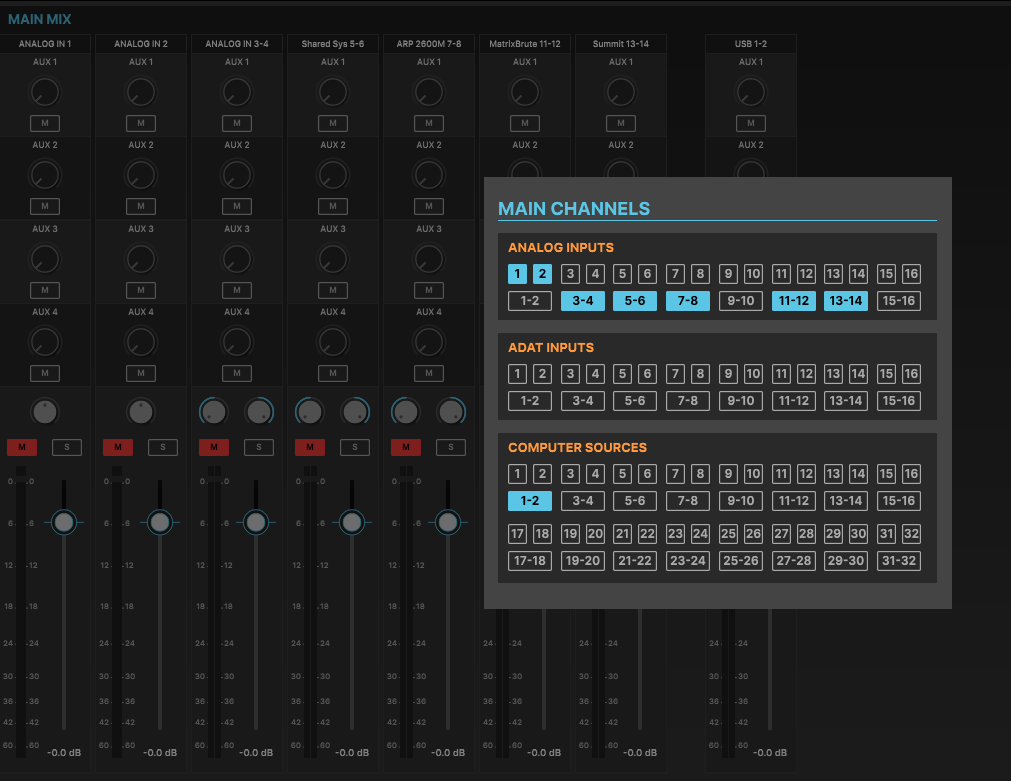
Then, add the USB 1-2 channels to the Main mixer page (labelled “Computer Sources” in the +/- Channels window), as well as any inputs that have external instruments attached:
This gives you the ability to control the level of your computer output in the mixer, and balance it with the instruments you have connected. It’s also the way to get direct monitoring of your instrument inputs while you record (or when you want to play them without using a DAW). You can also turn down the master fader here, if everything is too loud for your monitors.
It does seem to me that the Dim button cutting the signal if it dims below -60 dB could be considered a bug. It’s probably worth reporting that to Arturia to see if they can fix that in a firmware update.


 .
.