Yeah I saw this too, forgot to post about it. Hopefully with the cadence of the updates so far we get some cool new features soon. I’d really love some kind of strumming mode. Not sure how they’d incorporate that into the sequencer though.
I really like this so far. One thing I dont understand. Lets say I know I want to start with a Gmin11 chord for example. How would I start a blank project and get that chord in the first slot? Also if I find a chord I want to start with that is in a chordset, how do I get that chord on it’s own outside a chordset so I can make my own progression with it as the root chord?
I pulled this off once with copy and paste but it doesn’t always seem to work. I am not sure if it is because I power on the box and it already has a project loaded and I need to get out of that and start my own, or what the deal is.
But if anyone knows, that is all I need. I have watched the instructive videos but people don’t seem to work this way. Once I get that first chord down, I am typically off to the races since I can try a ton of voicings of it and then use cruiser mode to get a progression going. It is just that simple issue that holds me back from quickly getting progressions down.
1 Like
They added “chord edit mode” in firmware 1.30
shift+ key 10 = “edit chord select”
tap chord key
enter = “edit chord”
enter notes - key1=C4, chromatic (can change octave with shift + steps1/2)
(can also play the notes in from external keyboard)
enter to finish
You can download the manual addendum for it here:
https://support.alphatheta.com/en-US/articles/47401717479833
"CHORDCAT Additional Information manual EN "
see page 8
For your other question, I don’t remember ever having any issues with just holding copy and pressing a source chord key, and then later holding paste and pressing a target chord key, even in a new project.
You can save any chordsets you make via menu > user chordsets > save/save as (this was added in later firmware too)
4 Likes
This is great. So I can basically enter that mode and put in any chord I want on step 1 and then modify from there? That’s what I was missing. Thank you.
2 Likes
Yes. Notably too if chordcat recognizes a chord recorded into its sequencer from an external source, you can copy from the sequencer and paste into the chord bank.
3 Likes
I love that. So you could be playing keys and spam out some chord you like, record it into Cat and it will tell you what the chord is plus other chords in the cruiser that could complement it.
2 Likes
Yes but only if CC recognizes it. There are technically correct and potentially simple chord shapes that its engine might not recognize. But for the most part the workflow you just described is correct
1 Like
Tried it for the first time today and love the cruiser mode.
(The screen is really hard to read for me - hell, I am getting old  )
)
What’s strange to me: while changing the key (chromatic mode) the chords of a chord set does not seem to change? (Am I missing something here?)
Thanks for your help!
2 Likes
chordsets are fixed - it’s the brightness of the key that shows if they’re in the chosen key.
Thanks! You mean on the x/y pad?
Or on the “keys” 1-16 (the “starting” chords) - here, I expected the starting positions to change while altering the key (?)
Thanks again 
I might have misunderstood what you meant. I was talking about the 1-13 keys.
In a chordset, eachkey plays a fixed chord that doesn’t change if the key is changed - all that changes is the key LED is bright if that chord is now in key or else dimmed if it isn’t.
In chromatic, every chord is lit bright as all the notes are part of that.
1 Like
AFAIK, when you’re in Chromatic mode, the Chord Cruiser shows you the widest range of “candidate chords” on the XY pad, but if you then constrain yourself to a certain key or mode, the XY pad and 16 step buttons (your “chord palette”) will only play chords constrained to that key, which in my opinion, are kind of simplified and sometimes less interesting and juicy.
no the suggested chords are always the same. They will just light up different brightness levels depending on if they are fully in key or not.
In chromatic, all of the key chords are lit bright and all XY cruiser chords are lit bright because chromatic contains every note.
Cruiser suggested chords change after you’ve played chord on the keys or external - just changing key/scale doesn’t change the presented cruiser chords until you play a chord.
1 Like
Regarding the chords - is it still one clump of a chord when pressed?
Someone needs to invent a box where chords can be played with more expression (and not just adding a basic strum and calling it a day)
I think nopia does that?
1 Like
Need to take a proper look
It would be great if HiChord implements something. Select a chord and just enter another mode where all the keys from that chord are mapped out. So you can play the chord in a far more interesting way.
1 Like
I normally use DAW plugins/m4l devices to add variation to timing and velocity. Should be easy enough to program this type of thing - or something with more playable expression - into a retrokits RK-002 smart midi cable (which the chordcat does power).
To add to this, if you use a computer, you can feed chordcat and a midi keyboard into the Melodic Flow plugin from Feel You Sound, and that will let you play the individual chordcat chord notes however you want using the midi keyboard, including velocity.
3 Likes
If you registered your chordcat, you should have got an email where you get the Chordcat DAW plugin for free: https://alphatheta.com/en/product/production/chordcat/gray/#chord-cruiser
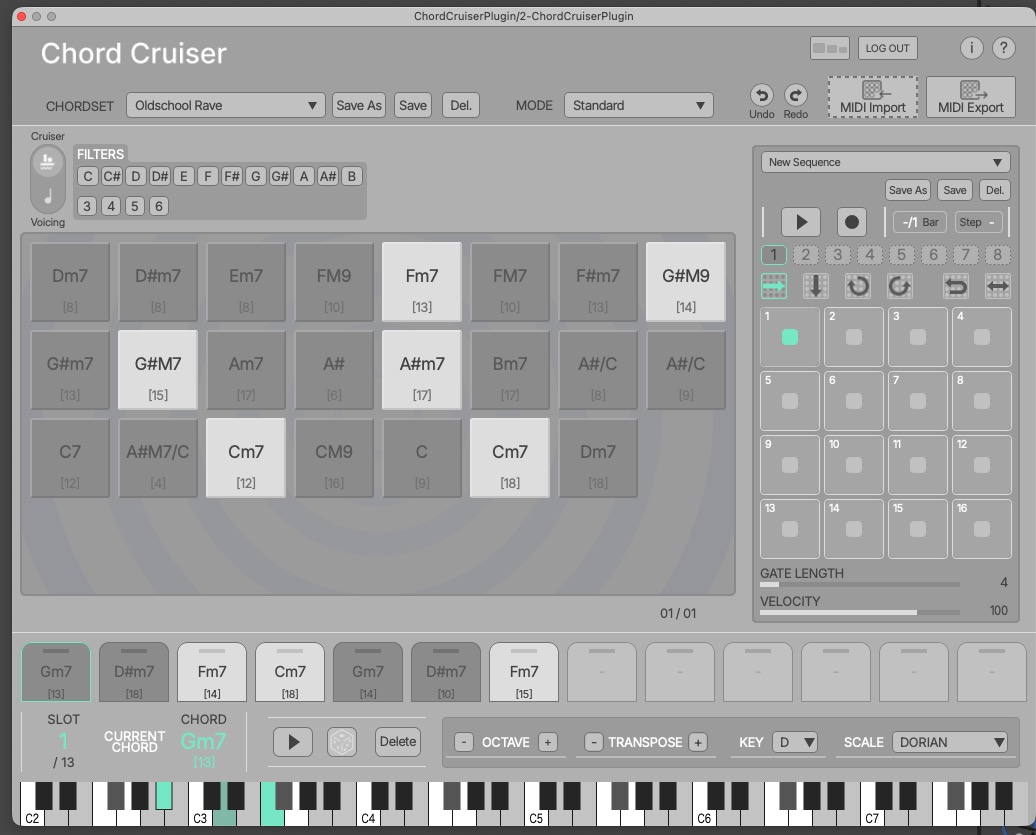
Added: although it doesn’t seem to work correctly:

4 Likes