I’m saying your comment stated the obvious as well. It doesn’t add any value or any new info.
Is my request for the looping bank something you’d be interested? Yes or no, let discuss that. If it is then also send a request saying you support this idea. If no, than explain why.
Does anyone one use Shift-Lock mode (2x tap the Shift button)?
You can move to left using the Shift button while tapping on the one the screen tabs which normally move to the right.
Go to the drum track editor, pick a tab that has multiple sub tabs like the Sample/Oscs tab, tap on it to go to the next sub tab, it moves to the right, hold Shift to move to the left - or double tap Shift to put it in Shift-Lock mode, (which keeps it held down until you unlock it by pressing Shift) & press the to move to the Left without holding Shift.
BTW, testing this out made me realize the Shift-Lock mode is kinda cool & a very slept-on feature. It’s like an invisible finger holding down the Shift button & gives you access to all the second button/screen tab functions, but you gotta test it out yourself to know if it’ll be helpful.
I never seen anyone make a video or discuss Shift-Lock mode, but I can see enhancing my workflow.
Not often enough. The last 3 days I’ve been remixing an old track and unknowingly engaged Shift-Lock and was confused for a bit.
That Shift button tip you posted is a good one. Saves a lot of time.
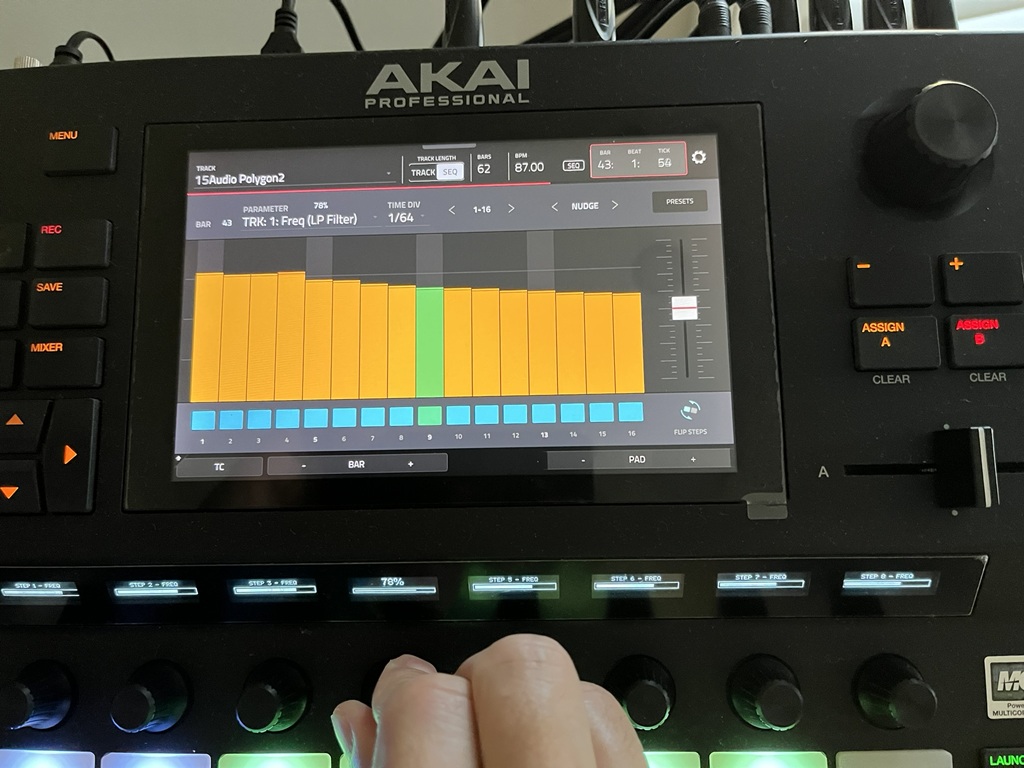
btw, I do lots of automation using the Step Sequencer (the onscreen one) and it’s buggy as heck. Twist the encoders and the values jump. The encoders are not broken (it’s not like the Blofeld/Supernova/A3000 skipping encoders hardware issue). Same issue in Sample Edit. But it’s only an issue in heavy projects. I wish Akai would fix the bugs man, but I guess throwing more CPU+RAM at it may help.
Yeah Shift-Lock is something I’ve seen for years but never really paid much attention & that I started using it, I can see the benefits.
Re: The jumping values. Try resetting the Preferences. I don’t know how heavy your projects are or what that means to you. Make sure to disk-stream long samples, even if they’re not being used in any seqs. Also, you may want to send Akai a bug report.
Jumping Encoder values issue in Step Sequencer, Sample Edit, etc.:
Resetting Preferences: Always 3x times after a firmware update.
Heavy projects to me?: Lots of automation + modulation. This old project (16 Tracks, half are MIDI tracks) doesn’t make use of the newer features like Sliced Wavetables in Advanced Keygroups (Alternating Pad Loop, Slice Motion, TAIL LENGTH, TAIL START, REPEATS, etc. for each slice), OSC/WTs in Drum & Keygroup Programs, articulations, mod matrix, etc. Add those and it becomes unusable.
Akai tends to drop stuff like OS updates on the Thursday on or pass the 20th of the month, so this or next week Thursday would be a good time to see something, especially since it’s been months since the last 1.
General:
• Tapping and then releasing a dialog’s F-Keys after it has been dismissed no longer causes a crash
• Making a change to tracks or changing the current mode during playback no longer has a risk of crashing
• Improvements to performance when changing sequence during playback
• Fixed issue causing certain audio interfaces to not function
MIDI:
• Pad input is now routed correctly to all tracks set to receive it
• Using Note Repeat now correctly respects MIDI input channel settings
• MPK Mini MKIV: Note-off messages now record and playback correctly
• Notes with MIDI channels set to anything other than 1 no longer hang when stopping playback
• Per-clip program change messages now send correctly when clips are launched
• MIDI input is now received correctly after disconnecting and reconnecting MIDI devices
on Windows
• Global MIDI learn no longer causes audio device failure on desktop
Export:
• Bouncing a clip twice no longer results in silent audio
Controller Mode:
• Using an external drive as the Temporary File Location no longer has risk of deleting user data on the drive
• MPC XL / MPC Live III: No longer a risk of data corruption to the internal drive when in controller mode
Desktop:
• Logging in on startup page now also logs in for Activation page
• Project panel no longer hides after switching to and from a mode where it is not available
• Starting playback while drawing automation no longer results in a crash
• Channel strip components in Mixer views now show/hide correctly after switching modes
• Track Length in Inspector panel can now be adjusted with more precision
• Selecting a track in Track Mixer now correctly sets it as the current track
• Right-clicking an empty track name in Inspector panel no longer causes a crash
• Grid and timeline now remain in sync after using scrollbar
• Kontakt instruments using tempo-based loops now sync correctly to MPC’s tempo
• VST3 plugin editors are now displayed correctly, without any black bars around them
• VST3/AU AIR plugins now display their editors inside the Track Edit panel
• Improvements to appearance of the Preferences dialog
• Fixed issue on Windows where after a crash, MPC failed to reopen
Main Mode:
• Auto-scroll of waveform view now functions correctly
• MIDI input channel is no longer changed when changing track type
• Recording to a new clip then disabling Loop no longer results in a crash
• MIDI Output combobox in Track Settings can now be edited as expected
• Channel Strip MIDI meters now function correctly for all tracks
• Track Length setting can now be edited as expected after using Copy Sequence
Arrange:
• “ALL TRACK TO ARR” F-Key now correctly shows if only bus tracks are returnable to Arrange playback
• Per-track “Back to Arrange” buttons always act on correct track after tracks have been reordered
• Extreme changes in zoom no longer risk a crash
• Locking zoom levels now works correctly
• Using Trim on a sequence now correctly clears events after the trim point
• Correct region of grid is now shown when triggering Locators with Auto Scroll set to Page
• Now possible to scroll while cursor is over track headers
Recording:
• Recording audio to end of sequence now places recorded region at correct time
• Previous audio no longer plays after recording over it with Loop enabled
• Recording to end of sequence with Loop off now extends sequence correctly
• Overwriting automation now works correctly for all parameters
Saving and Loading:
• Loading a Drum track containing an AIR Reverb Pro insert no longer causes a crash
• Project/Track load failure messages are now correctly formatted
• Correct error message now appears after loading project with missing data folder
• Clip Row tempos now load as the correct values saved with the project
• No longer possible to overwrite existing sequence data when loading a MIDI file
• Prompt to save project with unsaved changes now appears consistently
• Saving as Ableton Live Set (ALS) no longer risks crashing
• After loading a project using the Touch Strip in MIDI Control mode, it now outputs MIDI correctly
• Cancelling a project save now works correctly
• Samples that are in multiple audio clips no longer get deleted if another sample is loaded to one of the clips
Grid View:
• Pitch Quantize no longer allows notes to be transposed outside the standard pitch range
• Grid lines now align consistently in long sequences
• Playback of track using Independent Track Length no longer causes visual glitches
• Playback outside of Loop region no longer causes visual glitches
• Playhead position now remains correct after disabling loop just before the loop ends
List Edit:
• Changing a note’s Channel from List Edit no longer makes the note disappear
Browser:
• Pad Presets now appear correctly in the Browser
• Browser directory no longer reverts to Splice after switching mode and back
• Typing “[“ or “]” in plugin search no longer results in a crash
MPC as a Plugin:
• Logic Pro: Switching windows then clicking on a plugin’s editor window no longer causes a crash
• Logic Pro: Plugin editor windows are now displayed correctly
Sampler:
• Sampler “ARM” button can now still be used after purging the Sample Pool
• Redoing an undone Auto Sample now returns recorded samples correctly
• Crash no longer occurs when saving audio sample after pad assignment
• Q-Links for insert FX in Sampler mode now function correctly
Sample Edit:
• Sample Start/End flags now always adjust correctly
• Switching between Trim, Chop and Pad tabs now always displays the correct sample
• Selected sample no longer set to None after converting slices to new Drum track
Track Edit:
• Enabling Loop on a sample during playback no longer causes an infinite loop
• Randomization settings for a layer now only affect that layer
• Undo now correctly undoes Loop start change when Loop Lock is off
• User Oscillator content with capitalized file extensions now appear as expected in user folders
• Change of Oscillator type with Edit All Layers active now only acts on the current layer, avoiding destructive changes to layers using samples
• Fixed issue with some AIR plugins and FX editors not displaying correctly
Song Mode:
• Changing tempo while playing back song no longer restarts playback
Q-Link Edit:
• Projects with FX params on Submix/Return/Output being modulated by Env Follower or LFO no longer crash when closing
• Changes to parameters in Pad Scene mode are now retained after switching pads
• Correct parameters are copied when copying an existing macro in Track FX Rack mode
Step Sequencer:
• MPC XL / MPC Live III: Last Step Mode dialog now correctly displays clip lengths
• MPC XL / MPC Live III: Starting playback and launching clips now plays from correct place when step sequencer is in Next Seq mode
• MPC XL / MPC Live III: Undoing/Redoing Clear Sequence using Next Seq mode no longer results in a crash
• Pads preview correctly when tapped in Pad Select mode
Undo/Redo:
• Undoing/Redoing of Duplicate Track no longer causes a crash
Sounds Mode:
• Project/Track Data folders no longer appear in Sounds mode
Preferences:
• “Write automation when recording” state now saves to preferences correctly
• Force ejecting a drive while a download in Activations is currently extracting no longer results in a crash
Force:
• Using SELECT and +/- buttons to Tempo Nudge now only affects the tempo
• Using Lanes (Mono) step sequencer mode no longer overrides poly behavior on a drum track
• Q-Links are no longer blank when showing bank 9-16 and switching to Mixer mode
• Pads from banks A-D can now be selected when creating Stems
• Correct number of CV ports now shown for Force
• Step Sequencer pads now respond correctly to changes in clip loop length during playback
MPC Studio MKII:
• Pressing Zoom no longer causes crash
Yeah that last feature sounds interesting. I’ll check it out later, but it says that:
"Pad Mode Configuration Shortcuts:
Holding SHIFT while selecting a different pad mode now also opens the new mode’s configuration dialog, making it quicker to access pad mode settings.
• SHIFT + LAUNCH: Switches to Launch mode and opens the Launch Config dialog.
• SHIFT + NOTE: Switches to Notes mode and opens the Note Config dialog.
• SHIFT + STEP SEQ: Switches to Step Sequencer mode and opens the Step Sequence
Config dialog."
The arranger updates are a major step up!
This bug fix in MIDI section is nice:
“Per-clip program change messages now send correctly when clips are launched”
Improved on 3.10.0. Not perfect but improved. Confirmed after 2 hours in several affected Projects. Doesn’t skip/jump values as often. Biggest issue I had with it for years, probably since I’m spoiled by Elektron’s easy automation. There’s some other additions too. Keep it up Akai.
Thanks!! So used to a different workflow, hadn’t used that screen since I had the original MPC Live Have a new midi controller, so trying to limit myself to the Force and minimal other gear if possible

 Wonder what that last one is, will have to check out later today