That’ll do the trick! Thank you.
I’m thinking, that for power saving, when WIFI is off, it turns off Link, Cloud, Move.local web server to save up battery. So I imagine the opposite. When WIFI is on, those services are active. Even if you don’t send data over, they still eat up CPU => less battery.
I always keep it off when I don’t need it. I didn’t tested how long it lasts on a single session because I only had limited 20-30 min sessions with it. And it lasted a few days like this.
1 Like
This is a good one. I was actually creating a blank clip and copying the last 2 bars into the new clip. Like you do it it’s easier, but like I do it it results in a clean clip with no need for cropping.
Thanks!
1 Like
Wi-Fi on for me, because it keeps stuff in sync with Note so you can do neat stuff like rename sets, and it almost live-updates on the Move, and lets me quickly drop samples in from any browser.
Plus when I’m at home there’s always a long USB-C cable plugged into a charger nearby.
1 Like
I contacted them on the Ableton site, it worked for me.
1 Like
You have got it though, and it’s better than hitting Save.
Duplicate.
Duplicate your Clips.
Duplicate your Sets.
That’s effectively Saving the current state every time.
Duplicating Sets lets you have up to 32 snapshot Save’s of your project.
All we need now is quantised switching between Sets; it’ll be amazing if/when we get that.
9 Likes
Yes, hope everyone goes and upvotes the feature in Ableton’s discord. Not the most popular feature request so far
I’ve brought this to the developers, as I also think it would be really nice (I don’t like autosave at all).
2 Likes
I’ve had it since Thursday and charged once. Used it a total of 6 hours but it wasn’t fully charged when I got it
Agree, should be an option
Do we know where to send Move feedback?
Centercode doesn’t have a Move section. I would send it via Contact Support.
Depends on the feedback. Feature wish list is temporarily on discord. I would report bugs to support I guess
1 Like
My Move won’t connect to Ableton in controller mode. I have tried three USB-C cables, one Thunderbolt cable, and I have restarted Live and the Move.
The odd thing is that the Move shows up as a midi controller in Live’s preferences.
Any ideas?
Edit: also rebooted computer.
Got the move and love it as a sexy, small launchpad to trigger stuff for my live set - haven’t tried the main functionalities yet but works great for that!
Something to do with sample rate? I think Move is only working with 44100
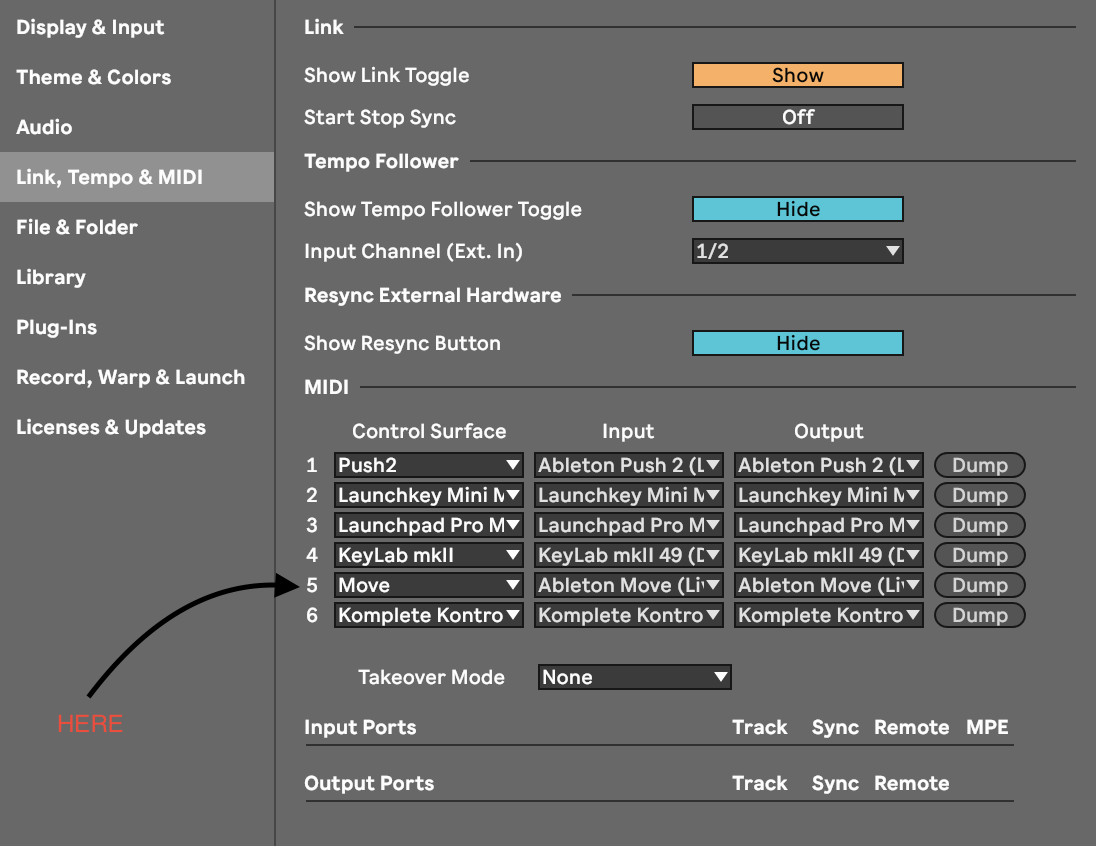
Are you on a pc? If so it’s might be the midi device list that’s causing problems, there a Korg midi device uninstall tool that can remove spurious registry entries to solve the situation, I had the same thing happen to me, you will need to unplug all your midi devices first though, then delete the devices with the tool one at a time, then plug them all back in sequentially, this doesn’t affect drivers or mess with anything other than the amount of midi device entries in windows, some devices won’t connect If they are higher than 10 in the list…
This might be it! I’m still running the 12.1 beta and I don’t have that entry in the list. Updating the regular Live to 12.1 now. Will report back.
1 Like
I had the same issue on 12.1 beta - Move wouldn’t connect as a controller no matter what I did. I downloaded the latest stable full release of 12.1 and now it works fine. I suspect it might also work if you download and reinstall the latest beta again.
1 Like